






How We Built People Counting Software for Real-Time Visitor Tracking
- 97% people-counting accuracy across 41 camera feeds
- ~$180K/year saved on door-staff labor
- <2 s from capacity breach to manager alert
Hand clickers at the door could not keep up with occupancy rules. We built people-counting software that reads existing cameras, counts visitors in and out in real time, and warns a manager before a floor gets too crowded.
Request similar solution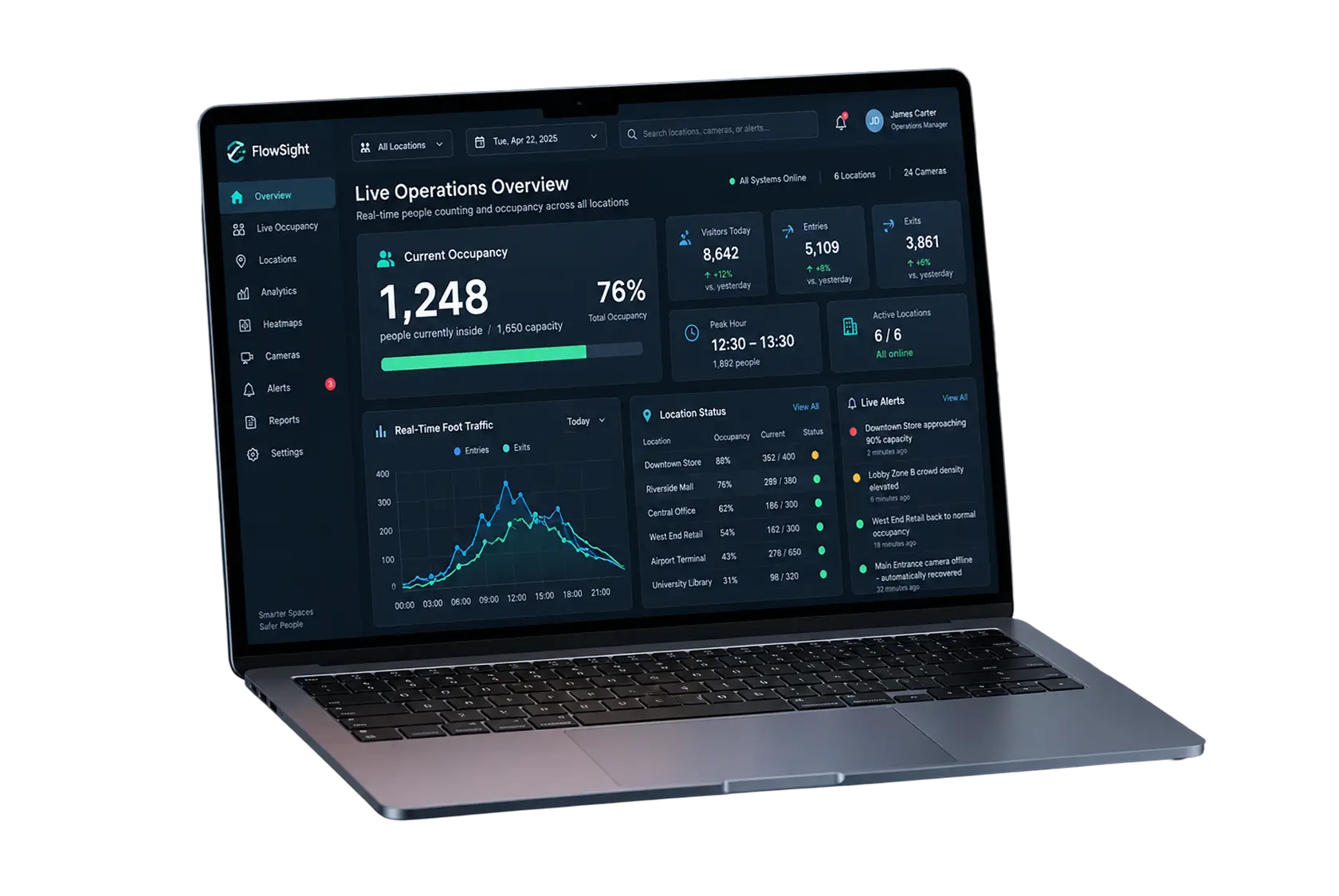
Project Details
A US facility management company came to us mid-pandemic with a simple ask and a hard deadline. State occupancy rules capped how many people could be inside its retail stores and office buildings, and its only tool was a person with a clicker at each door. Vendors pitched visitor-tracking software, crowd-counting software, and footfall-analytics software, all tied to new sensors. The client’s brief was simpler: an automatic people counter that worked with the CCTV system already on the walls, needed no new hardware, stored the people-counting data for later, and could tell a floor manager when a space was filling up.
 Client
- People Counter
 Industry
- Operations Management
 Solution
- AI-powered real-time people counting software
 Service
- Computer Vision Development + AI/ML + QA + Deployment
 Platform
- Web Dashboard + Camera Integration
 Scope
- AI Models, Backend, Dashboard, Camera Integration, Analytics
 Duration
- ~5 months
 Location
- US
Business Challenge: Accurate Visitor Counting
In spring 2020, the client counted foot traffic at its six busiest locations on paper. Two staff members stood at every main entrance with hand clickers, one for people entering and one for people leaving, and a supervisor reconciled the tallies each hour. Internal audits put the manual people counts off by roughly 28% at peak times. Side doors were not covered at all. When occupancy limits dropped to half of fire code, nobody could say with confidence how many people were in a store at a given moment.
-

Real-Time Accuracy Without Human Error
Clicker counts drifted by 28% in busy hours, and the error grew through a shift. Groups walking in together got logged as one, kids got skipped, and the running total was stale by the time a supervisor read it. Accurate people counting had to run without a human in the loop.
-

Integration with Existing Infrastructure
The client had a CCTV system of 41 IP cameras across six sites, from three vendors, installed over eight years. Dedicated people-counting sensors, thermal imaging, or overhead depth units were quoted at over $90,000, plus a three-month install. The software had to run on the cameras already in place.
-

Distance Monitoring Without Extra Staff
Counting how many people enter was half the job. State guidance also asked for six feet between visitors, and nobody could monitor crowd density across 41 feeds by eye. The same system had to estimate distance and warn a manager before a queue became a crowd.
Technologies Behind the People Counting Solution




Our People Counting Software Solution
One constraint shaped every decision: the cameras were staying. So instead of a sensor product, we built people counting technology that treats any RTSP stream from an existing IP camera as a counting source. A person detector fine-tuned on about 28,000 frames from the client’s own cameras picks people out from carts, strollers, and reflections, and a tracker follows each one across frames so a shopper who pauses in the doorway is not counted twice. Training data came from the camera angles the client actually had, from straight overhead to an angled entrance view, and from lighting conditions that ranged from bright storefront glass to a dim parking-level lobby. The computer vision pipeline is Python end-to-end.
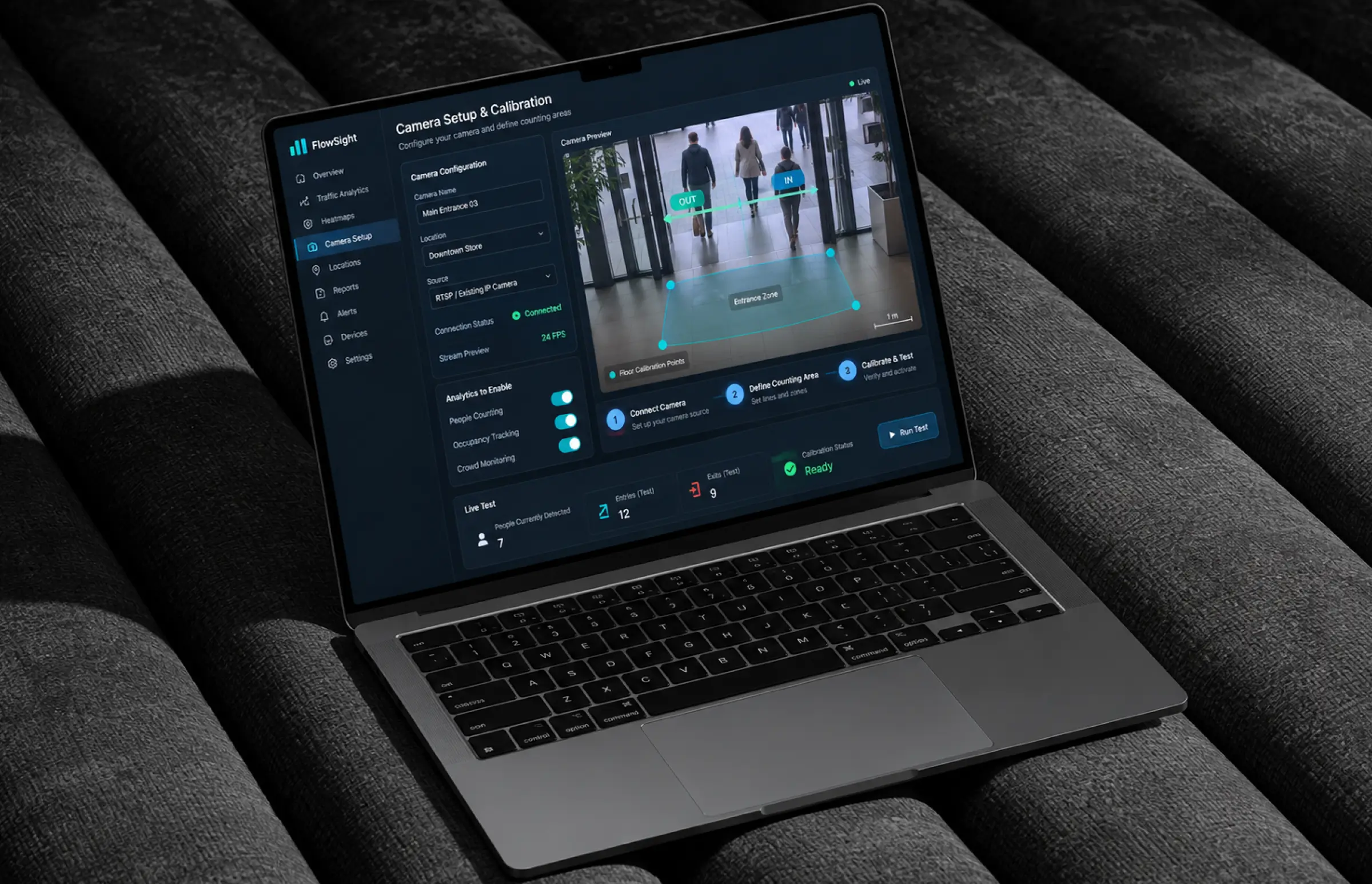
Bidirectional counting happens on a virtual line drawn across each entrance. Cross it one way, the entry count goes up. Cross it back, the exit count does. Occupancy at any given moment is the difference, and the real-time data updates within a second on a dashboard any manager can open on a laptop or mobile device. Where an entrance has multiple cameras, the people counter merges their counts so a double-door lobby does not log the same visitor twice. Where an angled entrance view made the line ambiguous, we let the site admin draw a polygon zone instead, which fixed three of the six pilot locations in one afternoon.
Distance estimation runs on the same frames. Each camera goes through a one-time calibration, four points on the floor, and from then on the system converts pixel positions into floor coordinates and measures the gap between people. Anything under six feet for longer than eight seconds raises a soft flag. Repeated flags in the same zone escalate to a crowd density alert for the floor manager.
Processing splits between edge and cloud. Small edge boxes at each site handle detection on four streams each at 24 FPS, so the video footage never leaves the building. Only counts, zone events, and thumbnails go to AWS, where the analytics layer builds foot traffic reports, heat maps, occupancy data by hour, and peak-hour views from the people counting data. Nothing about the counting software depends on the camera brand, which is why three vendors’ cameras run through the same people counting system today.
-
Bidirectional Counting on Existing Cameras
Any existing IP camera with a view of a door becomes a people counter, with entry and exit counts per door. No new hardware, no sensor calibration, and a new camera can be added to the people counting system from the dashboard in under ten minutes.
-
Live Occupancy Monitoring
A running headcount per floor and per building, checked against capacity limits the client sets. At 90% of the limit, the entrance screen turns amber. At 100%, door staff get a hold signal, and the manager gets a push alert.
-
Social Distance Estimation
Calibrated cameras measure the distance between people on the floor to within about a foot. Zones that stay crowded for more than 30 seconds trigger an alert, and the log of those events becomes the client's compliance record.
-
Foot Traffic Analytics and Heat Maps
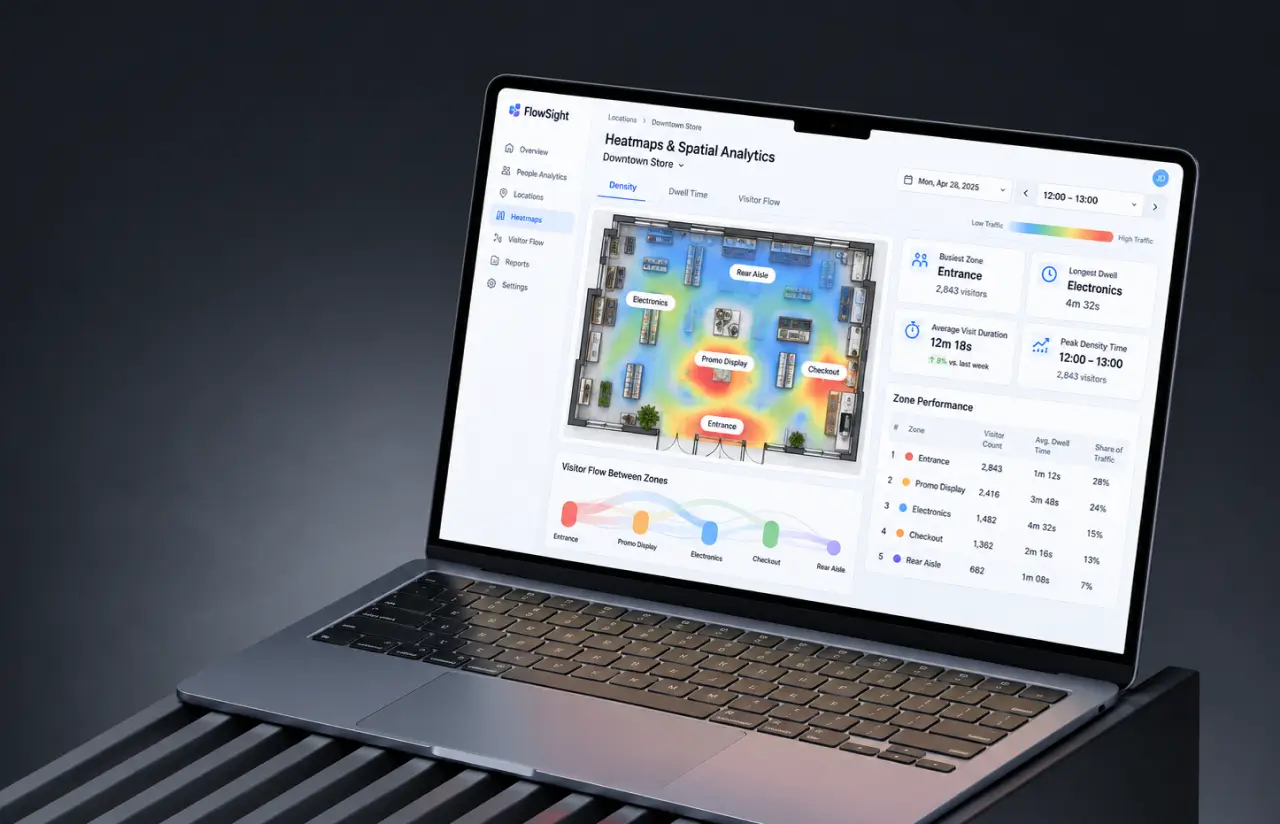
Real-time footfall analytics per entrance, hourly, daily, and weekly, plus heat maps and dwell time by zone, showing where people linger and for how long. Store teams use this data to identify peak times, plan staff scheduling, and adjust product placement to match, and once sales figures are joined in, to read conversion rate per store.
-
Multi-Camera, Multi-Site Dashboard
All 41 cameras and six sites in one view, with multiple cameras per site and drill-down to a single door. Role-based access means a store manager sees one location while the operations team sees every site side by side.
-
Privacy-First Processing
Detection happens on-site. The people counting system stores count data and anonymized zone events, not faces, and raw video clips are kept for 48 hours for QA only, then deleted.
Need a Similar Counting System?
Request similar solutionAgile Development Methodology
Project Journey
The five-month project ran in two-week sprints, starting with a three-week discovery phase in which we pulled sample video footage from all 41 cameras and labeled about 28,000 frames. The first working people counter went live on one entrance in sprint 3, and the client compared it against clicker counts for two weeks before we touched the rest of the sites. Ten sprints later, all six locations were live with counting, occupancy alerts, and distance monitoring.
- Week sprint cycles
- 2
- Sprints completed
- 10
- of sprints delivered on schedule
- 95%
- Team members
- 6
How People Counting Software Works
-
Camera Stream Ingestion
Each edge box connects to the existing IP cameras in the site's CCTV system over RTSP, pulling frames from up to four streams at 24 FPS.
-
Person Detection
A YOLO-based detector, fine-tuned on the client's own footage, finds every person in the frame and ignores carts, bags, and mannequins.
-
Tracking Across Frames
A tracker assigns each detected person an ID and follows them, so one visitor produces one count even if they stop or turn around.
-
Line Crossing and Direction
When a tracked person crosses the virtual line at an entrance, the direction of travel decides whether it counts as an entry or an exit.
-
Occupancy and Distance Checks
The running total is compared against capacity limits, and calibrated floor coordinates measure the distance between people in each zone.
-
Dashboard, Alerts, and Reports
Counts and events sync to the cloud within a second. Managers see live occupancy, get alerts, and pull footfall data by hour, door, or site.
Development Process Flow
Computer vision development rarely survives contact with real cameras unchanged, and this project was no exception. Shipping a working counter on one door in week six meant the client saw real numbers next to clicker tallies before we scaled, and two of those early reviews changed where the counting line sat. By the time all six sites went live, the client had signed off on ten working increments rather than one big release.
Inside Each Sprint
-
Daily Scrum
15-min sync every morning
-
Retrospective
Inspect & adapt process
-
Sprint Review
Demo to stakeholders
-
Increment
Shippable product update
How We Delivered the Software for People Counting
-
Scope & Timeline
We define the project goal together, agree on priority features, and set a realistic delivery date and budget.
-
Feature Priorities
We build a ranked list of everything the product needs, starting with what matters most to the business.
-
Sprint Kickoff
Work is broken into 2-week cycles. At the start of each, we select the next set of features to deliver.
-
Development Cycle
The team builds, tests, and integrates features throughout the sprint.
-
Review & Feedback
At the end of every sprint, you see working software and give feedback that shapes the next cycle.
-
Delivery
Each sprint produces a shippable piece of the product. We review what worked, adjust, and move forward.
UI/UX Design: Intuitive Interface for Video People Counting Software
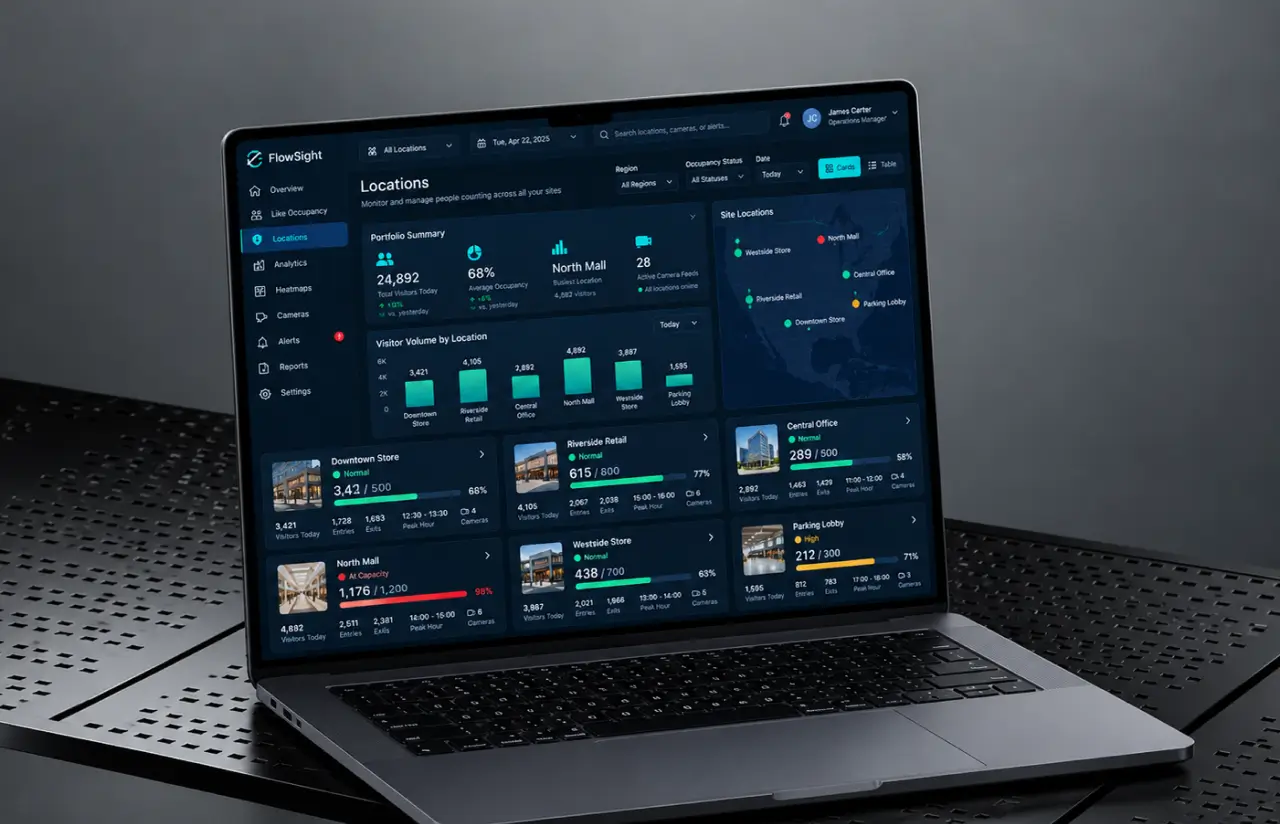
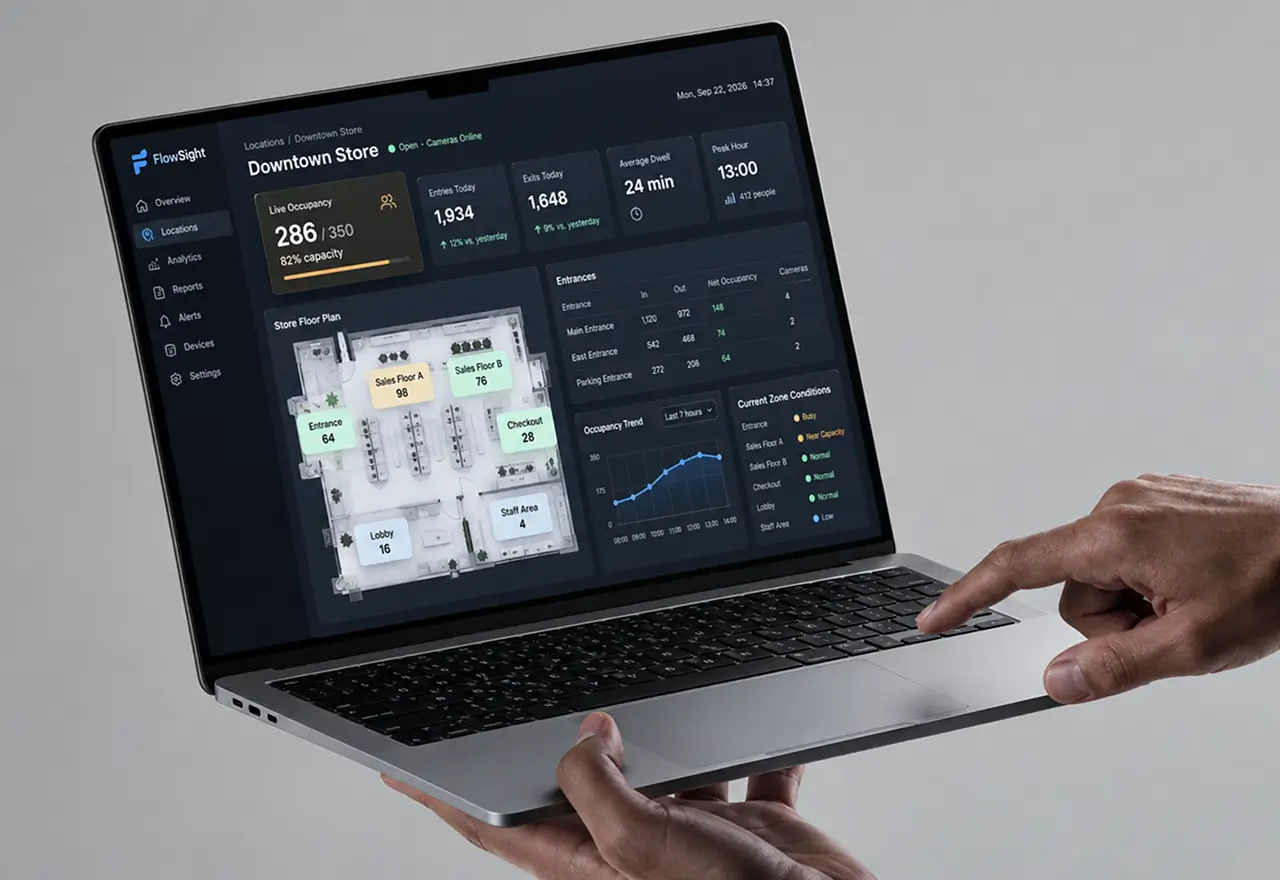
A floor manager during a lunchtime rush does not read charts. They glance. So the main screen is one number, the current occupancy, in large type with a color band beneath it: green, amber, or red against the capacity limit. Everything else sits one tap away.
We spent the first design week at two of the client’s sites, watching how door staff and managers used the clicker tallies. They checked them on the move, usually on a phone. The dashboard was built mobile-first as a result, with the live count readable at arm’s length, and the desktop view for the operations team layered on top.
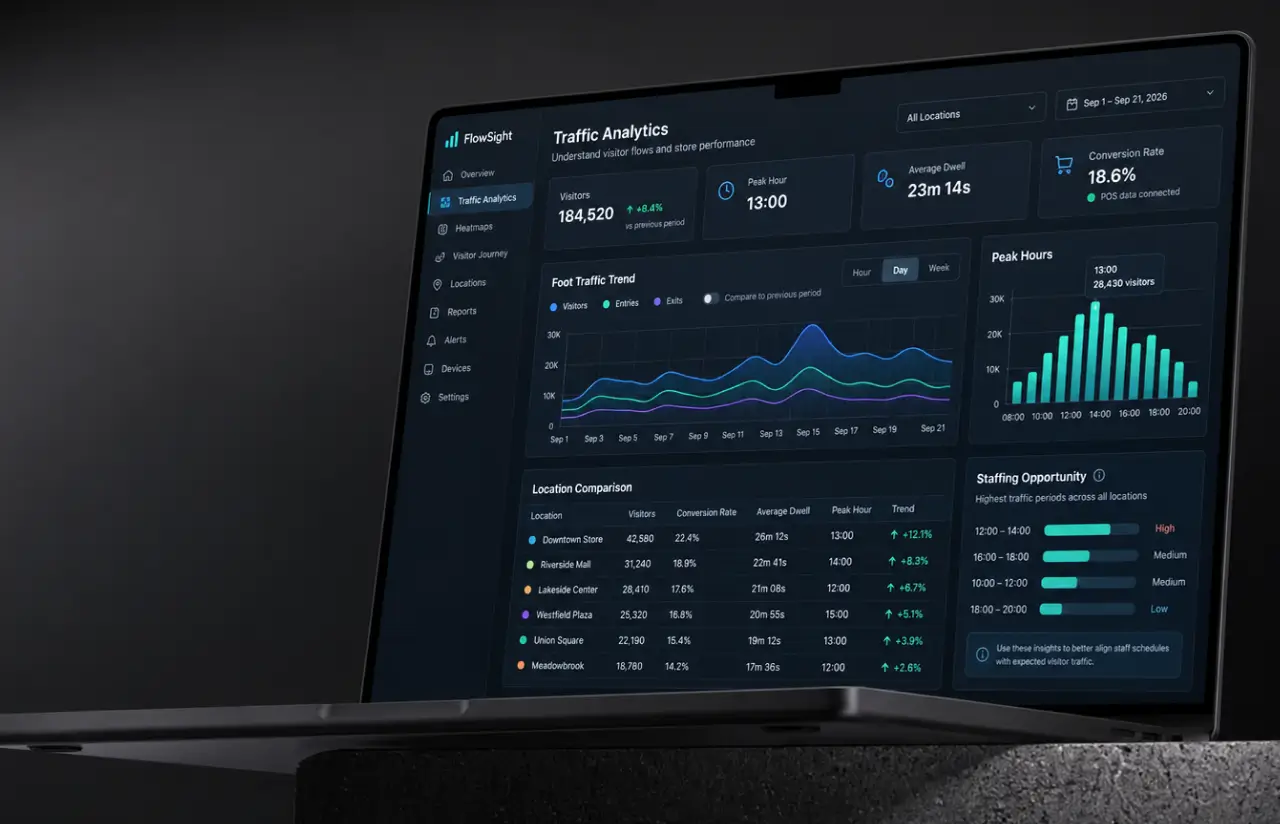
The analytics screens follow a pattern the client’s team already knew from POS reports: a site selector on the left, summary cards across the top for today’s visitors, peak hour, conversion rate, and average dwell time, then a foot traffic trend chart and a heat map below. Camera views are one click deep, with the counting line and zones drawn over the live feed so an admin can see exactly why a count moved. Occupancy data exports to CSV in one click for anyone who wants the raw numbers.
Alerts had to be calm. An early version flashed red on every distance breach, and managers switched it off within days. The shipped version escalates in steps: a quiet amber marker for a single flag, a banner for a persistent zone, and a push notification only when occupancy hits the limit.
Results
Before
- 2 staff with hand clickers per main entrance, side doors uncounted
- Manual people counts off by ~28% at peak hours, reconciled once an hour
- No way to know occupancy at a given moment across six sites
- Social distancing checked by walking the floor, with no record for audits
- A CCTV system of 41 cameras recording video footage that nobody analyzed
After
- 97% people counting accuracy against manual ground truth, at every door including side entrances
- Live occupancy for all six sites, updated within a second, with alerts under 2 seconds
- ~1,100 staff hours a month returned across six sites, roughly $180K a year in door-staff labor
- Distance events logged automatically, giving the client a compliance record for the first time
- One dashboard for counts, heat maps, peak times, and footfall data, on the same cameras as before
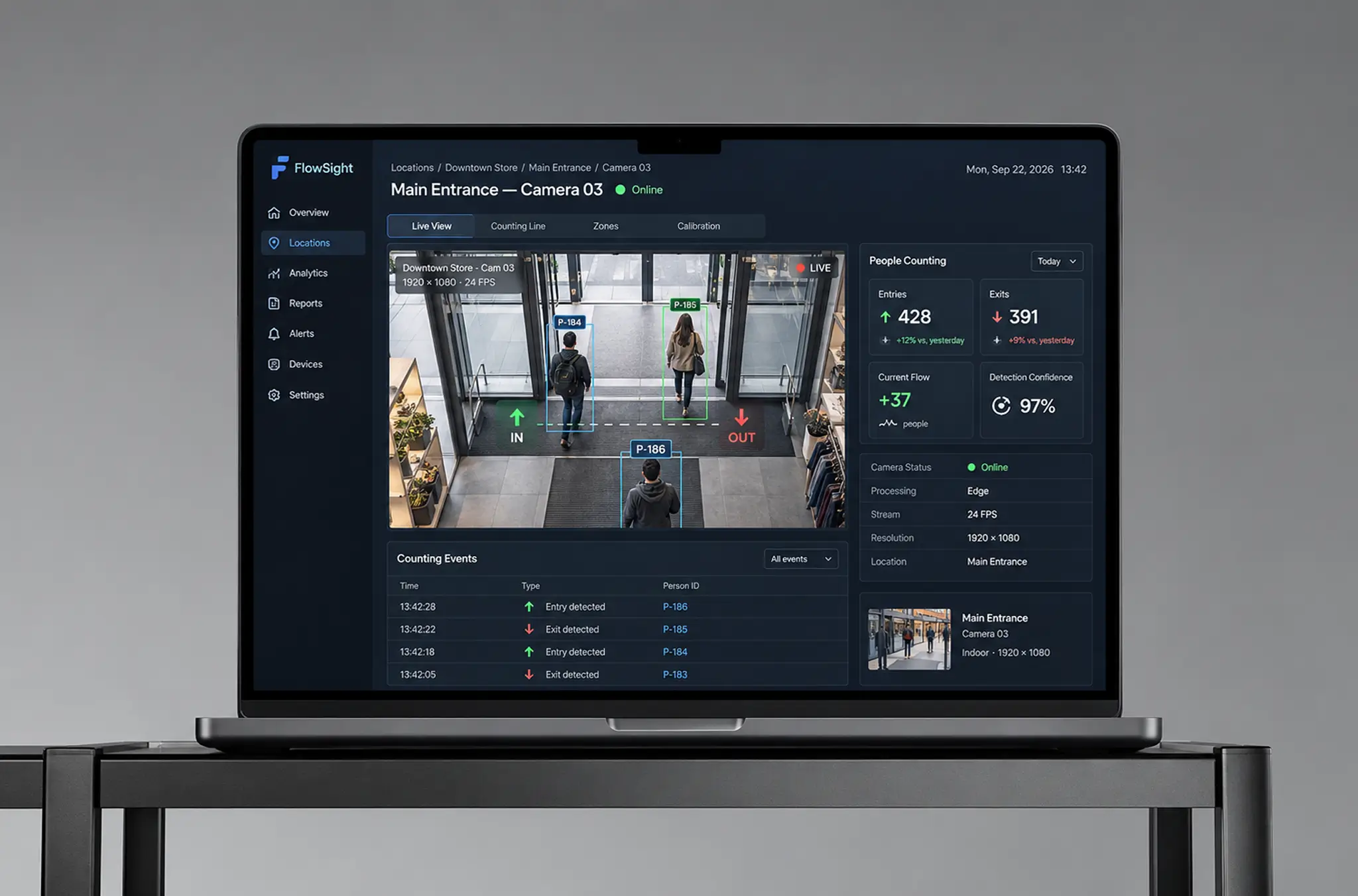
Impact of CCTV People Counting Software After Implementation
Numbers first. People counting error fell from about 28% to 3%, occupancy became a live figure rather than an hourly estimate, and the client stopped paying two people per door to hold clickers. That last line is what the finance team noticed: roughly $180,000 a year in labor moved back onto the sales floor, from a people counter that cost less than the sensor install it replaced.
The unplanned win came after the pandemic rules eased. The client kept the people counting camera software running because the footfall data turned out to be worth more than the compliance log. Store teams now make data-driven decisions: they set foot traffic against sales by hour to work out conversion rate per location, staff scheduling follows real peak hours instead of guesswork, and two sites moved their promotional displays after heat maps and dwell time showed where visitors actually stopped.
Want visitor counts you can trust?
Contact usWhat's Next
The current release of the people counting software covers real-time counting, occupancy monitoring, distance estimation, and historical analytics. Candidate directions for the next phase:
- AI-Powered Object Recognition: Teaching the people counter to tell shopping carts, strollers, and staff uniforms apart from customers, so store traffic reports separate shoppers from employees and deliveries.
- Multi-Location Management: Portfolio views for retail operators, transportation hubs, and public buildings with dozens of sites: unlimited locations per account, passenger flow and crowd management views, cross-site benchmarks, and occupancy data pushed to property management systems so landlords can report on high traffic areas and tenant satisfaction.
Verified Reviews
Our Reputation on Leading Platforms
LITSLINK holds a 4.8 rating on top platforms. Clients writing about our AI and machine learning work mention hands-on depth in computer vision, steady communication across long engagements, and a habit of testing on real footage rather than clean demo clips.
Have an Analytics Project in Mind?
Need people counting software for your stores, offices, or transportation hubs, or AI video analytics software that works with cameras? Tell us how many locations and cameras you have, and our specialist will get back to you within 48 hours.
Next steps:
- LITSLINK specialist reviews your request and contacts you to discuss the details;
- If needed, we can sign an NDA before moving forward;
- We send a project proposal – estimates, timeline, and team CVs included;
- After launch, we stay on for any updates your product needs.
- 48h Response
- 1540+ Projects
Thank you for your message. It has been sent.