Chatbot vs conversational AI sounds like a small wording choice, but it decides whether a product feels toy-like or mission-critical. That distinction got flattened by content farms and vendor blogs, so everyone thinks they already understand it. And now, the real meaning has gotten blurred.
We are going to clean that up properly. You will get a clear idea of what chatbots and conversational AI are. You will also learn 8 major differences most people never mention, and why calling them the same thing slows down serious product work.
What Are Chatbots?
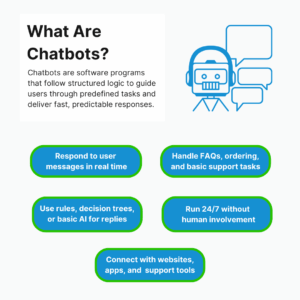

Chatbots are software programs that respond to user messages through predefined rules or scripts. Most chatbots follow structured flows. They look for keywords or button selections and return fixed responses. They work well for predictable and repetitive tasks and interactions where the questions and answers are known in advance.
Key Features:
- Respond to user messages in real time
- Handle FAQs and simple tasks
- Use rules or AI to generate replies
- Work 24/7 without human agents
- Integrate with websites, apps, and support tools
Chatbots In Modern Business Workflows
Chatbots are being used as transaction assistants. Their real value is not conversation but throughput. They are inside revenue-critical paths and move users from intent to payment with as few decisions or screens as possible.
Businesses use chatbots to:
- Pre-qualify customers before they reach live support.
- Replace form-based ordering with guided micro-steps that reduce abandonment.
- Enforce input validation in real time – URLs, order quantities, eligibility rules.
- Eliminate edge-case handling by narrowing the user’s choices to only what the system supports.
Chatbots work best when the business process is already clean and structured. If the workflow can be written as a decision tree, a chatbot can run it. There is no need for interpretation. There is no need for long memory. The system simply matches intent to a path and completes the task.
SocialPlug uses chatbots exactly this way. Their core workflow revolves around high-volume but low-friction purchases of social media services. Their chatbot doesn’t try to educate users on growth strategy. It doesn’t evaluate content quality. It doesn’t recommend campaigns. Instead, it operates as a structured order intake system:
- Captures a video URL and instantly validates format and eligibility.
- Presents only the packages that match the region and delivery model.
- Confirms quantity and delivery speed before executing the order.
What makes this powerful is not the conversation – it is the control. The chatbot prevents malformed orders and ensures every transaction conforms to backend fulfillment rules. This reduces refund requests and support tickets.
The business benefit is operational:
- Lower payment friction.
- Higher order accuracy.
- Fewer human interventions per sale.
This is the exact lane where chatbots win – systems that need speed and clean execution – not interpretation or guidance.
What Is Conversational AI?
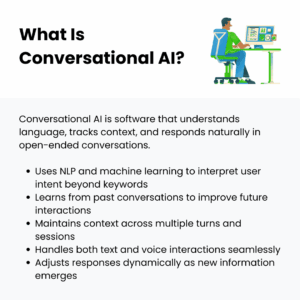
Conversational AI is the technology that lets machines understand human language and respond to it in a natural way. It learns from data to handle open-ended conversations and maintain context across turns. Conversational AI systems use natural language understanding to power chatbots, voice assistants, virtual assistants, and other interactive systems.
Key Features:
- Uses machine learning, natural language processing (NLP), and generative AI
- Learns from data and conversations
- Handles complex tasks and context
- Supports text and voice interactions
- Improves responses over time
Conversational AI In Modern Business Workflows
Conversational AI shows up when the workflow is evaluative. The system is not executing a known process. It is helping someone figure out what process even applies to them. That shifts the entire role of the technology.
Here, conversational AI is used to:
- Extract emotional or loosely defined needs.
- Convert personal situations into structured decision criteria.
- Maintain continuity across long and evolving conversations.
Rather than following a script, conversational AI builds a working model of the user’s situation. It adjusts its responses as new details show up. It can resume and reshape the conversation without restarting.
MedicalAlertBuyersGuide is a strong example of this approach. Their users are not buying casually. They are making high-stakes decisions about safety, health conditions, budgets, and eligibility. And a scripted chatbot would collapse under that complexity.
Their conversational AI works as a decision-mapping system:
- Gathers contextual inputs such as age, mobility limitations, living arrangements, and medical history – not in a fixed order, but as they surface naturally.
- Dynamically adjusts its line of questioning based on earlier answers.
- Remembers prior responses if a user returns later, so the conversation continues.
For example, a user may start by asking about fall detection. Later, they mention their parent uses a walker and has memory issues. The AI reframes the recommendation logic in real time and prioritizes wearability, automatic alerts, caregiver notifications, and battery reliability.
The value here is not speed. It is decision quality:
- Users reach solutions that actually match their situation.
- Drop-offs decrease because uncertainty gets resolved, not ignored.
- Trust increases because the system adapts instead of forcing a funnel.
This is where conversational AI really earns its place – when people don’t even know exactly what they need yet, and the system has to walk with them through the decision instead of just pushing buttons.
Chatbot Vs Conversational AI: 8 Differences Most People Miss
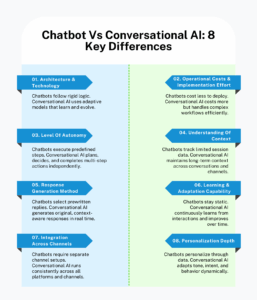

There is more to conversational AI and chatbots than most people realize. Here are 8 key differences that actually change how these systems perform in the real world.
1. Architecture & Technology
Chatbot
Chatbots are basically built like a set of “if-then” instructions. Every possible path has to be thought out and mapped in advance. The tech behind them is simple but rigid:
- Keywords and intent matching run almost every interaction.
- Responses are prewritten and triggered by exact or close matches.
- Flowcharts or decision trees define how conversations move from one step to another.
- Any “memory” is manually tracked with variables or flags.
- Adding a new feature usually means rewriting multiple flows and testing edge cases.
This makes chatbots predictable and easy to debug – but they break quickly when users say something unexpected. The tech stack is lightweight – basic NLP libraries, logic engines, minimal backend. There is no learning happening on its own.
Conversational AI
Conversational artificial intelligence is in a league of its own. It is built around models and designed to bend and adapt to whatever comes its way:
- Uses NLP models, embeddings, and probabilistic intent recognition.
- Dialogue state tracking is dynamic, not pre-mapped.
- Retrieval layers can pull info from APIs or internal databases on the fly.
- The system improves automatically from customer interactions.
- Multi-turn memory can reference user preferences and context cues.
The difference is night and day. One is rigid and fixed, the other adapts and grows smarter over time.
🏆 Winner: Conversational AI 🤖
2. Operational Costs & Implementation Effort
Chatbot
AI chatbots are cheap and fast to set up, but effort shows up in design:
- You pay for the platform – low to mid-tier subscription.
- Most of the work is writing flows and updating rules.
- Maintenance is predictable. Scaling means adding more flows – not computing power.
- No specialized ML skills are required.
Once deployed, customer service costs stay stable, which helps businesses save $0.70–$0.90 per interaction. You don’t worry about compute-heavy model inference or continuous fine-tuning.
Conversational AI
Implementing conversational AI is easier said than done. And it is expensive to maintain, too, but capable of handling complex conversations:
- High compute costs for running models, especially if using LLMs.
- Requires data pipelines, vector databases, and embeddings storage.
- Teams must have ML engineers and backend developers.
- Maintenance is ongoing – model updates, prompt adjustments, drift corrections, safety checks.
It is not just user numbers that matter when scaling. Conversation complexity, session length, API/tool connections – they all count. And the system pays the price as things get complicated.
🏆 Winner: Chatbot 💬
3. Level Of Autonomy
Chatbot
Chatbots are obedient. They do exactly what you have told them to do – nothing more:
- Follow the flow without improvising.
- Escalate to humans when they hit uncertainty.
- Can’t chain multiple actions on their own.
- Can’t learn new paths unless manually updated.
Rule-based chatbots are perfect for simple FAQs and basic lead capture. But anything slightly unpredictable makes them stumble.
Conversational AI
Conversational AI agents don’t need you to plan every possible path. It can “think” on its own. You can give it complex instructions, and it figures out how to execute them:
- Can plan multi-step actions across systems.
- Adjusts responses based on conversation flow or user tone.
- Can chain more complex tasks like booking appointments and checking inventories without a hardcoded path.
- Learns from new interactions and adapts without direct intervention.
It is like the difference between following a script line by line and actually thinking on your feet.
🏆 Winner: Conversational AI 🤖
4. Understanding Of Context
Chatbot
Chatbots “remember” only what you tell them to. Any jump in the conversation or revisit after days, and they forget everything – unless you have built a separate database and explicitly coded retrieval.
- Tracks slots (like user name, order ID, or issue type).
- Session flags or flow positions define the current state.
- Long conversations usually break unless manually coded to handle exceptions.
- Cross-session memory requires explicit database mapping.
They are great for short and predictable interactions, but as soon as things jump around, their contextual understanding can’t keep up.
Conversational AI
Conversational AI handles context like a human would. People can reference old interactions or switch tasks mid-session, and it still delivers human-like interactions intelligently.
- Maintains conversation history, even across sessions.
- Can understand user intent from indirect phrasing.
- Tracks preferences, past interactions, and conversation style.
- Handles topic jumps without losing track of context or meaning.
It is capable of simulating human conversations, where users don’t have to repeat themselves.
🏆 Winner: Conversational AI 🤖
5. Response Generation Method

Chatbot
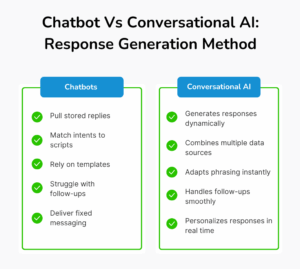
Traditional chatbots rely on predefined scripts and structured templates for responses. They don’t create anything new; every reply is stored in a database or flowchart. The logic is simple – match an intent → pick the closest response → send it.
- Responses are strictly prewritten; no new phrasing is generated.
- If a user’s input doesn’t match exactly, the bot falls back to generic messages.
- Conditional logic can tweak phrasing slightly – “Hello [Name], your order is [Status]”. But that is the limit.
- Can’t synthesize information from multiple sources. It can only pull from one predefined content set per intent.
This method works wonders for clear and narrow tasks – like confirming a password or sending a static FAQ. In fact, chatbots can handle 80% of routine inquires like these. But it can’t handle anything outside what you have coded.
Conversational AI
Conversational AI solutions don’t pick from a fixed list. It puts together personalized responses based on intent and context, plus whatever data it can reach.
- Can generate answers by combining multiple data sources simultaneously – knowledge bases, databases, prior conversation snippets.
- Can reword, summarize, or break down complex answers on the fly.
- Adjusts the answer to match the channel or user tone.
- Handles follow-up questions or multi-part answers all by itself.
This makes conversational AI technology far more flexible. Customers get exact and situation-specific answers that aren’t just canned messages.
🏆 Winner: Conversational AI 🤖
6. Learning & Adaptation Capability
Chatbot
Chatbots don’t actually learn – they are static until someone updates them. You can track fallback rates or drop-offs, but fixing issues always means developers or conversation designers going in to analyze failures and rewrite flows.
- Success metrics (like drop-off rates or unresolved queries) are tracked manually.
- Changes in user language or new questions require explicit updates.
- No predictive adaptation – behavior remains the same until someone intervenes.
- Fixes only happen after things break – not before.
This works fine in stable setups where nothing really changes. But the moment things evolve, it falls behind fast and needs constant maintenance.
Conversational AI
Conversational AI tools learn from human interactions – and it is ongoing. It can pick up on changes in user intent patterns and new topics without anyone having to update it manually.
- Naturally adjusts when people start phrasing things differently.
- Picks up new vocabulary or slang on its own.
- Notices when it keeps getting something wrong and fixes itself.
- Reduces the need for human intervention in high-volume environments.
Bottom line – conversational AI gets better the more people use it. Instead of needing constant rewrites, it improves organically.
🏆 Winner: Conversational AI 🤖
7. Integration Across Channels
Chatbot
Chatbots can exist on multiple platforms, but each integration is usually independent. Website, mobile app, messaging platform – every channel needs a separate setup or flow replication.
- Channels require different formatting or response handling.
- Some platform-specific limitations may force simplified flows.
- Cross-channel reporting is separate unless additional engineering is added.
- Switching users between channels can break conversations; context is not shared automatically.
This means multi-channel deployments are functional but fragmented. So the experience isn’t truly unified, and you have to repeat updates for every channel.
Conversational AI
Conversational AI integrates channels natively. You set it up once, and it works across all without separate builds for each one.
- Single deployment handles multiple channels – web, mobile, voice, social.
- Remembers the conversation even when users switch channels.
- Adjusts response formatting (like character count or voice output) automatically for each channel.
- You get unified analytics and insights for all channels.
The result is consistent. Customers can use different channels, and the system still knows who they are and what they were talking about.
🏆 Winner: Conversational AI 🤖
8. Personalization Depth
Chatbot
Chatbots personalize only what is explicitly programmed. Any data outside the predefined variables can’t influence the conversation.
- Can insert static variables – name, account ID, purchase details.
- Can’t infer user preferences from behavior automatically.
- Custom logic needed for adding deeper personalization (like recommending content or predicting needs).
- Customer experience feels repetitive for repeat interactions beyond the basics.
This makes interactions functional but not intelligent. And customers notice the lack of attentiveness – customer engagement drops when repetitive interactions aren’t enhanced.
Conversational AI
Conversational AI bots personalize interactions naturally. It remembers user history and adapts tone and style. It can even anticipate what a user might want next.
- Tracks long-term preferences and adapts dynamically.
- Adjusts responses for tone or formality based on user behavior.
- Predicts and suggests next steps or relevant actions.
- Personalization scales across users without additional engineering effort.
The experience is genuinely human because the system treats each user as an individual rather than a template.
🏆 Winner: Conversational AI 🤖
How To Choose Between Conversational AI Vs Chatbots: 6 Strategies That Save Time & Budget
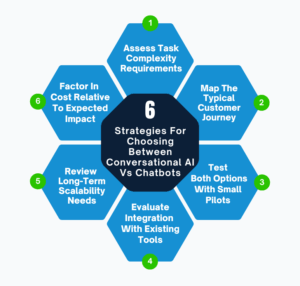

Picking between chatbots and conversational AI can get confusing if you just go by features or hype. Here are 6 strategies that make the decision easier.
1. Assess Task Complexity Requirements
Start with the work itself – not the technology. Write down the exact actions users expect the system to complete. Pay attention to how often those actions change mid-conversation. Routine tasks that stay fixed from start to finish are meant for a chatbot. Complex customer issues that shift based on inputs or follow-ups demand conversational AI.
Do This:
- Document the top 20 user requests and break each into steps and decision points.
- Count how many conditional branches each task has. More than 5 branches point toward Conversational AI.
- Identify tasks where you have to get data from multiple systems in one interaction – CRM + billing + product database.
2. Map The Typical Customer Journey
Ignore edge cases for a moment and focus on what happens usually. Track how users enter, progress, pause, and exit interactions. Some journeys move in a straight line. Others bounce around or jump steps entirely.
Chatbots work best when the journey stays in one lane. Conversational AI handles journeys where users change direction without warning. Match the system to how users actually behave – not how the journey looks in slides.
Do This:
- Draw a journey map from first contact to resolution. Include handoffs to human agents.
- Mark points where users change topics in the middle of a conversation or return after hours or days.
- Identify where users repeat information. These are strong signals that context continuity matters.
3. Test Both Options With Small Pilot Programs
Assumptions cost money. Pilots save it. Rather than debating features, put both systems in front of real users for the same task. Keep scope tight and timelines short. The behavior you see during a pilot settles the debate fast. The goal is not perfection. The goal is exposure – where things break and where support escalations spike.
Do This:
- Pick one high-volume use case – could be order tracking or appointment booking.
- Track metrics – task completion rate, average conversation length, human handoff frequency.
- Send real-time alerts through a team notification app whenever pilot metrics cross thresholds (like rising handoffs or failed tasks) so issues get flagged instantly instead of days later.
4. Evaluate Integration With Existing Tools & Platforms
Your current stack matters more than features on a vendor’s website. Around 38% of employees already struggle to keep up when new tools roll out, so the last thing you want is another system that makes life harder.
Chatbots integrate through APIs or plugins for single platforms. For conversational AI platforms, you need deeper integration with CRMs and analytics tools. This prevents budget overruns by custom integrations and middleware.
Do This:
- List all systems that the AI assistant must connect to – CRM, ticketing, billing, knowledge base, analytics, marketing tools.
- Check whether integrations are native or need custom development.
- Estimate the ongoing maintenance you need for integrations when APIs change or tools update.
5. Review Long-Term Scalability Needs
Decisions made for Monday’s break on Tuesday. Look at how usage is expected to grow, not just in volume but in variety. Adding users is one type of scaling. Adding new use cases is another – and the second one is usually harder. Chatbots scale by repetition. Conversational AI chatbots scale by coverage. This distinction matters when expansion is already planned.
Do This:
- Forecast conversation volume growth and new channels you plan to add.
- Identify future use cases – proactive outreach, recommendations, automated upselling.
- Assess whether your team can maintain training data and rules as things get complex.
6. Factor In Cost Relative To Expected Business Impact
Cheap systems become expensive when they limit outcomes. Expensive systems waste money when they overshoot requirements. You have to decide on business impact – not software pricing. Look at what actually changes – support load, conversion rates, response time, internal workload, customer satisfaction. Then compare the cost against those outcomes.
Do This:
- Add up everything it will cost over 3 years. Don’t forget development and maintenance.
- Figure out how much time and money you save by reducing manual support and letting automation handle more.
- Map revenue impact from upsells or faster resolution times.
Conclusion
When it comes down to chatbot vs conversational AI, it is not a debate about which is fancier – it is about matching the system to the work you actually need done. So start looking at real workflows. Ignore demos and marketing slides. Go with the system that completes tasks without causing extra work for your team.
At LITSLINK, we design and build chatbots, conversational AI, and broader AI systems so they fit into your existing stack without extra complexity for your team. We handle the full process end-to-end – from strategy and model development to integration and ongoing optimization. Our team of 300+ developers has delivered AI-powered solutions and platforms to more than 80 startups across fintech, healthcare, eCommerce, and education.
Get in touch with us and let’s talk about what you want to build next.