





Building AI Photo Culling Software That Selects Best Photos Automatically
- Up to 96% reduction in sorting time compared to manual culling
- 3,000+ photos scored in a single culling session
- 12 quality signals checked on every individual frame
- 3 platforms running on one shared codebase
We built AI photo culling software that grades sharpness, exposure, and facial expressions on every image, then hands back a ranked shortlist of the best photos in roughly twenty minutes. This lets wedding and event photographers pick the best shots from 3,000+ images much faster.

Project Details
Album Refiner started with a problem photographers hit every week: thousands of images on a card, and a handful worth keeping, editing, or printing. Other AI culling programs solved parts of it. None of them combined preference learning with identical behavior on a phone, a tablet, and a browser, which is what our client wanted.


Business Challenge: Creating an Intelligent Photo Culling App
Photographers who cover events come home with cards holding two to five thousand frames. The first pass, the one where you throw out the blinks and the misses, was eating entire evenings.
The client had watched studio teams run that pass in Lightroom with star ratings and keyboard shortcuts. It works. It also takes six to eight hours on a 3,000-frame wedding, and by hour four the standards start slipping. Album Refiner had to cut that down without taking the creative choice away from the person who shot the job. Our AI development team scoped the product around one rule: artificial intelligence proposes, the photographer decides.
Scale made it harder. A mid-size studio shooting 40 weddings a year moves through something like 120,000 frames, and a sports shooter can pass that inside one season. Every decision the app made had to be defensible frame by frame, because a photographer who cannot see why a shot got rejected quits on AI culling software after two jobs.

Accurate Image Quality Assessment
Sharpness alone says nothing about a keeper. The model had to read focus on the subject, exposure, and facial expressions, closed eyes included, across raw files from more than twenty camera bodies.

Learning User Preferences
Two photographers reject opposite frames out of the same burst. One fixed scorer would argue with both of them. Personal preference had to become data the system could hold per user and keep updating.

Cross-Platform Performance
Culling on a phone at the venue, finishing on a laptop at home. Scores had to match in both places, and the first pass had to run on a device with no internet connection at all.
Technologies Used for Creating This App for Culling Photos





Our AI Photo Culling Solution
LITSLINK built an AI culling app that helps photographers shortlist images while keeping every decision visible and reversible. Rejected frames move to a separate view, and originals remain untouched.
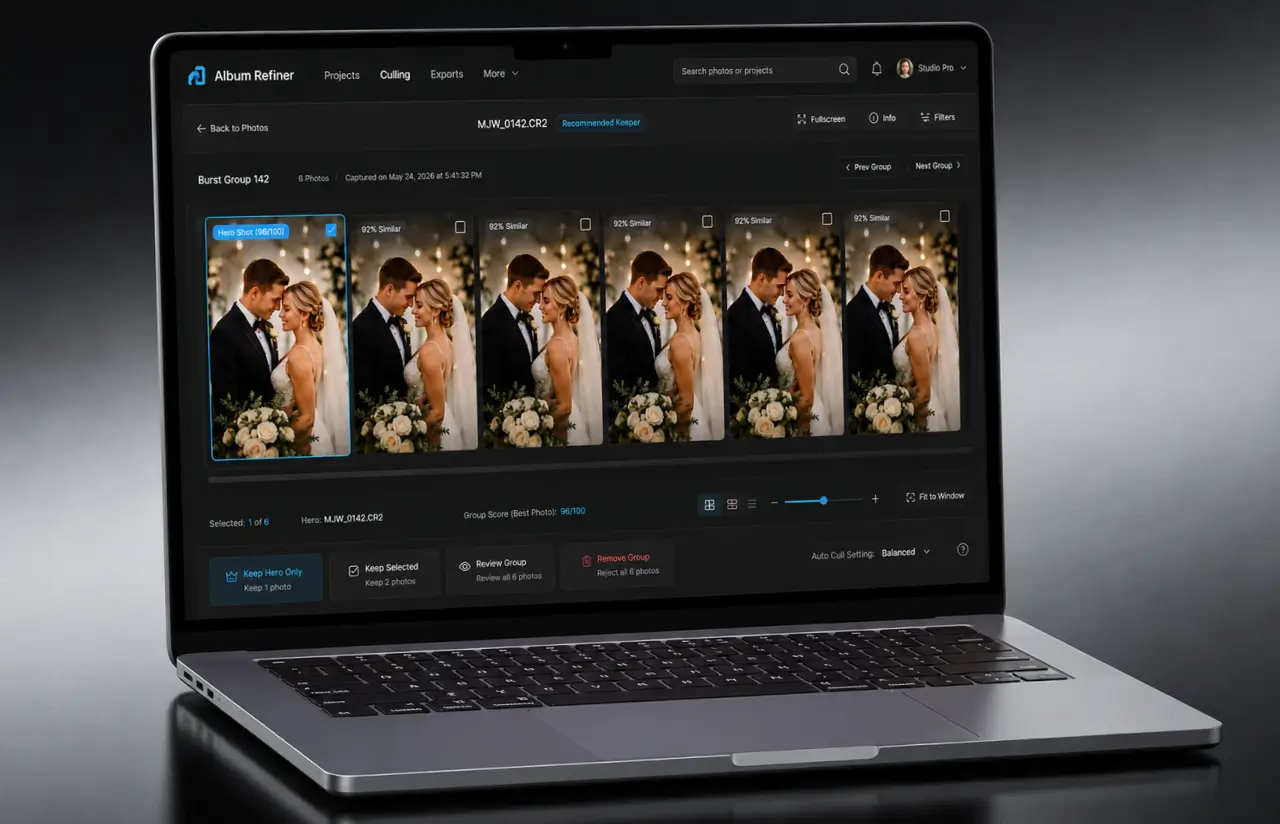
The AI checks focus, exposure, noise, closed eyes, and framing, then groups similar shots and ranks the strongest options. Photographers review each group instead of sorting through near-duplicates individually.
Built with Python and PyTorch, the model runs on-device through ONNX Runtime. React Native powers iOS and Android, while React.js supports the browser. Large shoots load in batches of 500 images.
The system learns from manual corrections. After roughly 150 overrides, agreement with a photographer’s final selection reaches approximately 92%, compared with 74% on the first run. Training used around 120,000 frames labeled by nine photographers, with disputed images flagged for user review.
Processing takes roughly 250 ms per raw image on a recent phone and 90 ms on desktop. Testing on a 4,000-image holdout set kept false rejects below 3%. The AI recommends selections; photographers retain final control.
AI-Powered Image Analysis
Every frame goes through 12 quality signals, among them focus on the subject, exposure, noise, motion blur, facial expressions, closed eyes, and framing. Quick face assessments support the blink and expression scoring, and scores sit next to individual images instead of hiding in a report, so photographers quickly identify what deserves a second look.
Automatic Best Photo Selection
The system ranks a burst and marks the best shots inside it. Photographers get the best images in the order the model would keep them, which makes it faster to filter out weak frames, and anything can be promoted back out of the rejected pile in one tap.
User Preference Learning
Each photographer builds their own profile out of accepts and rejects. That profile saves as an AI preset per shoot type, so a newborn session and a football match never share the same standards.
Smart Album Organization
Keepers land in albums grouped by event, time, and people. Album Refiner reads time gaps and scene changes to split a long day into segments, which lands closer to how photographers think than one flat folder does. A ten-hour wedding usually splits into 8 to 12 segments.
Cross-Platform Synchronization
Start a culling session on a phone at the venue and finish it in a browser at home. Ratings, groups, and profile updates sync in under two seconds at the 95th percentile, and a session resumes on the exact frame it stopped on. That lets the app connect the culling stage with the next editing step across devices.
Custom Selection Criteria
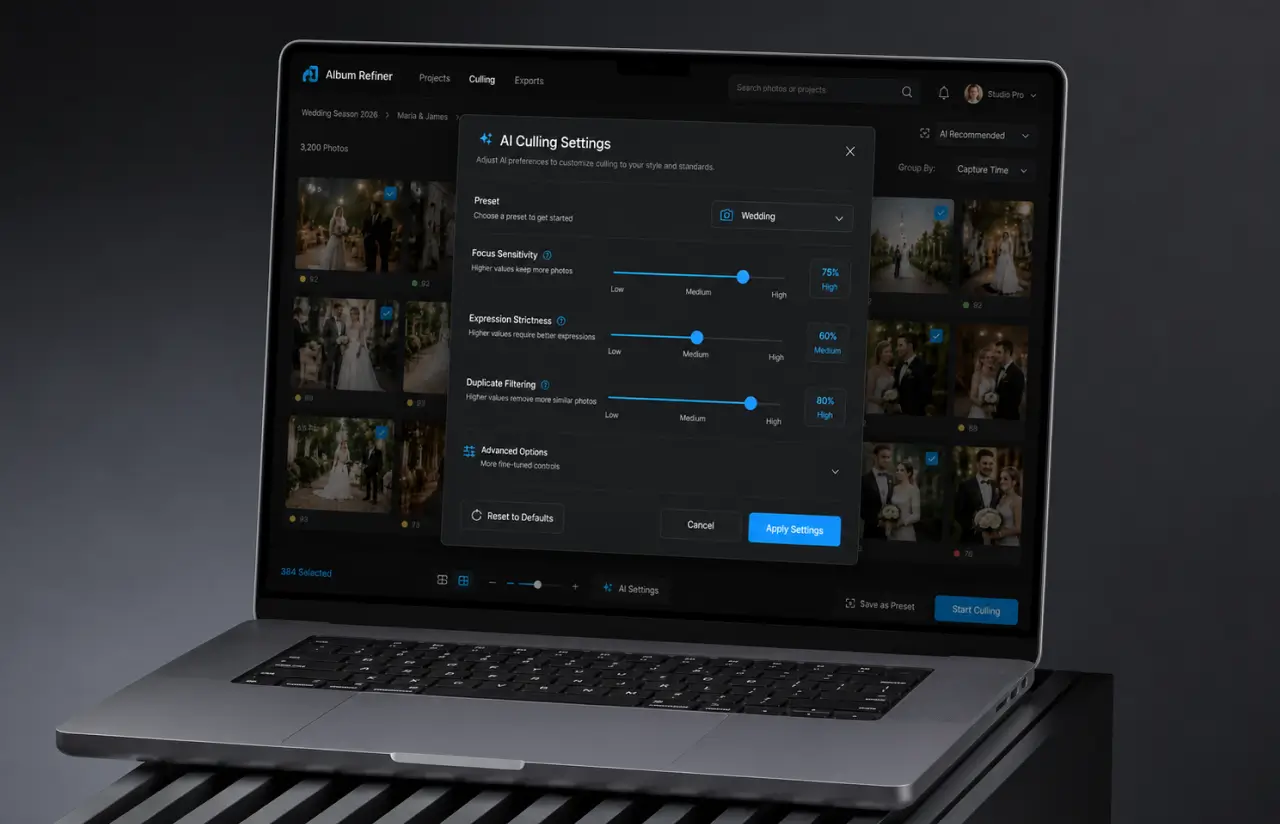
Thresholds belong to the photographer, and so does the outcome. Turn duplicate grouping down for wildlife, push expression strictness up for portraits, or cull with scoring off entirely when the job calls for it. That flexibility gives photographers the ability to set configurable thresholds, including keeping only a chosen percentage from a burst or shoot type. Full control, bent around their own workflow.
Scrum Methodology
Project Development Journey
Across fourteen two-week sprints, the team moved from discovery to store release, spending the first four on the quality model before shipping six core features. User research moved progressive scoring into sprint three so photographers could review images while files were still importing. Burst grouping caused the only delay, requiring stricter similarity thresholds and automatic splitting for groups over 25 frames. As a result, 93% of sprints finished on schedule.
How Album Refiner Works: AI-Powered Culling, Step by Step
- The import process reads raw files and JPEGs, builds previews, and clusters burst images. A folder of 2,000 photos is ready for culling in about four minutes.
- Twelve technical signals per photo, including focus, exposure, and closed eyes. Scores sit on individual images, never on groups, so no photos get hidden.
- Ranking shifts toward the images you have kept before. New accounts start on the general culling model and diverge inside one session of AI culling.
- You set the target count. The app returns that many best shots in order, each carrying a one-line reason. Remaining images move to a review pile.
- Swipe through rejected files, restore any images worth saving, and the profile records the correction. No photos are deleted without you.
- Approved photos flow into a story-ordered album, ready for print layout or export straight into Lightroom.
Scrum Process Flow
Web development paired with mobile work moved fastest here because the client saw a real culling session at the end of every second week. Sprint reviews used a fresh card from an actual shoot rather than a curated test set, which is how the burst-grouping bug in sprint six surfaced at all. Priorities shifted twice on the back of those reviews, and both changes were still cheap at that point.

Development Process: Building Photography Culling Software
- We define the project goal together, agree on priority features, and set a realistic delivery date and budget.
- We build a ranked list of everything the product needs, starting with what matters most to the business.
- Work is broken into 2-week cycles. At the start of each, we select the next set of features to deliver.
- The team builds, tests, and integrates features throughout the sprint.
- At the end of every sprint, you see working software and give feedback that shapes the next cycle.
- Each sprint produces a shippable piece of the product. We review what worked, adjust, and move forward.
Timeline
Five Phases of the AI Culling Project
Discovery & Workshop
- Camera formats and raw file handling
- How photographers cull today, start to finish
- What the app must never do without asking
UX Prototyping
- Compare view and group card layouts
- Mobile-first flows for culling on site
- Web dashboard for the long evening session
Agile Development
- Quality scoring model and training pipeline
- Burst grouping and duplicate detection
- Preference profiles, presets, and cross-device sync
QA & Testing
- Model regression runs on a 4,000-image holdout set
- Device testing across iOS, Android, and browsers
- Offline culling with no internet connection
Launch & Support
- Store submission for iOS and Android
- Beta with roughly 40 photographers and 180,000 images
UI/UX Design: Intuitive Interface for AI Photo Culling
The interface has one job: move someone from a full card to a final selection without making them think about the model. Scores show as a short bar and a number, and the number is always overridable.
Group cards carry a count badge and a thumbnail of the leader. Tap to open the group, swipe to compare two frames side by side, hold to pull a shot out of the rejected pile. On the web app, those same actions map to keyboard shortcuts, because that is what selecting images on a laptop looks like at 11 p.m.
Numbers stay quiet until somebody asks for them. A card shows the score and one reason, something along the lines of soft focus on the eyes, or closed eyes on 2 of 5 faces. For a quick first pass, one visible reason is usually good enough to trust the call. Tapping opens the full breakdown across all 12 signals, though most beta users checked that a handful of times in week one and almost never after.
Onboarding is three screens and a real card. New users import a shoot, watch scoring run, and correct 20 frames before they see anything else. It sets the expectation the whole product rests on: the interface takes care of the repetitive first pass while leaving judgment to the user, so this is ai assisted culling, not automation with a lock on the door.
Color stays out of the way. A near-neutral gray shell, one accent for actions, and no chrome sitting over the photo itself, since anything colored next to an image quietly changes how you judge it.

Results: Before and After AI-Powered Culling
Before
- ✕Six to eight hours to cull a 3,000-frame wedding, selecting images one at a time.
- ✕Blinks and soft focus caught by eye, with standards slipping after the third hour.
- ✕Bursts reviewed frame by frame, even when 30 shots covered the same two seconds.
- ✕Culling photos locked to one desktop, so nothing could start at the venue.
- ✕No record of why a shot was kept, and no way to reuse that judgment on the next job.
After
- ✔Up to 96% less sorting time: a 3,000-frame shoot reviewed in about 20 minutes, a real change in the post-shoot workflow.
- ✔12 quality signals scored on every frame, closed eyes and motion blur included.
- ✔~35% of a typical shoot collapsed into groups, so similar images get judged once and the saved time goes back into more valuable editing work.
- ✔92% agreement with the photographer's own picks after roughly 150 corrections.
- ✔One profile across three platforms: culling starts on a phone and finishes in a browser, and that shared profile continues to improve as the photographer keeps correcting it.

Impact of AI Photo Culling After Launch
Verified Reviews
Our Recognition on Top Platforms
LITSLINK holds a 4.8 rating with over 1,540 projects delivered since 2014. Reviews tend to point to the same three things: technical depth in AI and mobile software development, communication that holds up across long engagements, and delivery dates that stick, including for photography and creative-tool companies that value fast turnaround, and for teams that need one partner able to offer both AI and cross-platform product delivery under one engagement.
Planning Your AI Photo Project?
Building AI photo culling software of your own, or running a photo curation app that has outgrown its first version? Tell us what your users need to try first and how they cull today, and we will come back within 48 hours with scope, timeline, cost, and a number.
Thank you for your message. It has been sent.