






Building a Personalized Lawn Care App with AI-Powered Maintenance Planning
- ~40% lower yearly app maintenance cost
- 1 codebase instead of two
- 99.4% crash-free sessions after migration
- ~4 minutes from sign-up to first plan
A US lawn and garden products company came to us with two native apps that cost too much to keep alive. We rebuilt them as one Flutter lawn care app that gives homeowners a personal lawn care plan and reminds them when to mow, feed, seed, and treat their lawn.
Request similar solution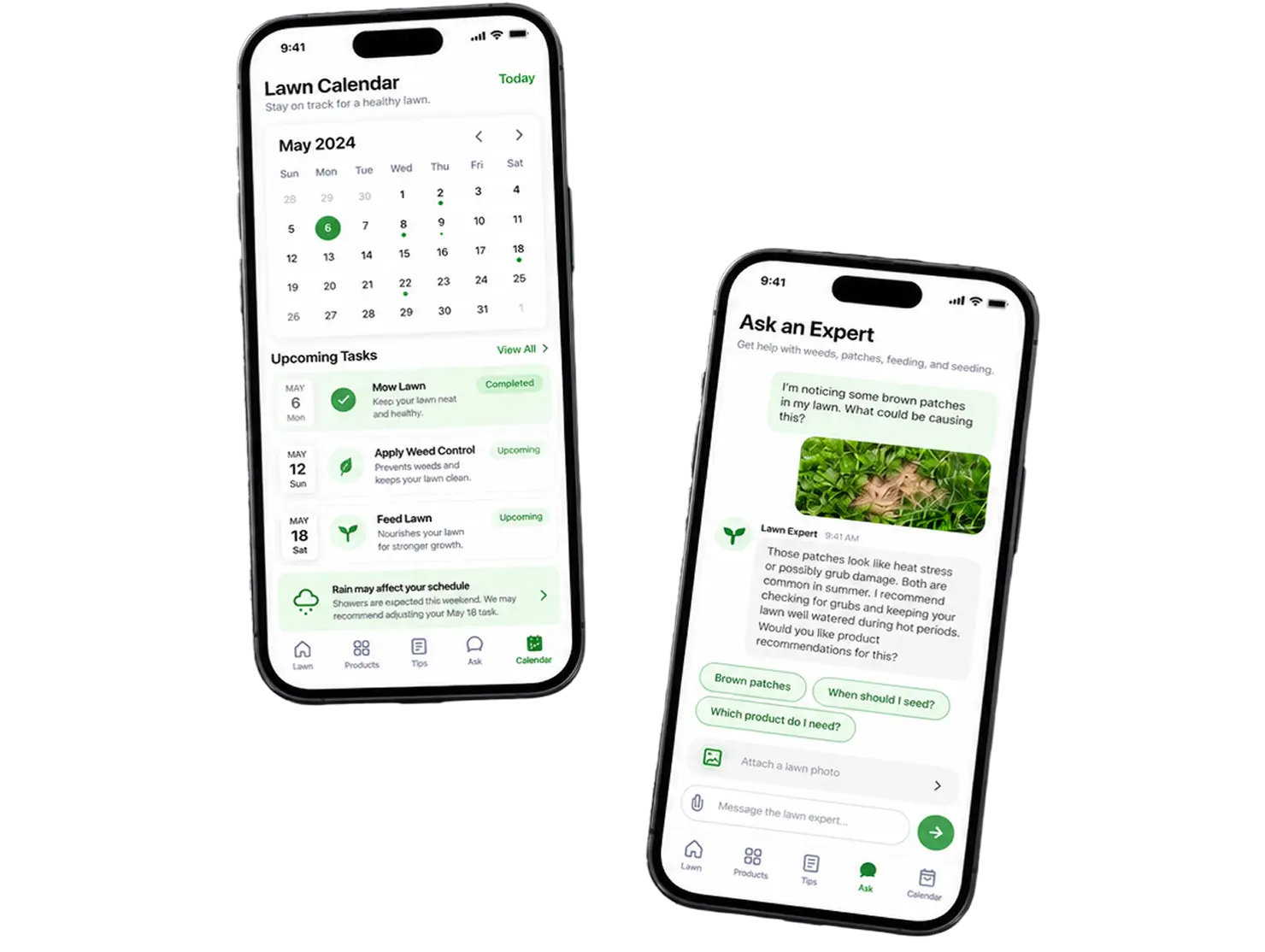
Project Details
The client is a US-based lawn and garden products company that sells lawn food, grass seed, and weed and insect control through retail chains in the US and Canada. Their app is the digital front door to that product line: a free lawn care tool that tells a homeowner what to apply and when.
 Client
- MyLawn
 Industry
- Agriculture
 Solution
- AI-powered lawn care app with a personalized maintenance plan and product finder
 Service
- Product Design + Software Development + Full Cycle QA + App Store Publishing
 Platform
- Mobile (iOS, Android)
 Scope
Scope- Mobile App, Backend Integration, Personalization Logic, Push Notifications, QA, Design
 Duration
- 2+ years (ongoing)
 Location
- US & Canada
Business Challenge: Creating a Unified Lawn Care Experience
The client had a working lawn care tool with a loyal base of homeowners and no sane way to keep it running. They had to build and test every fix twice. Three problems drove the rebuild.
-

Personalized Maintenance Scheduling
A generic calendar does not help a homeowner in Georgia and one in Ontario at the same time. The lawn care schedule had to account for lawn size, grass type, and climate, and the old apps handled that logic differently on each platform.
-

Two Native Codebases, Double Cost
Swift and Kotlin crews shipped the same feature weeks apart. The Android app lagged on three product categories, and the maintenance cost grew about 15% a year. Time went to parity work instead of features.
-

Cross-Platform Data Synchronization
Property data, lawn ratings, and completed tasks lived in different shapes on iOS and Android. A person who switched phones sometimes lost their plan history. Missing-data tickets were the largest support category.
Technologies Behind the Lawn Care App



Our Lawn Care App Solution
One rule drove the migration: nothing existing users relied on could break. The Flutter app ran alongside the native apps for about five months, with parity tracking in a checklist of 140 items. The client signed off on the store swap only at 100%.
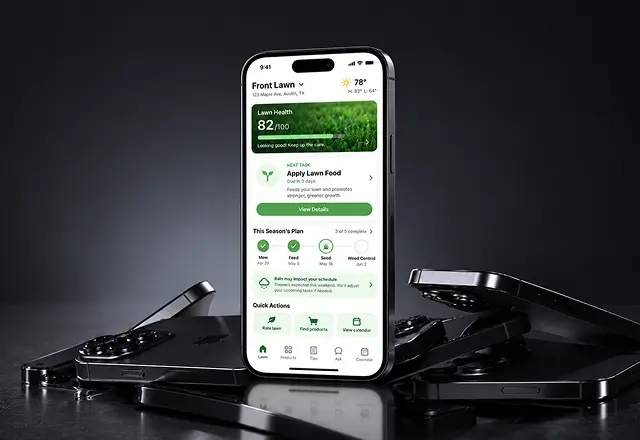
The core of the app is the plan engine. A homeowner enters location, lawn size, and grass type, rates the current lawn on thickness, color, and weeds, and the app creates a lawn care schedule for the year, with every mowing and feeding task in one place. Each task points to a product from the catalog, so the advice is concrete: this fertilizer, this weekend, this rate per square foot. Push reminders fire when the time comes and shift if rain is forecast.
-
AI-Powered Maintenance Planning
The engine combines lawn size, grass type, region, and the homeowner's own rating to create a lawn care schedule from early spring through late fall. Every task has a product, a date, and a reason.
-
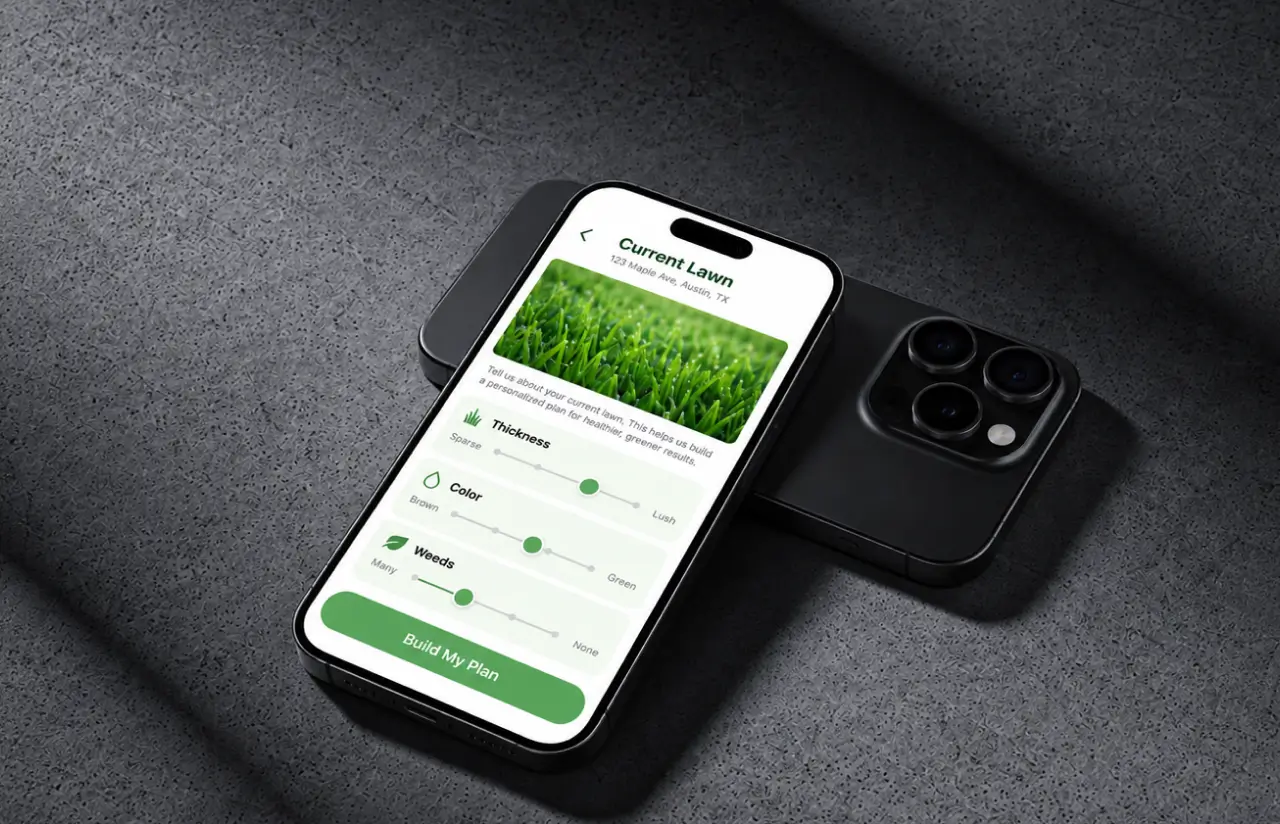
Lawn Assessment Sliders
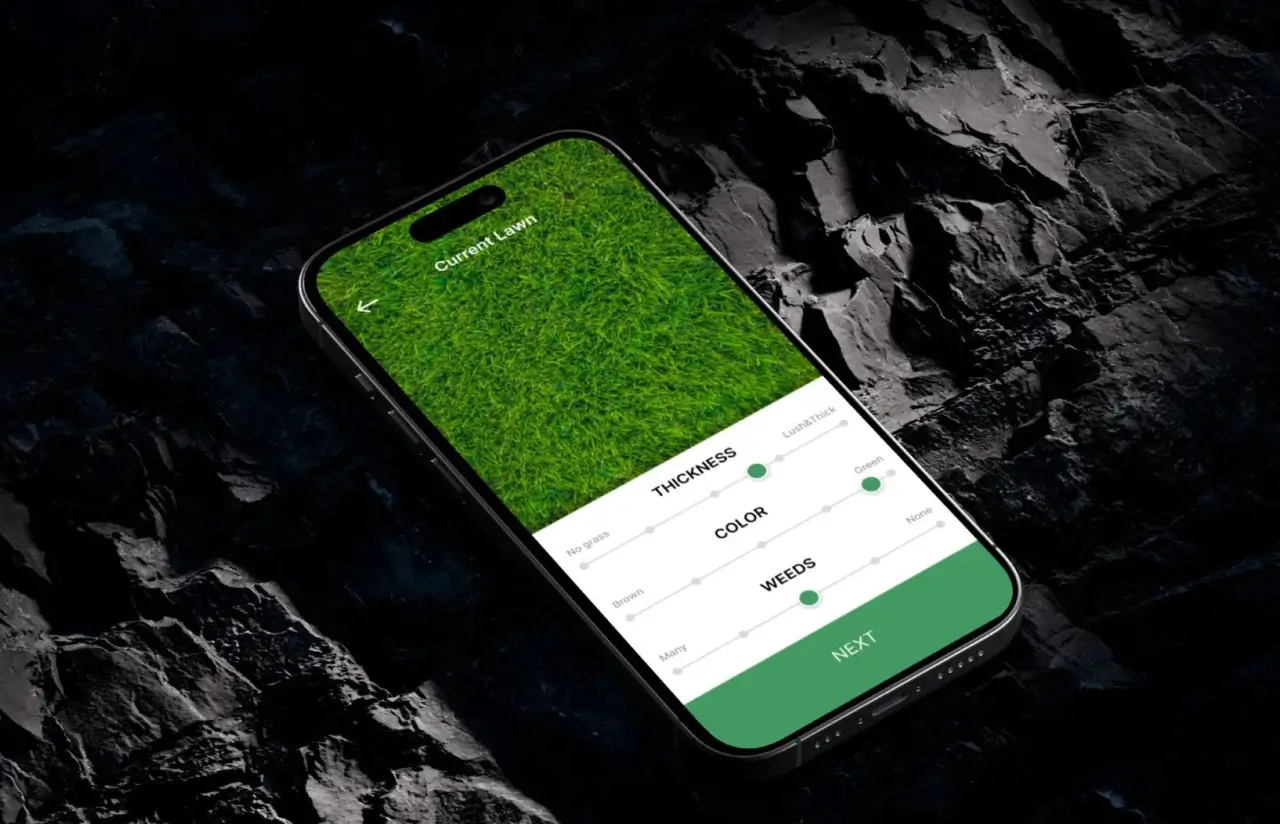
Three sliders for thickness, color, and weeds replace a long questionnaire. About 4 minutes from sign-up to a complete lawn care plan, which is why 71% of new accounts finish in one session.
-
Weather-Aware Reminders
Notifications tie to property and forecast data. Feeding gets pushed if rain is coming. Around 62% of reminders are acted on within 48 hours.
-
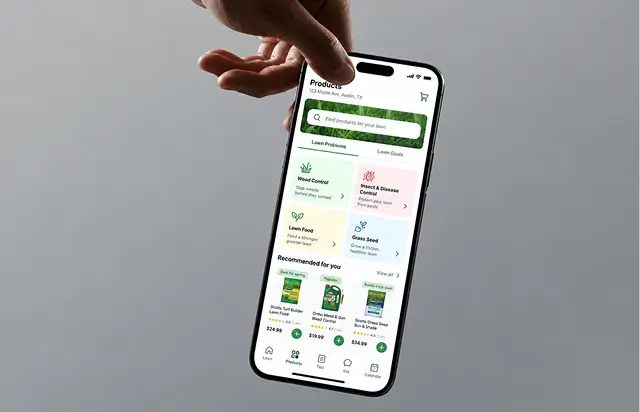
Product Finder by Problem or Goal
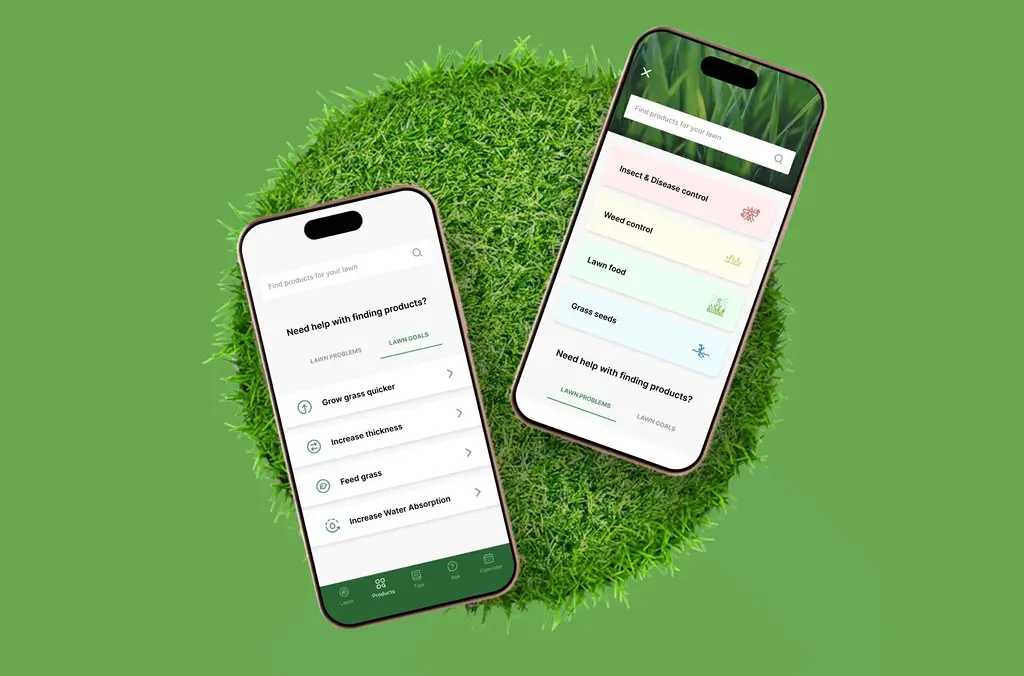
Homeowners browse by lawn problems (weeds, insects, disease) or lawn goals (grow grass quicker, feed grass). The catalog covers roughly 120 lawn care products in four categories.
-
Task Calendar and Tracking
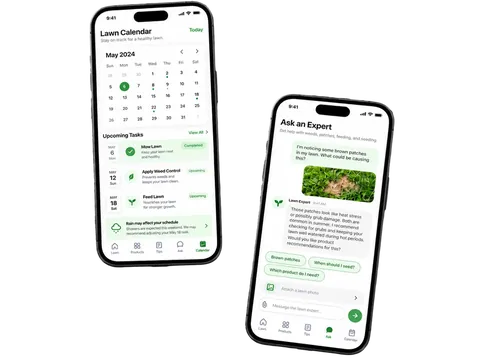
Mowing, feeding, seeding, and soil care show up in one calendar. Tracking completed work keeps the plan honest and gives the client anonymized data on what gets applied and when.
-
Tips and Ask an Expert
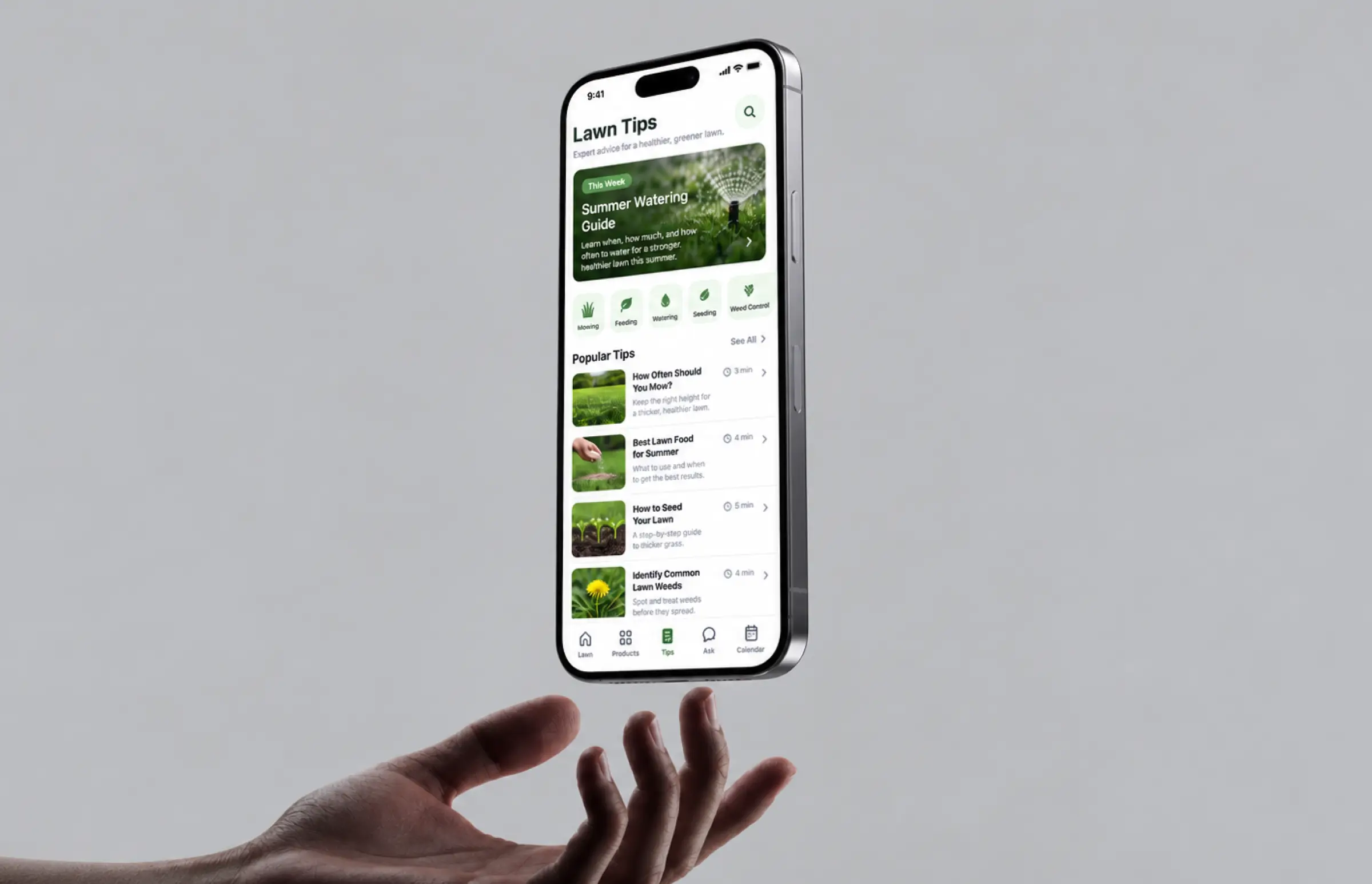
A tips library covers feeding rates and mowing height. The Ask tab routes tougher questions to the client's support team inside the app, an essential channel for first-time homeowners.
Planning a Similar Lawn Care Product?
Request similar solutionScrum Methodology
Project Journey
We ran two-week sprints from day one, and the first six went almost entirely to the parity checklist. The client’s product manager joined every sprint demo, which helped us catch Canada-specific season-timing bugs before launch. After the store swap, the same cadence carried new features: weather integration, the product finder, the assessment sliders, and on-site testing with the client’s agronomy team.
- Week sprint cycles
- 2
- Sprints completed
- 36
- of sprints delivered on schedule
- 94%
- Team members across development, design, and QA
- 12
How the Lawn Maintenance Schedule App Works
-
Sign Up and Add Property
Quick download and sign-up, then location, lawn size, and grass type. Several properties can sit under one account.
-
Rate the Current Lawn
Three sliders capture thickness, color, and weeds. The rating can be redone any time the lawn changes.
-
Receive a Personalized Plan
The app builds a lawn care schedule for the year with a product and a reason attached to each task.
-
Track Tasks in the Calendar
Mowing, feeding, seeding, and treatments appear as dated items. Marking one complete updates the next step.
-
Get Reminders at the Right Time
Push notifications fire by region and forecast. A rain window shifts feeding, a warm spell moves seeding earlier.
-
Find Products for Problems and Goals
The finder points to the exact lawn food, seed, or weed product the plan calls for, filtered by problem or goal.
Development Process Flow
Migration projects fail when old and new versions drift apart, so every sprint compared the Flutter build against the native apps on the same devices. Our crew shipped a store-ready build at the end of each cycle, and the client checked it before the next one started. It is the cadence we use across our app development services, and it kept the lawn care app schedule honest week to week.
Inside Each Sprint
-
Daily Scrum
15-min sync every morning
-
Retrospective
Inspect & adapt process
-
Sprint Review
Demo to stakeholders
-
Increment
Shippable product update
How We Delivered the Lawn Care App Project
-
Scope & Timeline
We define the project goal together, agree on priority features, and set a realistic delivery date and budget.
-
Feature Priorities
We build a ranked list of everything the product needs, starting with what matters most to the business.
-
Sprint Kickoff
Work is broken into 2-week cycles. At the start of each, we select the next set of features to deliver.
-
Development Cycle
The team builds, tests, and integrates features throughout the sprint.
-
Review & Feedback
At the end of every sprint, you see working software and give feedback that shapes the next cycle.
-
Delivery
Each sprint produces a shippable piece of the product. We review what worked, adjust, and move forward.
UI/UX Design: Intuitive Interface for Lawn Maintenance App
The two native apps had grown into two slightly different interfaces. The Flutter rebuild was a chance to unify them, and our product design team cut the screens between sign-up and a finished lawn care schedule from nine to five. The app lives or dies on that first session.
The palette stays on brand: fresh green (#6aa84f) for actions, dark green (#184020) for headers, white backgrounds, Inter as the typeface. Sliders sit over a photo of the homeowner’s own lawn, which tested better than icons.
Five tabs sit in the bottom navigation: Lawn, Products, Tips, Ask, Calendar. Product cards use soft color coding by category, so the app reads at a glance. Every screen renders the same on both platforms, one reason the client picked Flutter.
Results
Before
- Two native codebases, every feature built and tested twice
- About six weeks between releases, Android often later
- Maintenance cost growing roughly 15% a year
- Reminders on fixed dates, not tied to location or weather
- Plan history lost for some users when switching phones
After
- One Flutter codebase shipping to both stores from the same build
- 2-week release cadence with identical features on iOS and Android
- ~40% lower yearly maintenance cost
- Reminders tied to lawn size, climate, and a 3-day forecast
- 99.4% crash-free sessions, plan data synced across devices
Impact After Launch
The client stopped paying for two crews and two release schedules. The budget that covered parity work now goes into lawn care features, and the app has shipped more updates in the two years since migration than in the three years before.
For homeowners, the change is a plan they trust. Reminders land at the right moment for their property, the product advice is specific, and the calendar follows them to a new phone. Retail partners report the app as a top referral source for lawn care purchases, the outcome the client cared about most.
What's Next
The current version covers planning, reminders, and product discovery. Purchases and payment still happen at retail. The roadmap we are scoping with the client adds:
- Expanded Plant Recognition: Photo-based identification of weeds and disease, so a homeowner can point the phone at a patch and get the right product suggested.
- Smart Irrigation Integration: Connecting the plan to smart sprinkler controllers so watering follows the same schedule as feeding.
- Commercial Landscaping Features: Multi-property dashboards for landscaping companies and landscaping crews, with contracts, per-site schedules, and time tracking in one tool.
- Seasonal Service Expansion: A marketplace layer where homeowners book local providers for aeration or overseeding, compare top-rated pros by reviews, get instant pricing, and complete payment in the app. Local providers would sign contracts on the same platform.
Verified Reviews
Our Reputation on Top Platforms
LITSLINK holds a 4.8 rating on Clutch across 70+ reviews and a 4.8 on GoodFirms with 30+. Clients mention the same things: communication that fits US hours, engineers who question the brief when it needs questioning, and quality assurance services that catch problems before the app store does.
Have a Home and Garden App Project in Mind?
Whether you need a lawn care app built from scratch or a native lawn tool moved to Flutter without losing users, tell us where the project stands, what the current app costs to run, and which services you need. Expect a reply from us within 48 hours.
Next steps:
- LITSLINK specialist reviews your request and contacts you to discuss the details;
- If needed, we can sign an NDA before moving forward;
- We send a project proposal – estimates, timeline, and team CVs included;
- After launch, we stay on for any updates your product needs.
- 48h Response
- 1540+ Projects
Thank you for your message. It has been sent.


