






Building AI-Powered Image Tagging Software for Photoshoot Workflow Management
- ~$23K/year saved on manual culling
- ~92% tag agreement with the studio's own photographers
- ~25 min from upload to a client-ready shortlist
- 0.4 sec per image on a CPU-only server
- 10 attribute groups detected on every frame
We built image tagging software that reads every model photo as it lands, labels posture, gaze, eyes, smile, focus, and exposure, and turns a raw folder into a filterable shortlist.
Project Details
The client is a US commercial photography studio shooting lookbook and e-commerce campaigns for apparel brands. Each campaign day ended with a few folders of near-identical frames, one person scrolling for the shot where the model’s eyes were open, and three people keeping separate pick lists.


Business Challenge: Revolutionizing Photography Workflow Management
A typical apparel campaign day at the studio ran six to nine looks, three or four models, and close to 2,000 frames. At that point, photo shoot workflow management meant Lightroom, a handful of color labels, and whoever was still awake at 9 p.m. going through the day’s folders one thumbnail at a time.
The metadata already in the files did not help. EXIF stores information about the lens, the shutter, and location data. Nothing in it says whether the model was smiling or whether her hands were where the brief asked. So keywords got typed by hand, when they got typed at all, and every shoot used slightly different labels from the last one. Digital images from the same brand sat under four different tag sets, and nobody could run a quick search across them. Image organization across large collections came down to memory: who shot it, when, and which folder it went into. Visual content that expensive deserved better.

Automated Image Classification and Tagging
A retoucher spent six to eight seconds per frame judging eyes, smile, posture, and hand position. Across 2,000 images, the image tagging process ran close to four hours of manual work before the first select reached the client, and the labels changed from one shoot to the next.

Technical Quality Assessment at Scale
Soft focus and clipped highlights hid inside bursts of near-identical frames. Around 18% of a shoot day was unusable for that reason, and catching it by eye at thumbnail size meant flawed photos kept landing in client galleries.

Multi-User Workflow Integration
The photographer, the art director, and the brand's marketing lead each kept picks in their own folders. Three copies of the same tags, three versions of "final," and no shared view of which images moved on to retouching.
Technologies Behind the Image Tagging Software




Our AI Image Tagging Solution
One question shaped the build: what does a photographer need at 7 p.m. after a shoot? Not a search engine over metadata. A wall of thumbnails already sorted by the criteria written in the brief, with the bad frames out of the way. That is what saves time on a shoot day, so that is what we built.
The signals lived in the pixels, and the tools lived in the file browser. Lightroom could filter by any keyword a person had typed, and no person had typed “eyes closed” on 300 frames. Photo tagging by hand does not stretch to image libraries of that size. That gap is where the tagging software sits. It looks at the picture, writes the relevant keywords as tags, and hands the rest back to the tools the studio already owned.
We kept the stack deliberately small. A Flask backend takes the upload and runs each image through one pass. MediaPipe finds 468 face landmarks and 33 body landmarks. SciPy turns those points into angles and ratios. OpenCV scores sharpness and light. Pandas and NumPy handle the batch, and the whole thing runs on a CPU server at about 0.4 seconds per image, so a 2,000-frame day is tagged in roughly 15 minutes.
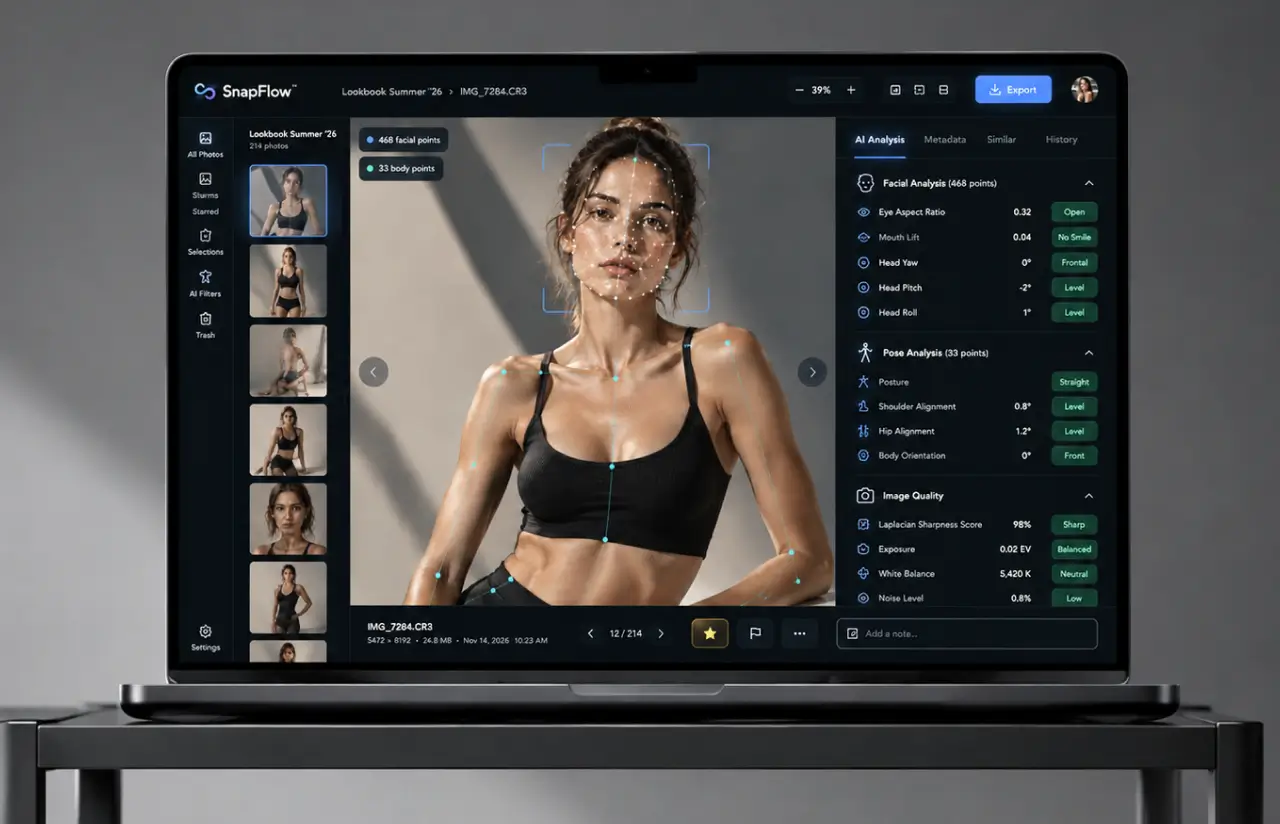
There is no single model that classifies images here. Every tag has its own method to recognize it. Eyes open or closed comes from the eye aspect ratio across 12 landmarks. Smile comes from mouth-corner lift relative to the lip center. Posture reads the shoulder-to-hip line, face direction reads head yaw, and distance to camera reads the face box against the frame. Each threshold was tuned on about 3,000 hand-labeled frames from 12 past shoots, which is why agreement with the studio’s photographers landed near 92% instead of the 70s.
The corner cases made it custom. Hair over one eye, sunglasses, profile poses, backlit rooftops, and motion blur that looked like intentional shallow depth of field all needed their own handling, and the QA suite grew to about 140 such cases. Tags are written to the image database and to XMP sidecars next to the raw files, so Lightroom and Bridge read the same labels as the web dashboard. The key features below are the ones the studio opens on every shoot day.
Model-Specific Attribute Detection
Every frame gets tags for posture, face direction, eye direction, eyes open or closed, smile, hands, arms, legs, and distance to camera. Ten attribute groups, about 30 tag values, written in the plain words a photographer already uses.
Technical Quality Analysis
Focus and light are scored on the same pass. A Laplacian variance check catches soft frames, and a histogram read flags overexposed or underexposed shots, so the 18% of a day that is unusable stops short of the client gallery.
Bulk Image Processing
Drop a few folders onto the dashboard and the pipeline handles multiple files simultaneously. About 0.4 seconds per image on a CPU server, which puts a 2,000-frame day at roughly 15 minutes while the crew is still coiling cables.
Smart Selection Suggestions
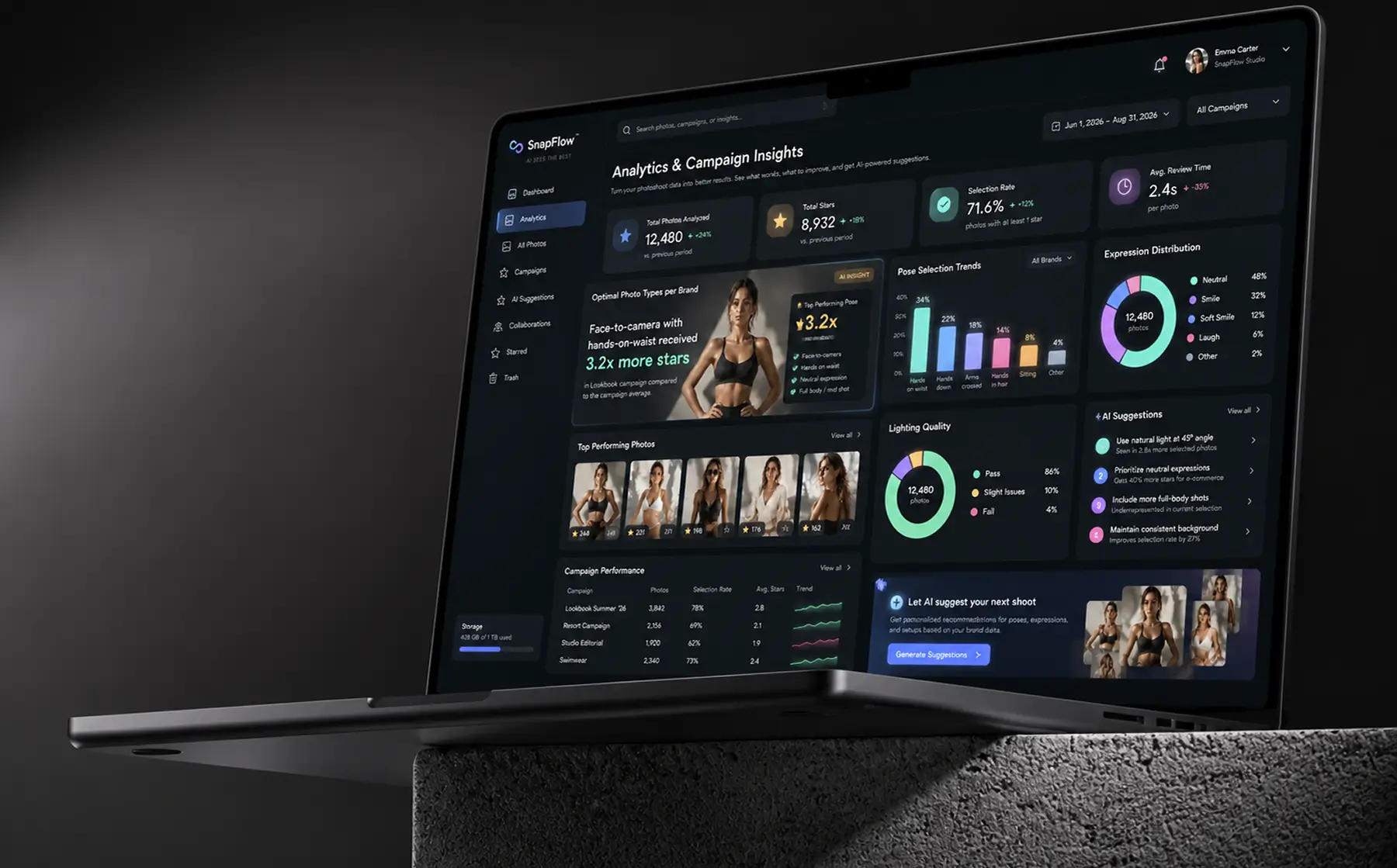
The tool logs which tag combinations get starred. After three campaigns, it began reporting optimal photo types per brand. One example: a lifestyle brand's face-to-camera, hands-on-waist frames were starred 3.2 times more often than any other combination.
Workflow Integration
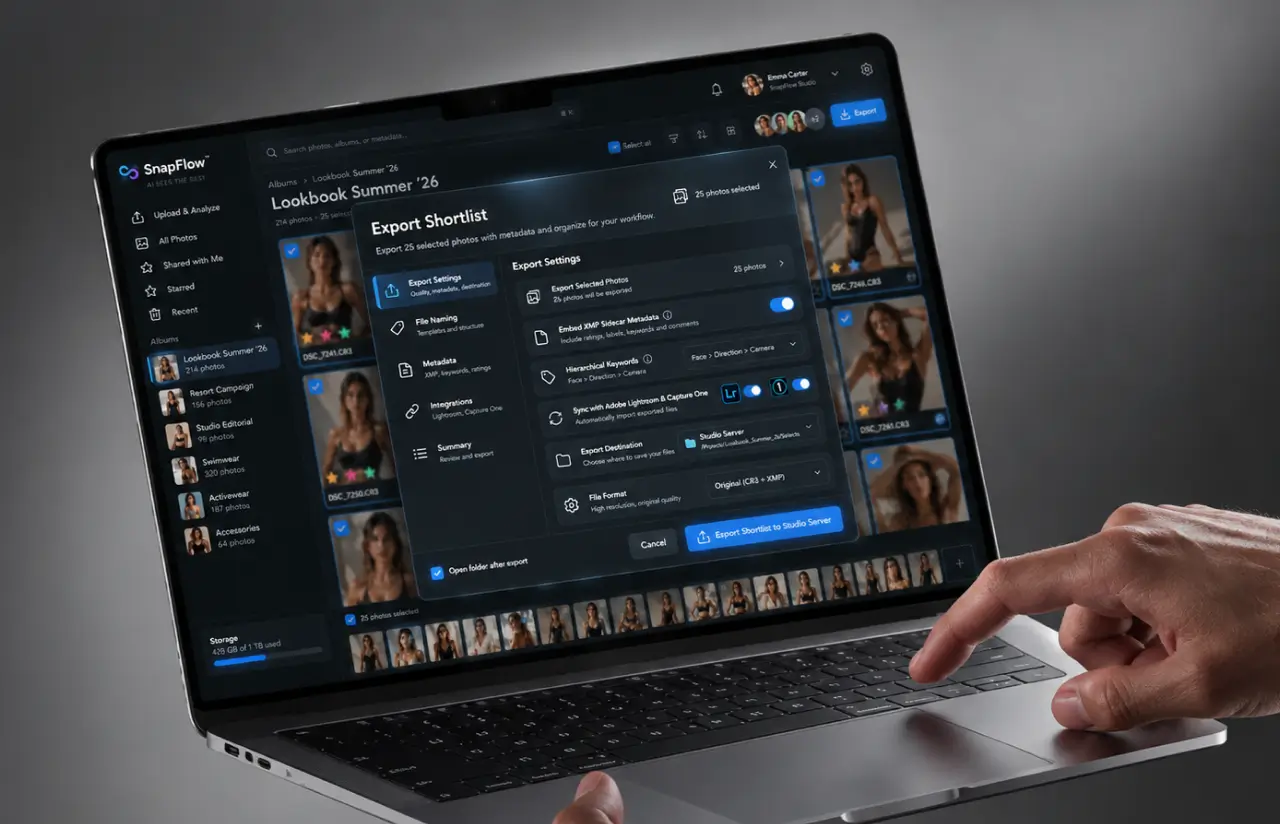
Tags export as XMP sidecar data embedded next to the raw files, written as hierarchical keywords (Face > Direction > Camera), so Lightroom, Bridge, and the studio's existing digital asset management folders read the same labels. No re-tagging and no second copy of the library.
Multi-User Dashboard
Photographer, art director, and brand reviewer share one album view. Stars, notes, and filters sync live, so "final" means the same five images to everyone instead of three folders that disagree.
Custom Tagging Rules
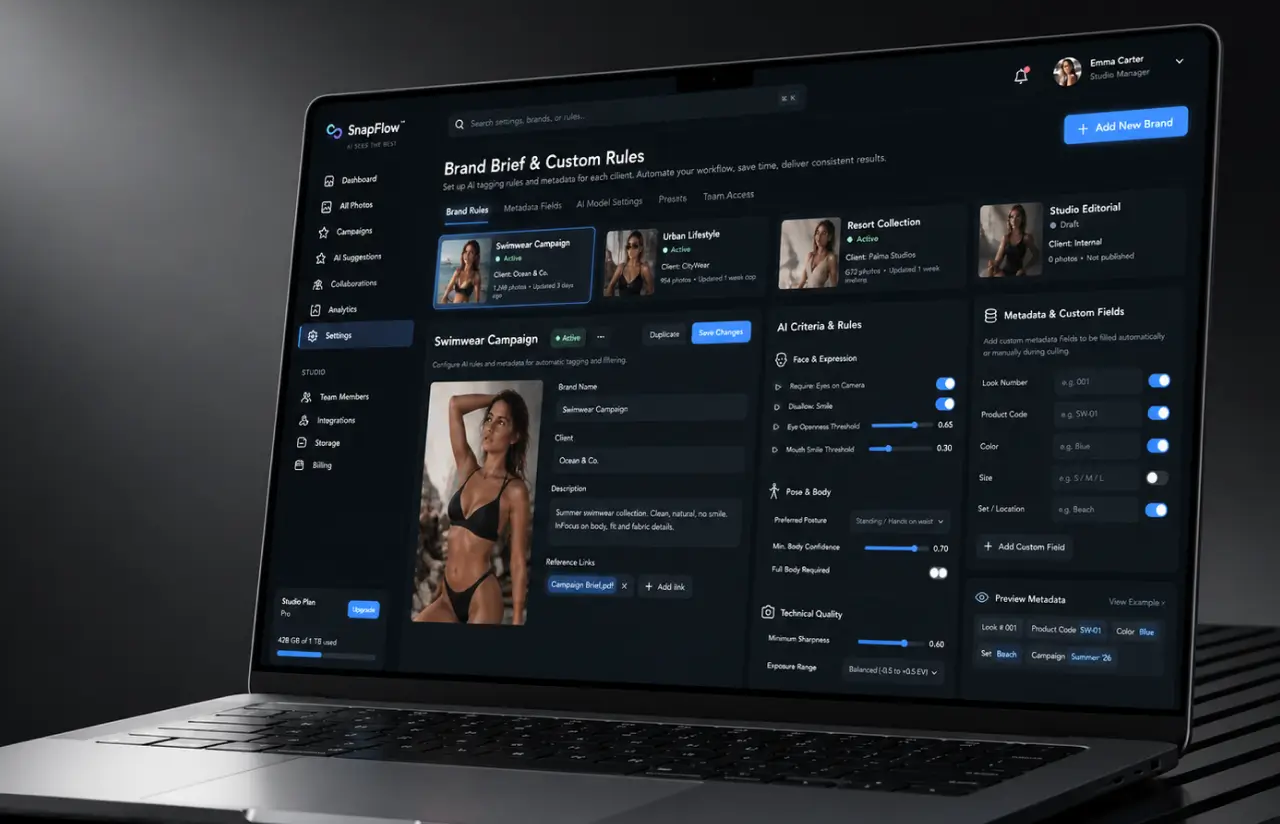
Each brand brief becomes a saved filter with custom fields for look number and product code. A swimwear client wants eyes on camera and no smile, a lifestyle client wants the opposite, and those specific criteria load with the album so the next shoot day opens on the right view.
Scrum Methodology
Project Journey
The five-month engagement ran in two-week sprints, and the first two were spent labeling images: about 3,000 frames from 12 past shoots, tagged by the studio’s own photographers so the thresholds matched how they actually judge a picture. Discovery settled the ten attribute groups, the file formats to support, and the decision to run the photo tagging software on CPU rather than rent GPUs for a tool that processes a folder once a day.
From sprint three onward, every demo ran against a fresh shoot day instead of the training set.
How the Image Tagging Software Works
- Drag one or several folders of image files onto an album. The tool reads JPEG, PNG, TIFF, and the embedded preview in raw files, keeps original file names, and tags new images added later on the next pass.
- MediaPipe maps 468 face points and 33 body points per frame. Images with no detectable person go into a separate group rather than getting tagged wrong.
- SciPy angle and ratio math turns landmarks into tags: posture, face direction, eye direction, eyes open or closed, smile, hands, arms, legs, and distance.
- OpenCV scores sharpness and light for every image. Soft, overexposed, and underexposed frames get their own labels and hide behind one filter.
- Descriptive tags land in the image database and in XMP sidecars, so the same tags appear in the web dashboard and inside Lightroom.
- Users choose tags, add tags of their own, star the keepers, add notes, and export the shortlist. Starred combinations feed the campaign suggestions for the next shoot.
Development Process Flow
AI development for photographers has one honest test: a shoot day the model has never seen. Offline accuracy on labeled frames said little about a backlit rooftop session with three models in motion, so the two-week cadence put fresh campaign folders in front of the photographer ten times before launch. Four of those reviews moved a threshold, and one of them removed a tag the studio decided nobody would ever filter by.

How We Delivered Photo Workflow Management Software
- We define the project goal together, agree on priority features, and set a realistic delivery date and budget.
- We build a ranked list of everything the product needs, starting with what matters most to the business.
- Work is broken into 2-week cycles. At the start of each, we select the next set of features to deliver.
- The team builds, tests, and integrates features throughout the sprint.
- At the end of every sprint, you see working software and give feedback that shapes the next cycle.
- Each sprint produces a shippable piece of the product. We review what worked, adjust, and move forward.
Timeline
Five phases, clearly defined
Discovery & Labeling
- Labeling about 3,000 frames from 12 shoots with the studio's photographers
- Fixing the ten attribute groups and roughly 30 tag values
- Choosing supported file formats and the CPU-only deployment
Attribute Prototyping
- Testing landmark ratios against labeled data, one attribute at a time
- Comparing Laplacian variance with two other sharpness measures
- Setting the first thresholds for eyes, smile, and exposure
Agile Development
- Building the Flask pipeline, image database, and album dashboard
- Adding hands, arms, legs, and distance tags sprint by sprint
- Shipping XMP export, saved filters, and multi-user starring
QA & Testing
- Running about 140 corner cases on every build
- Checking a full 2,000-frame day end-to-end on the CPU server
- Verifying tags match inside Lightroom and Bridge
Launch & Support
- Rolling out on three live campaigns over six weeks
- Reviewing tag agreement after each shoot and re-tuning thresholds
- Adding campaign suggestions once starred data reached three brands
UI/UX Design: Intuitive Interface for Photography Professionals
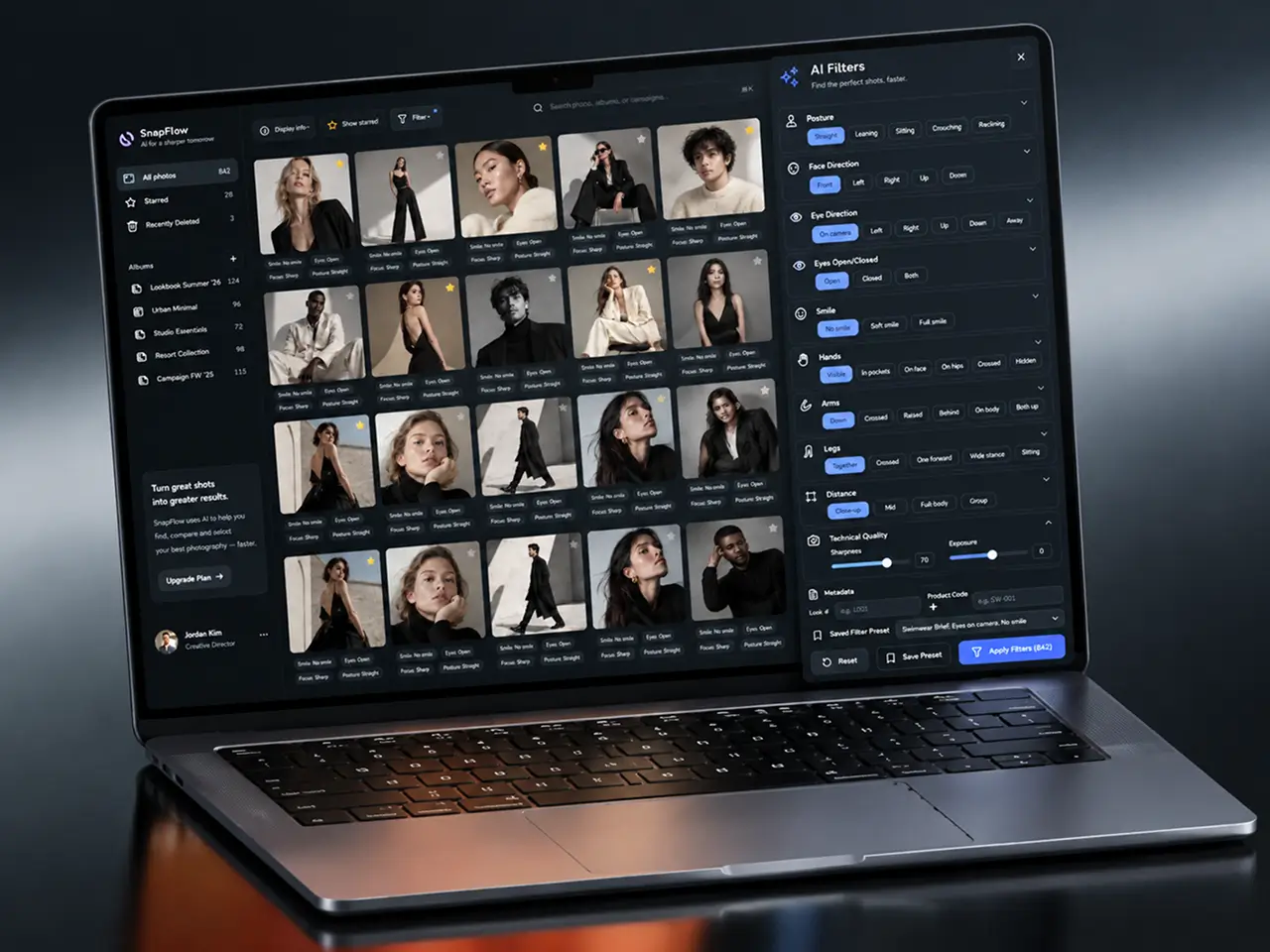
The interface borrows the layout of the image management tools photographers already open: a slim left rail with All photos, Starred, and Recently Deleted, then Albums underneath, one per campaign, which is how the studio already organizes photos. We watched two photographers and one art director work through a real shoot day before drawing anything. They scanned the grid and wanted the tags right there. So each card carries the photo with ten short label-value pairs under it: Smile: No smile, Eyes: Open, Focus: Sharp, and a Display info toggle hides them when someone just wants to look at pictures.
Three controls sit above the grid, and that is all of them: Display info, Show starred, and Filter. The filter panel organizes tags by attribute group and remembers the last combination per album, so users find images from the previous look in one click and pull specific images out of a 2,000-frame day without scrolling. A star is the only way to add ratings, because the studio wanted a single yes rather than five-star scales nobody agrees on. Tags read as words, never as confidence scores. Recently Deleted keeps rejects for 30 days, and the brand reviewer opens the same dashboard in read-and-star mode.
Results
Before
- ✕~2,000 frames a day sorted by hand at six to eight seconds each, close to four hours before the first select
- ✕Around 18% of frames were soft or clipped, and some of them reached client galleries
- ✕Keywords typed into Lightroom by one person, different from shoot to shoot
- ✕Three people, three folders of picks, three versions of "final"
- ✕No record of which poses or expressions a brand actually chose
After
- ✔~92% agreement between auto-tagging and the studio's photographers across ten attribute groups
- ✔~25 minutes from upload to a client-ready shortlist, with 2,000 frames tagged in about 15
- ✔Zero blurred or clipped frames in client galleries across the first three campaigns
- ✔3.2x more stars on the top pose-and-expression combination, now reported per brand
- ✔One shared dashboard for the photographer, the art director, and the brand reviewer

Impact of AI Photoshoot Management Software After Implementation
Verified Reviews
Our Reputation on Top Platforms
LITSLINK holds a 4.8 rating on top platforms. Clients writing about our machine learning and software development work most often mention technical depth in computer vision, steady communication through long engagements, and a willingness to cut a feature when the data says nobody will use it.
Have a Workflow Management Software Project in Mind?
Need image tagging software for a studio, an agency, or a photo workflow management software product of your own? Tell us what you are working with, and our specialist will get back to you within 48 hours.
Thank you for your message. It has been sent.