




Building an App to Track Employee Wellness With AI Health Risk Assessment
- 6 health data sources connected, from Apple Health to Garmin
- 2,500+ data points processed
- 3 user roles served in one mobile and web app per assessment
- 14 days of activity data behind every risk score
- 12+ months from codebase rescue to production release
This app to track employee wellness turns tracker data into AI-based risk scores and practical recommendations. Records stay encrypted end to end: the insurer sees aggregate scoring only, in one mobile and web experience.
Project Details
An insurance client needed to turn health-tracker data into a practical corporate wellness product. However, the inherited mobile application and backend were unstable, and the existing architecture was not designed in line with modern development practices.


Business Challenge: Building an Employee Health Monitoring App for an Insurance Client
Before LITSLINK stepped in, the product existed but could not be trusted. The inherited codebase ignored basic engineering practices, the mobile app crashed on common flows, and the backend went down under real user load.
Every bug fix risked breaking two other things. For an insurance product built on personal health data, that instability was more than an inconvenience. Three problems defined the engagement:

Accurate AI Health Risk Assessment
Risk scores only work if people trust them. The models needed at least 14 days of clean activity data per user, and the inherited pipeline lost or duplicated records often enough to skew the health risk calculations.

Uniting Mobile and Web
Some employees connect Apple Health on a phone. Others export a ZIP archive from a tracker and upload it in a browser. Both paths had to feed the same assessment, yet the old code treated them as two separate products.

Structuring Insurance Wellness Data
Three user roles, six data sources, one insurer reading the results. The data model had to keep individual records private while still giving the insurance client aggregate risk scoring it could use.
Technologies Behind the Employee Wellness App




Our AI Health Risk Assessment Solution
We assigned a project team led by one of our senior solution architects. The first move was not writing code. It was a full audit of the existing codebase and project structure, which produced two roadmaps: a short one for fast stabilization and a long one for rebuilding the whole solution properly.
Stabilization came first. Crash fixes, data pipeline repairs, monitoring. Once the product stopped falling over, the team rebuilt the mobile app and backend on a new architecture designed to grow with the user base, without ever taking the live product offline.
Our machine learning engineers reworked the Python services that run the risk models, so each assessment now processes around 2,500 data points reliably instead of failing partway through.
AI-Based Health Risk Assessment
Python models read 14 days of activity data and estimate the probability of specific health risks. Employees see results on their phone within minutes, instead of waiting for a report weeks later.
App to Track Employee Wellness
Daily steps, activity minutes, and heart data sync automatically once a tracker is connected. No manual logging. Each employee sees exactly what was collected and when, so nothing about the data feels hidden.
Health Risk Calculations
Every assessment crunches roughly 2,500 data points and returns scores per risk factor and BMI category. The math runs server-side, so a mid-range Android phone gets the same accuracy as a new iPhone.
Health Risks and Improvement Recommendations
Scores arrive together with plain-language recommendations. An employee with an elevated risk sees what to change, not just a number. That closes the gap between knowing a risk exists and acting on it.
Mobile and Web App
One account works everywhere. Connect a tracker on the phone, upload a data archive from a laptop, read results on either. React Native and React.js share the core logic, so the two versions never drift apart.
Insurance Wellness Platform With Health Risk Scoring
The insurer gets aggregated risk scoring across the covered population while individual health records stay private. Underwriters see trends. Employees keep control of their own data.
Data Privacy by Design
Health data is encrypted, and access is controlled by role: each employee sees only their own records, and the insurer works with aggregate risk scores across the covered population — never individual health data.
Scrum Methodology
Project Journey
This engagement began as a rescue-and-rebuild rather than a conventional greenfield project. A senior solution architect led the initial review of the mobile application, backend, project structure, and recurring stability issues.
The team separated urgent product fixes from the larger architectural work. This made it possible to protect current workflows while rebuilding the system for long-term development. Product design, engineering, QA, and publishing remained connected throughout the 12+ month engagement.
How the Employee Health Monitoring App Works
- An employee joins through the corporate wellness program and opens the app on mobile or web.
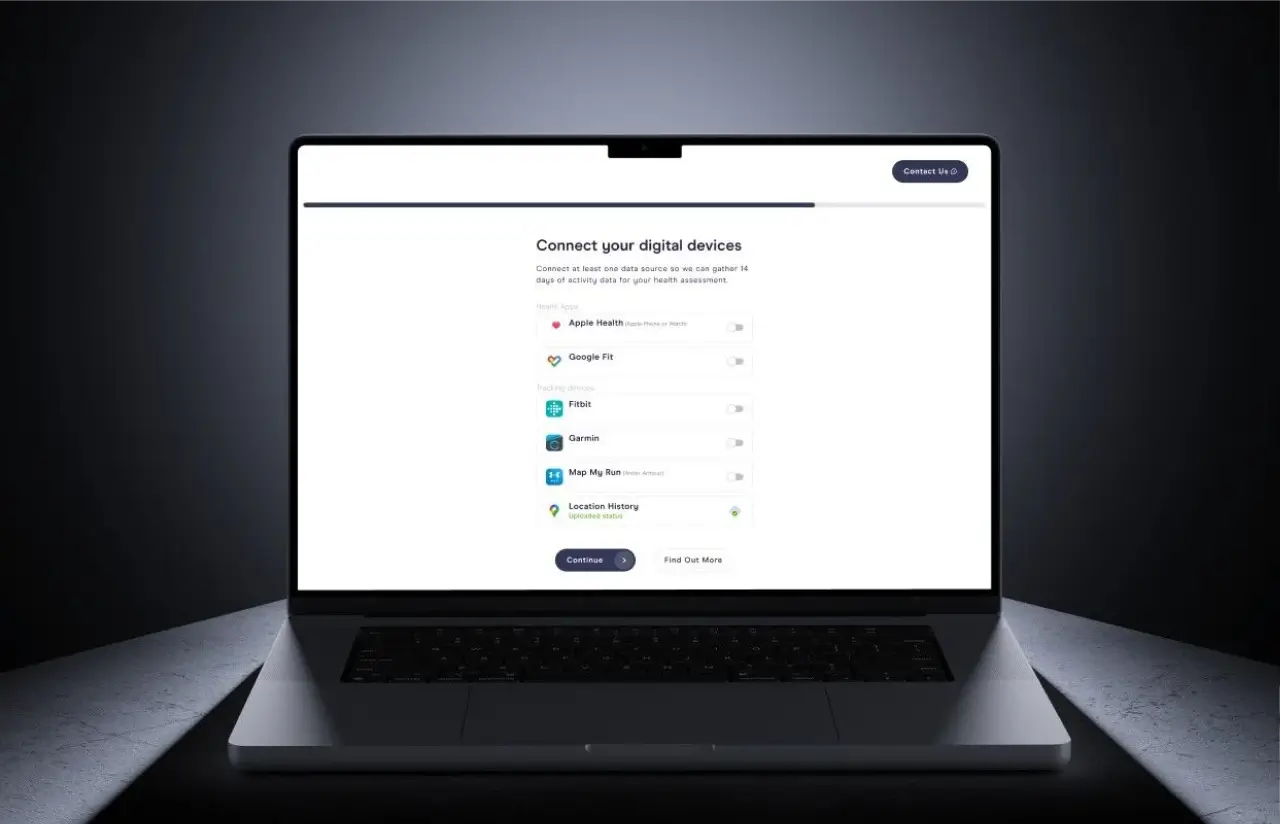
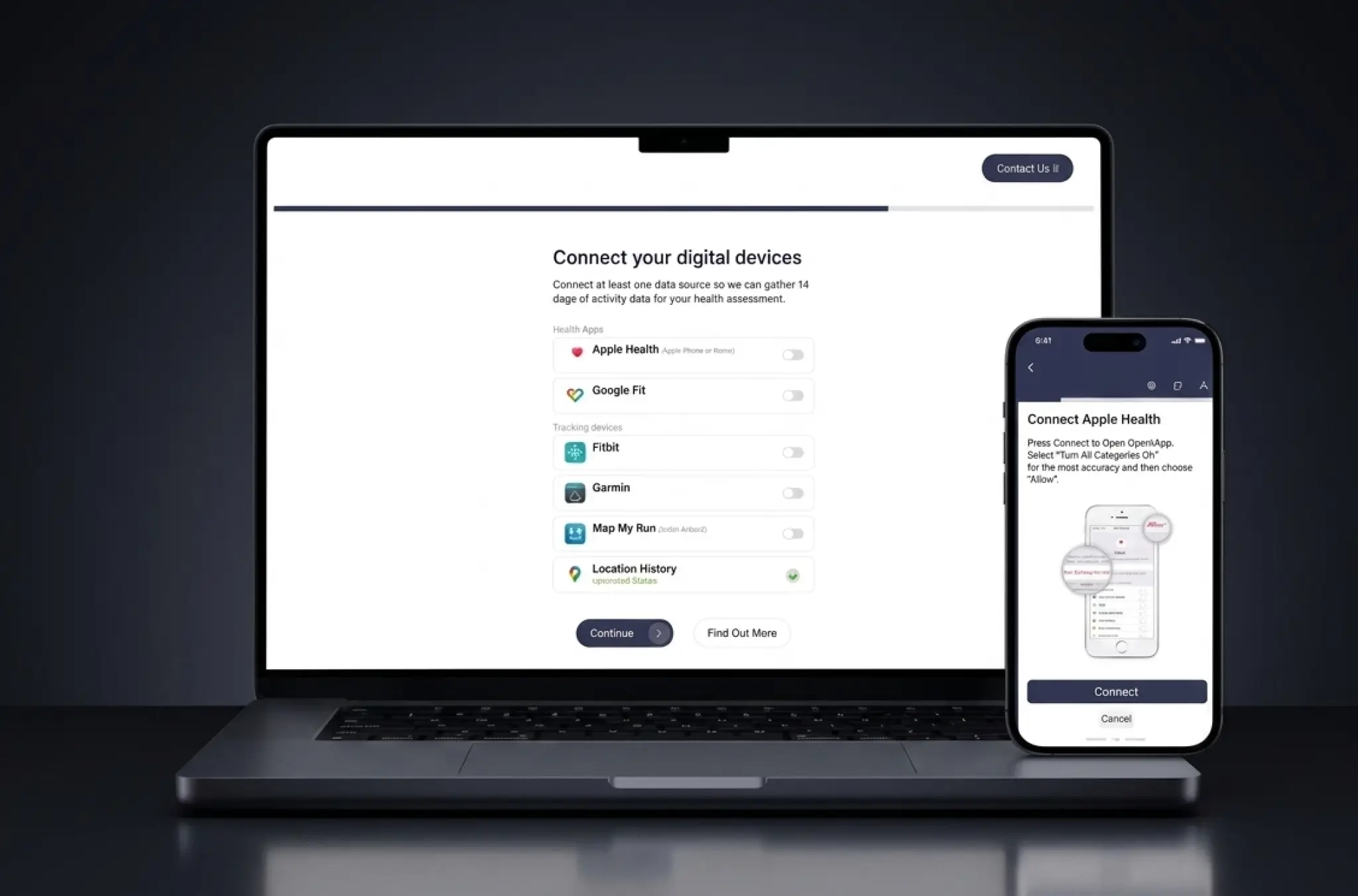
- Apple Health, Google Fit, Fitbit, Garmin, MapMyRun, or location history. One toggle per source; status shown right on the screen.
- The app gathers two weeks of activity data automatically. Web users can upload a ZIP archive from their tracker instead.
- Python models process about 2,500 data points and calculate individual health risk scores on the server.
- Results land in minutes: risk factors, BMI category, and concrete improvement recommendations for each one.
- The insurer reads population-level risk scoring without ever touching an individual's private records.
Scrum Process Flow
AI development rarely moves in a straight line, and this project proved it. Two-week sprints let the client watch the risk scoring improve step by step and redirect the team while changes were still cheap to make.
How we deliver your project
- We opened with a codebase audit instead of a feature wish list. The findings set the real scope: stabilize first, rebuild second.
- Crash fixes and data pipeline reliability went to the top of the backlog. New tracker integrations waited until the foundation held.
- Every two weeks the team picked the next slice. One sprint went to the web upload flow, another to the risk score screens.
- Mobile, backend, and AI work ran in parallel. QA tested every build on real devices with real tracker data, not mocked feeds.
- The client saw a working build at the end of each sprint and redirected priorities before the next one started.
- Each sprint shipped something usable. The full architecture rebuild happened without taking the product offline for a single day.
Timeline
Development Process — Five Phases
Discovery & Codebase Audit
- Full review of the inherited code and project structure
- Crash and error log analysis across mobile and backend
- Two roadmaps drafted: quick stabilization and full rebuild
Stabilization
- Critical crash fixes on the mobile app
- Data pipeline repairs to stop lost and duplicated records
- Monitoring added so regressions surfaced within hours
Agile Development (Sprints)
- Step-by-step rebuild of mobile app and backend architecture
- New tracker integrations and the web upload flow
- Risk model improvements with the Python services
QA & Testing
- Full cycle QA on real devices with real tracker data
- Regression runs before every release
- Load checks on the backend under realistic traffic
Launch & Support
- App store publishing for iOS and Android
- Production monitoring and incident response
- Incremental updates shipped every sprint
UI/UX Design: Simple Interface for an Employee Wellness App
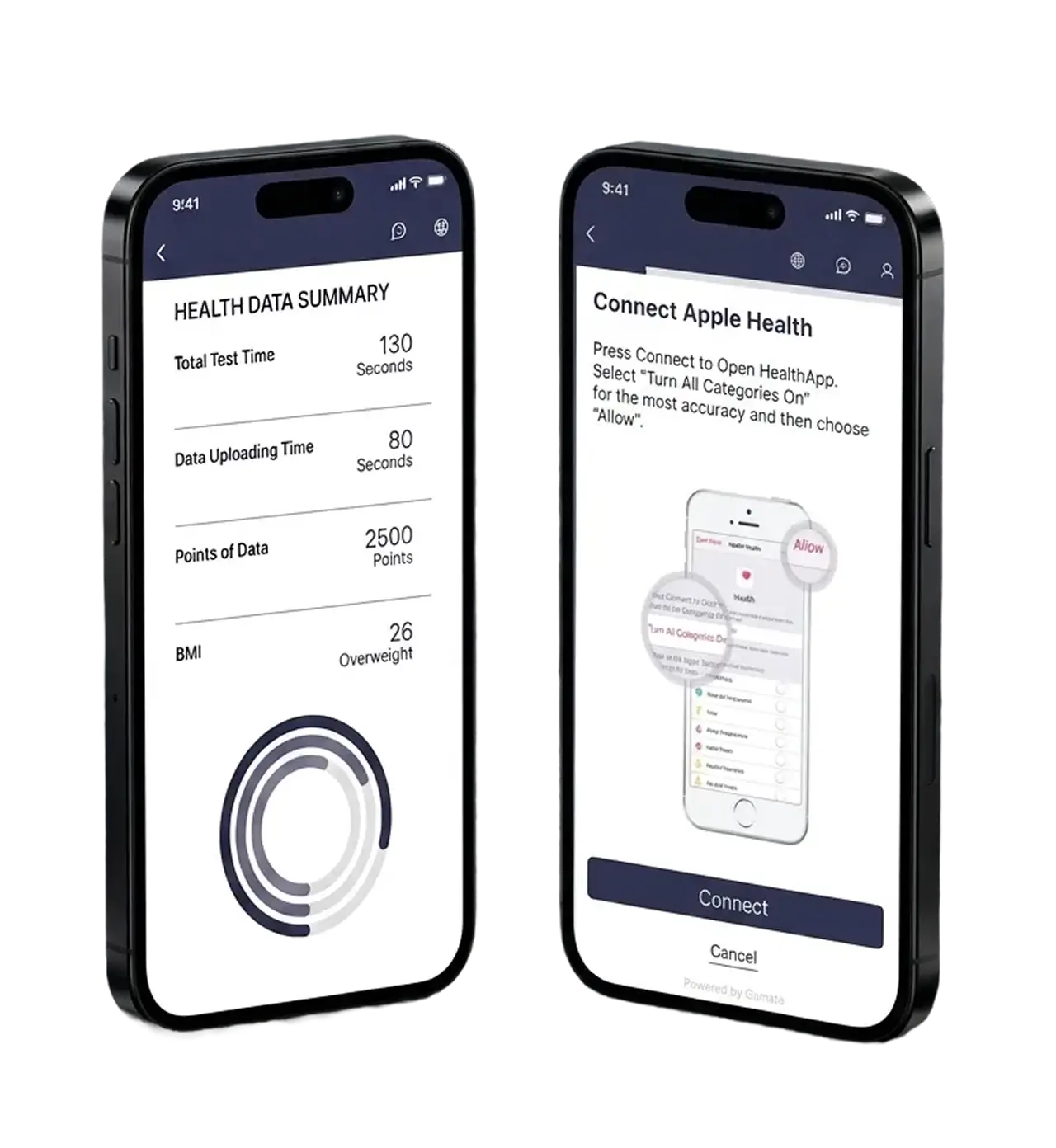
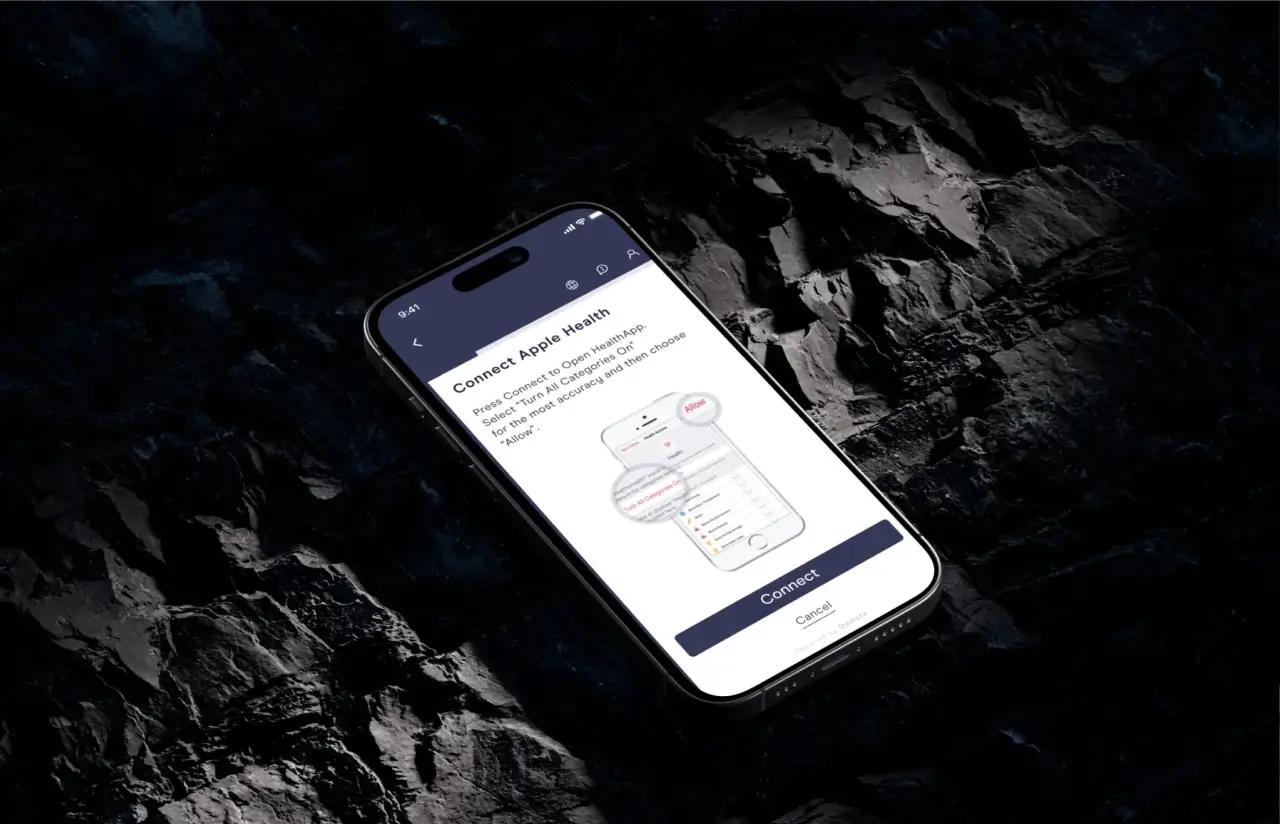
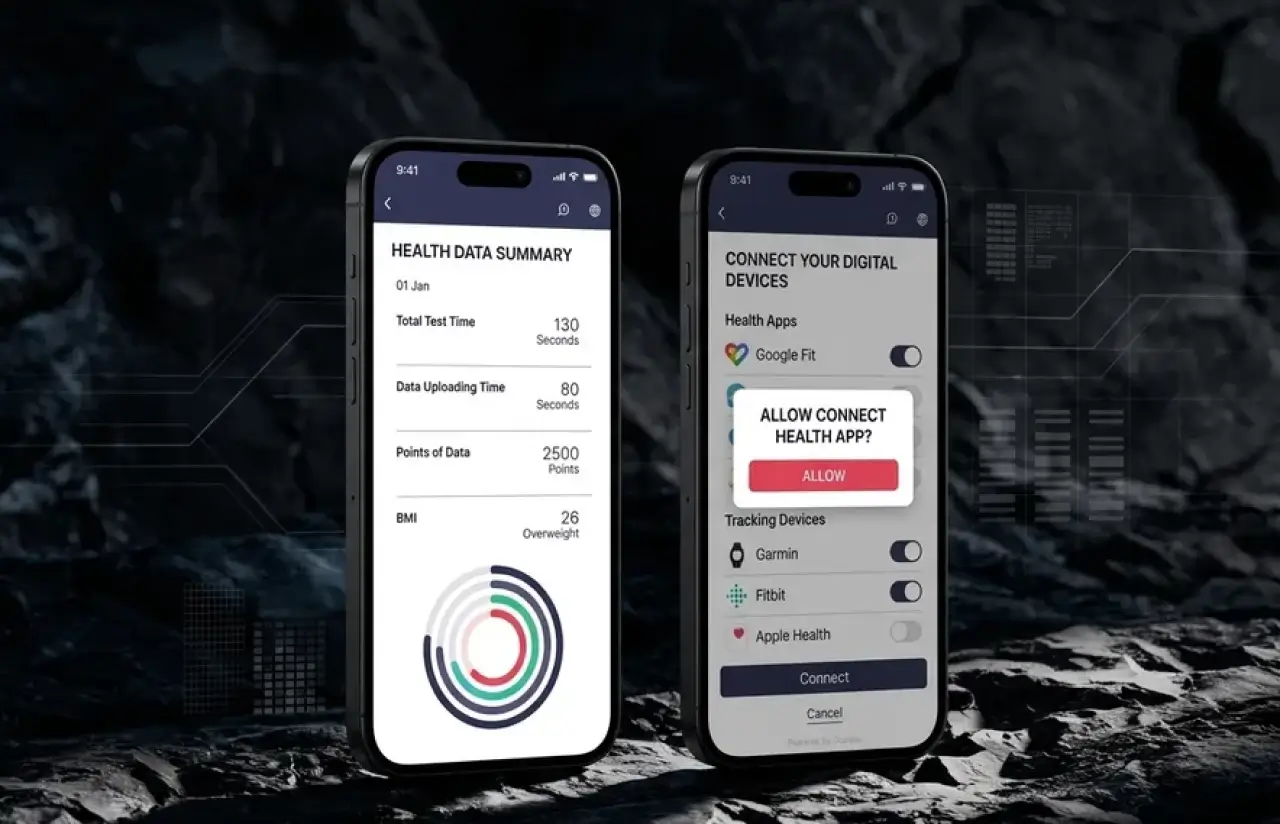
Health data makes people nervous, so the interface was built around one principle: never let the user wonder what is happening with their information. The “Connect your digital devices” screen lists every source with a plain toggle and a visible status label; Google Fit shows “Connected” in green the moment the link works. The Apple Health flow goes further and shows an annotated preview of the iOS permission screen, telling the user exactly what to tap: “Turn All Categories On”, then “Allow”. A progress bar at the top of every onboarding step shows how much is left.
The same restraint carries into the results and upload screens. Assessment metrics appear as labeled rows anyone can read at a glance: Total Test Time 130 seconds, Data Uploading Time 80 seconds, Points of Data 2,500, BMI 26 with the category “Overweight” spelled out instead of hidden behind a chart. On the web, the upload flow is a numbered step with a drag-and-drop zone and the supported format stated up front. The whole product runs on a calm two-color palette, deep purple #343755 and turquoise #249AA7, with a clean geometric typeface that stays readable at small metric labels.
Results
Before
- ✕Employees' tracker data sat in separate services with no unified wellness app for the client's corporate programs.
- ✕The mobile app crashed on common flows, and the backend went down under real load.
- ✕Codebase written without regard for best practices, so every fix risked breaking something else.
- ✕Health data processed without a reliable AI pipeline; results came back inconsistent.
- ✕No health risks and improvement recommendations available in one place.
After
- ✔A working health risk assessment platform in production, ready to sell into corporate wellness programs.
- ✔AI-based health risk calculations return scores within minutes of upload instead of days of manual processing.
- ✔One employee health monitoring app as a mobile and web app: a single codebase to maintain, so updates ship faster and cost less.
- ✔6 data sources and 2,500+ data points per assessment give the insurer risk data it can trust for underwriting decisions.
- ✔Insurance wellness platform with health risk scoring live for 3 user roles: employees, corporate admins, and the insurer.
Impact of the Health Risk Assessment App After Launch
Verified Reviews
Our Reputation on Top Platforms
LITSLINK holds a 4.8 rating on Clutch and appears among the top healthcare software development companies on GoodFirms and other review platforms. Reviews from insurance clients and health startups often single out one thing this project needed most: the ability to take over a troubled codebase and turn it around.
Have a Wellness Platform Project in Mind?
Planning an app to track employee wellness, or rescuing one that already exists? Send us a short description of your product and data sources. We will come back within 48 hours with an honest read on scope, timeline, and team.
Thank you for your message. It has been sent.