





Building a CRM for Travel Agents that Simplifies Client and Trip Management
- 2 specialists delivering the platform end-to-end
- 2 years of continuous development and support
- 8 user roles running on one permission model
- 4 work queues in the agent dashboard: todos, trips, client tasks, sales goals
- 3 currencies in commission reporting (USD, EUR, JPY)
LITSLINK built Trips Planner as a Flutter-based CRM for travel agents that brings client management, trip planning, booking, task tracking, and reporting into one platform. A connected traveler app lets tourists find agents and book trips without leaving the product.
Request a Similar Solution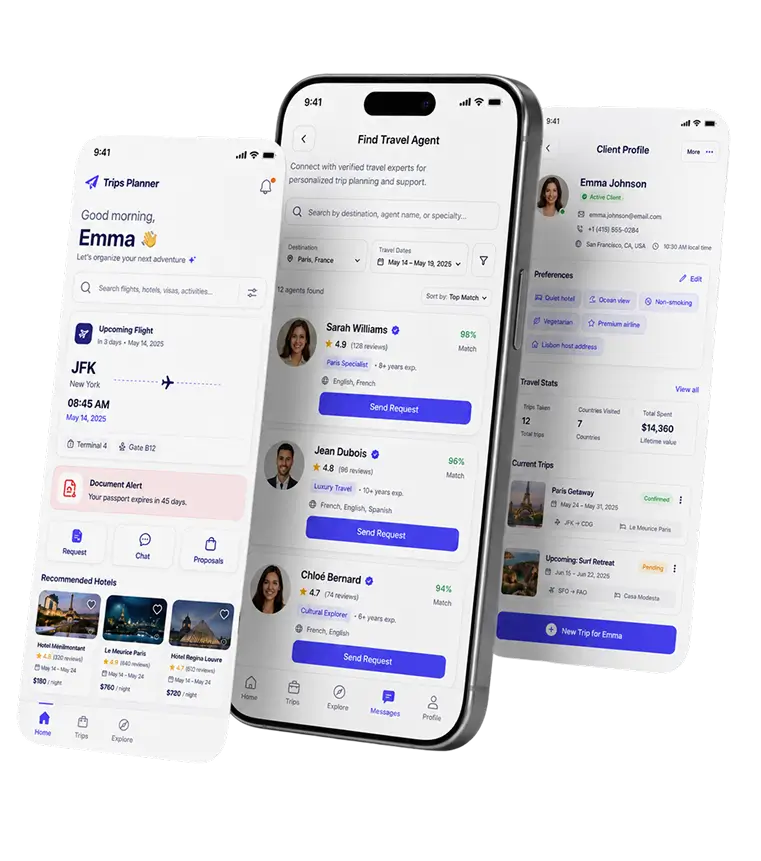
Project Details
Trips Planner connects tourists with travel agents and includes a CRM for the agent side. LITSLINK built both Flutter products: an agent workspace for client, trip, and booking records, and a traveler app for search, proposals, and booking.
 Client
- Trips Planner
 Industry
- Travel
 Solution
- Client management CRM travel-industry teams use to match tourists with agents and run bookings end-to-end
 Service
- Product Design + Software Development + Full Cycle QA + Publishing
 Platform
- Mobile (Flutter), plus a wide-screen dashboard for agents
 Scope
Scope- 2 people, 8 user roles
 Duration
- ~2 years
 Location
- US
Business Challenge: Helping Travel Agents Manage Clients and Trips
A travel agent’s real job is remembering things. Which client wants a quiet hotel, whose passport expires in March, which family is traveling with a host in Lisbon and needs the address before Friday. The agents behind Trips Planner were doing all of it in spreadsheets, email threads, and notes on a phone.
Past roughly two dozen active trips, that system stopped holding. What the best CRM for travel agents fixes first is the gap between a conversation and a record: a client mentions a date change in chat, and twenty minutes later nobody can find it. Agents needed travel agency automation software that could carry a client record properly, and travelers needed a way to find an agent in the first place. Building only the back office would have left the demand side unsolved, so Trips Planner was scoped as a SaaS product with the CRM sitting inside a marketplace.
-

Scattered client data
Trip dates lived in one spreadsheet, hotel preferences in another, passport scans in email. Answering “what did we quote the Adams family?” meant opening four things and trusting the most recent one.
-

No easy way for tourists and agents to connect
Travelers had no reliable way to find an agent who actually covered their destination. On the other side, agents had no shopfront. Word of mouth and a Facebook page were the entire funnel.
-

Manual trip tracking
Dates, hosts, and destinations were tracked by hand. Fine for five trips. At fifty, the usual failures were double-booked weeks and a passport deadline nobody chased.
Technologies Behind the Travel Agent CRM


Our Travel Agent CRM Solution
The product runs as two connected surfaces. Travelers use a mobile app to find an agent, send a request, review proposals, and book. Agents work in a dashboard that holds the client record, the trip record, and the money. Both come out of the same Flutter codebase, which is how a team of two covered this much ground in the first place.
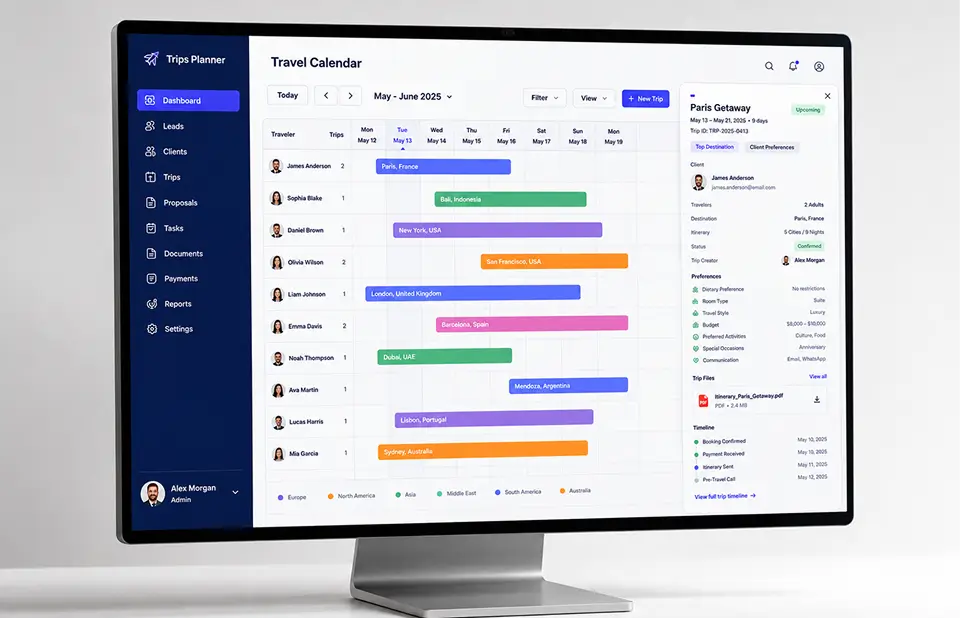
Inside the agent view, the trip is the object everything hangs off. Client details, dates, locations, hosts, and preferences attach to it, along with every task that has to happen before departure. Trip management software for travel agencies often stops at the booking record, so the calendar was pushed further: it shows dates, traveler names, and destinations together, which is what an agent scans first thing in the morning. Agencies comparing crm software for booking engine travel agents run into the same split between quoting and tracking, and Trips Planner keeps both on one screen.
One framework, two audiences. Flutter travel app development let a two-person team ship the agent side and the traveler side without maintaining separate iOS and Android codebases, which matters a lot when the team is that small. Agencies evaluating crm software for travel agents usually care less about the framework than about how fast a fix reaches everyone. Here the answer was one release. Teams planning something similar can hire Flutter developers who have shipped this pattern before.
-
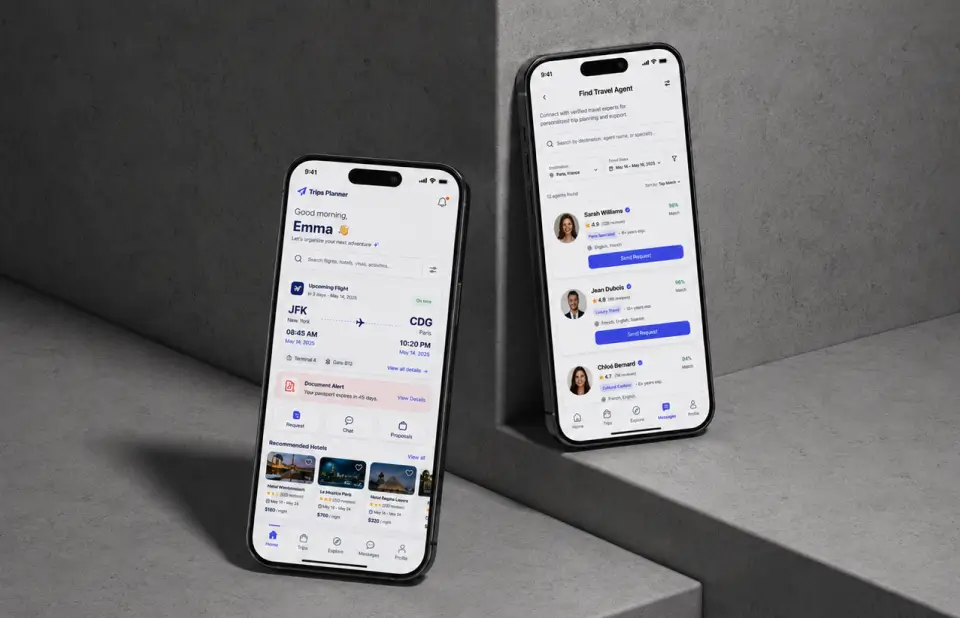
Tourist-agent matching
Travelers browse agents inside the app and send a request without leaving it. The agent receives a lead with destination and dates already attached.
-
Client and trip data management
Dates, locations, hosts, and traveler preferences sit on one record. Agents stop retyping the same details into a quote, an email, and a spreadsheet.
-
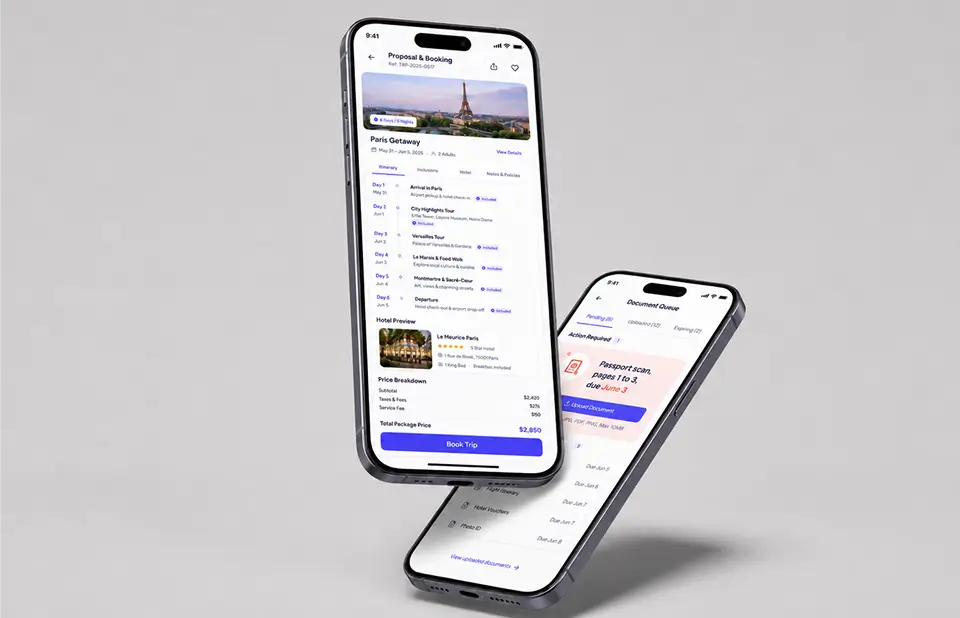
Trip booking for tourists
Travelers review proposals, pick one, and book in the same place they asked the question. The home screen keeps the next flight and its departure time in view, so a trip already in motion is one tap away.
-
Travel tracking calendar
One calendar shows trip dates, traveler names, and where each person is going. An agent running dozens of overlapping trips can see a collision before the client does.
-
Document and payment task queues
Passport pages, forms, and payment deadlines appear as dated to-dos on both sides. A traveler sees “passport scan, pages 1 to 3, due 4:30 PM June 3” and uploads it straight from that card.
-
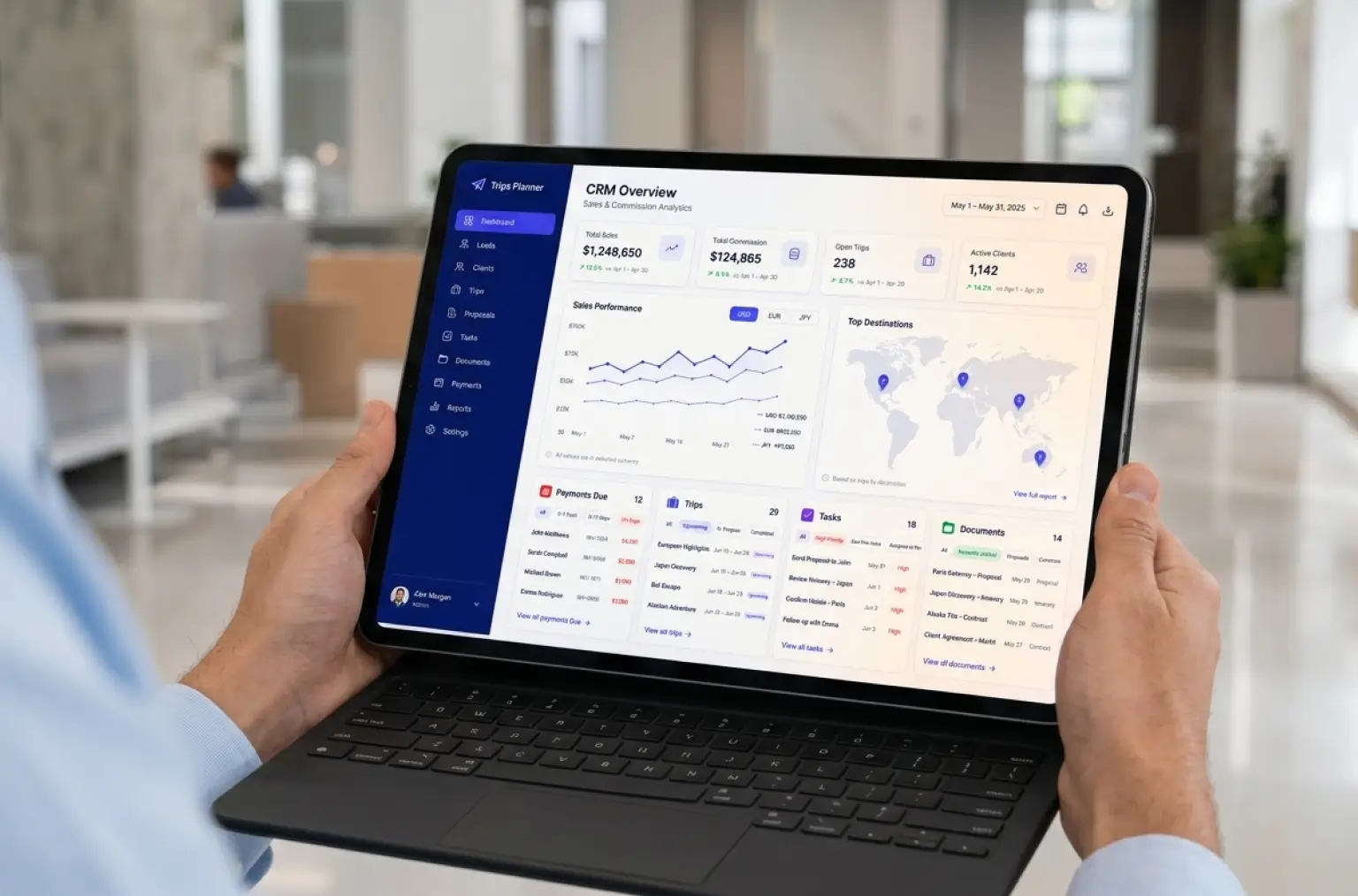
Sales and commission reporting
The dashboard charts sales and commission against the previous year, month to date and year to date, with totals in USD, EUR, and JPY.
Ready to build a travel agent CRM of your own?
Request a Similar SolutionScrum Methodology
Project Journey: Building the Trips Planner CRM
Two years is a long engagement for a two-person team, and the shape of the work changed across it. Early sprints went into the agent side, since a marketplace with no agents on it has nothing to show a traveler. The mobile experience for travelers followed once the client record was stable.
Discovery covered the eight user roles the platform had to support and exactly what each one could see. Getting that wrong would have been expensive later. Permissions touch every screen, and retrofitting them into a live CRM is never a small patch.
- Weeks per sprint
- 2
- Months of delivery
- 24
- User roles supported
- 8
- Team members
- 2
How the Travel Agent CRM Works
-
Agent creates a profile
A travel agent registers, sets up a profile, and takes the role that matches how the agency works.
-
Tourist finds an agent
A traveler searches the marketplace and lands on an agent who covers the destination.
-
Agent logs client and trip data
Client details, travel dates, locations, hosts, and preferences go onto the trip record.
-
Tourist selects and books a trip
The traveler reviews proposals in the app, picks one, and books it.
-
Calendar tracks the trip
Dates, traveler name, and destination land on the shared calendar the moment a booking is confirmed.
-
Agent manages ongoing bookings
Payment-due and document tasks queue by date, so the agent works a list instead of a memory.
Scrum Process Flow
SaaS development on a two-sided product evolves through testing, because the agent side and the traveler side keep pulling requirements out of each other. Two-week cycles meant the client saw working screens often enough to redirect priorities before a change got expensive to reverse.
Inside Each Sprint
-
Daily Scrum
15-min sync every morning
-
Retrospective
Inspect & adapt process
-
Sprint Review
Demo to stakeholders
-
Increment
Shippable product update
How we deliver your project
-
Scope & Timeline
We define the project goal together, agree on priority features, and set a realistic delivery date and budget.
-
Feature Priorities
We build a ranked list of everything the product needs, starting with what matters most to the business.
-
Sprint Kickoff
Work is broken into 2-week cycles. At the start of each, we select the next set of features to deliver.
-
Development Cycle
The team builds, tests, and integrates features throughout the sprint.
-
Review & Feedback
At the end of every sprint, you see working software and give feedback that shapes the next cycle.
-
Delivery
Each sprint produces a shippable piece of the product. We review what worked, adjust, and move forward.
-Timeline
Five Phases, Clearly Defined
-
Discovery & Product Workshop
1–2 weeks
- Use cases for agents and for travelers
- Mapping all 8 user roles and their permissions
- Deciding what data a trip record has to carry
-
UX Prototyping
2–3 weeks
- Wireframes for the agent dashboard
- Traveler app flows: search, request, proposals, booking
- Profile, calendar, and task queue layouts
-
Agile Development (Sprints)
~20 months
- Marketplace and matching between tourists and agents
- CRM records, calendar, and task queues
- Sales and commission reporting on the agent side
-
QA & Testing
2–3 weeks
- Full-cycle QA across client records and bookings
- Calendar and permission testing on real scenarios
- Cross-device checks on iOS and Android
-
Launch & Support
Ongoing
- Store publishing for both platforms
- Ongoing updates and maintenance
UI/UX Design
Two user types, one codebase, and no room to run two design systems. The visual language leans on a deep purple (#102069) for headers and body text, a brighter purple (#5D76E5) for anything actionable, and white for the rest. Poppins carries the type. It stays legible at small sizes inside the agent’s data tables and still reads friendly on a traveler’s home screen, which is a harder balance to strike than it sounds.
The traveler app opens on whatever happens next. A greeting, a search field, then the upcoming flight with its departure time, then the to-do that is genuinely due. Three buttons sit under that: Request, Chat, and Proposals, covering most of what a traveler does mid-trip. Hotel suggestions for top destinations run along the bottom as a card carousel, each showing stay dates, a star rating, and the city.
The agent view is dense on purpose. Sales and commission charts sit at the top against last year’s figures, a world map plots active trips by region, and the lower half is a working queue: type, subject, linked trip, due date, status, and an inline edit control. Filter chips split that queue into general items, payments due, and anything approaching its due date, so the day starts with a list rather than a search.
Results & Impact
Before
- Client details spread across spreadsheets, email threads, and phone notes.
- No place for a traveler to find an agent who covered their destination.
- Trip dates and hosts tracked by hand, with double-booked weeks as the usual failure.
- Passport pages and payment deadlines chased over email, one client at a time.
- Sales and commission figures pulled together manually at the end of the month.
After
- One record per trip carrying client, dates, locations, hosts, and preferences.
- A marketplace where travelers and agents find each other inside the product.
- A shared calendar showing trip dates, traveler names, and destinations together.
- Dated task queues for documents and payments, visible to the agent and the traveler.
- Sales and commission dashboards with year-over-year comparison across three currencies.
The Impact
Two people built and maintained this for two years, which only works when a product has one spine. Here that spine is the trip record.
The CRM for travel agents at the center of Trips Planner gave agents a single client record in place of four places to look, and gave travelers a way to book without leaving the conversation they started in. Eight user roles run on the same permission model, so an agency can add staff or split responsibilities without another build.
Want the same setup running in your agency?
Request a Similar Solution-Verified Reviews
Our Reputation on Top Platforms
LITSLINK is consistently rated among the top software development companies on Clutch, GoodFirms, and similar review platforms. Client reviews point to technical depth, clear communication across long engagements, and delivery that holds its dates. See more of our travel industry work.
Have a Travel CRM or SaaS Idea in Mind?
Planning a CRM for travel agents, or already running one that has outgrown its first version? Tell us what the agency needs to track, and we will come back within 48 hours with a scope and a number.
Next steps:
- A LITSLINK specialist reviews your request and contacts you to discuss details.
- If needed, we sign an NDA before moving forward.
- We send a project proposal: estimates, timeline, and team CVs included.
- After launch, we stay on for any updates your product needs.
- 48h Response
- 1540+ Projects
Thank you for your message. It has been sent.