



Building an AI-Powered Dance Learning Solution That Compares Teacher and Student Movements
- 17 body keypoints tracked per frame
- 87% agreement with teacher-marked corrections
- 6 dance styles at public launch
- ~80% less time reviewing student videos
Dance teachers can't watch every student practice at home, and a mirror won't tell a dancer that the arms came in late on count five. LITSLINK built a dance learning app for a US EdTech company that records a student on a phone, compares the movement with the teacher's reference, and points to the exact count where timing or posture slipped.
Project Details
The client runs online dance classes for teens and adults across the US, many of them students with little prior dance experience. Between classes, they practiced alone and sent videos to teachers by direct message, and most never heard back before the next lesson. The brief was to turn that loop into one product that could connect students with their teacher: record, compare, correct, all on the phone a student already owns.


Business Challenge: Seeing What a Mirror Cannot Show
Video already won the first round of online dance education. Subscription platforms like STEEZY Studio proved that people will pay to learn dance from instructors they never meet, and free tutorials on YouTube and dance websites fill the gaps. The weak spot is what happens after the lesson. A student puts the class on a laptop or a TV, plays the track from Apple Music, runs the routine twenty times, and still has no idea whether the left arm is late.
Our client’s teachers tried to close that gap by hand. Each one received 40 to 60 student videos a week, spent about 10 minutes on each, and replied three or four days later, often after the next class had already started. Honestly, the feedback itself was good. There just wasn’t enough of it, and it couldn’t scale past a few hundred students.

Accurate Motion and Pose Feedback
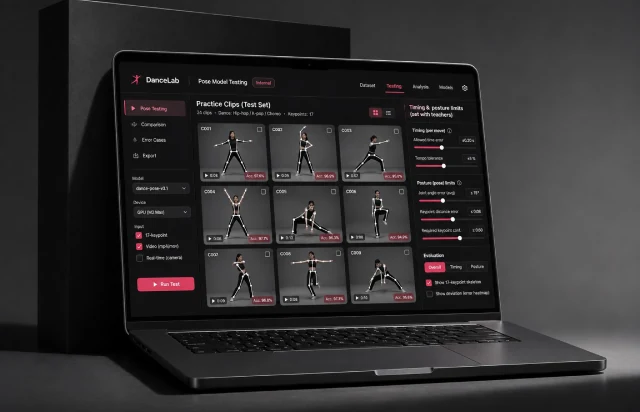
Home practice happens in real-world rooms: a sofa in frame, low light, a phone propped on a shelf at odd angles. With no sensors, depth cameras, or extra equipment, the model still had to catch a 15° elbow drop.

Aligning Teacher and Student Experiences
Students rarely dance at the teacher's pace. They start late, slow down on a hard section, and face the screen mirrored. Comparing frame 300 with frame 300 would flag everything, so the two performances had to be matched by movement, not by clock.

Structuring Dance Learning Data
Every routine carries music, counts, sections, a style, and a level. Without one data model for that dance content, scores couldn't be compared across attempts, and teachers couldn't track a student's progress across weeks of lessons.
Technologies Behind the Dance Analysis AI


Our AI-Powered Dance Learning Solution
The product had one job: tell a dancer what to fix next, in words a 15-year-old can act on. Most dance video analysis tools stop at a similarity number, and a number doesn’t help anyone practice. A note like “Counts 5–6: right arm about a quarter beat late” does.
Analyzing dance from a single phone camera starts with a skeleton. Our computer vision pipeline runs a TensorFlow pose model that extracts 17 body keypoints per frame at 30 fps, so a one-minute dance routine becomes about 1,800 poses. The Python service then normalizes each skeleton for height and distance from the camera, which lets a 5’2″ student be compared fairly with a 6’1″ teacher. Dynamic time warping lines the two sequences up by movement, and only then does the comparison begin.
We kept the scope narrow on purpose. The model judges timing and posture. It does not grade style, energy, or creativity, because teachers told us in discovery that a score for groove would undercut them, and they were right. Those calls stay with the person who teaches the class.
Comparing Teacher and Student Movements
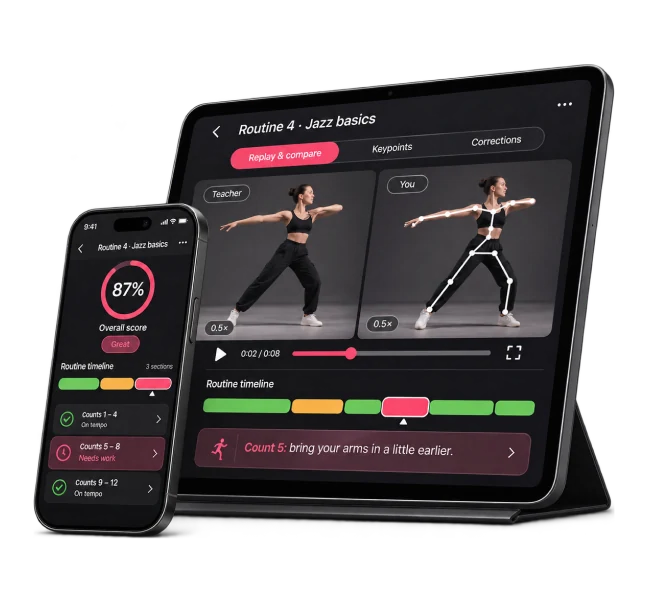
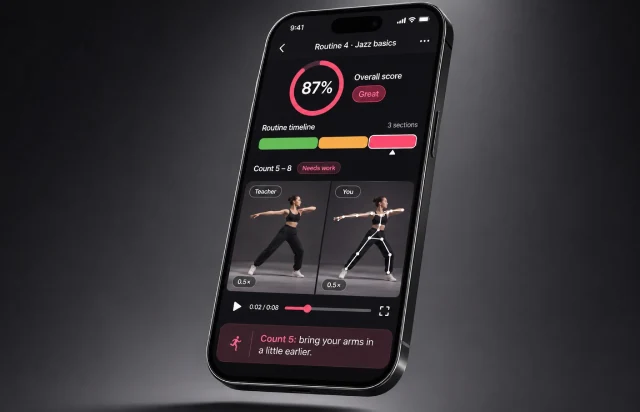
The app overlays the student's skeleton on the teacher's, frame by aligned frame, and gives each section a 0 to 100 match score. Mirror mode flips the reference automatically, since most students practice facing the screen.
Timing Discrepancy Detection
Each move is checked against the counts in the music. Gaps above 120 ms, roughly a quarter beat at 120 BPM, get flagged with the count number, so dancers know whether they rushed the tempo or dragged behind it.
Posture Discrepancy Detection
The system compares 12 joint angles, from shoulders and elbows to hips, knees, and torso lean. A gap over 15° that holds for more than a few frames counts as a real posture issue, not camera noise.
Corrective Suggestions for the Dancer
After each complete attempt, the dancer gets three corrections at most, ranked by impact, so the focus stays on one fix at a time. Fix those, record again, and watch the score climb.
Teacher Dashboard and Role-Based Access
Teachers, students, and studio admins each see their own view. A teacher uploads reference videos and sets pass scores, while an admin manages classes, teachers, and access across the dance studio.
Structured Dance Content Library
Routines are stored by style, level, section, and count, with the ability to play any reference at 0.5x or 0.75x. Students explore new moves in a variety of dance styles, from hip hop to K-pop, instead of scrolling a feed.
— Scrum Methodology
Project Journey
The project ran in two-week sprints over about eight months, opening with a four-week proof of concept on 300 teacher-annotated clips before anyone touched the UI. An internal MVP was ready by sprint 6, and the first partner studio started using it in sprint 9. By launch, the app had been tested on 14 iPhone and Android models and had scored more than 20,000 student attempts in beta.
How Our Dance Movement Analysis Works
- Teachers and choreographers create the reference by filming the choreography once, then mark counts and sections and set a pass score.
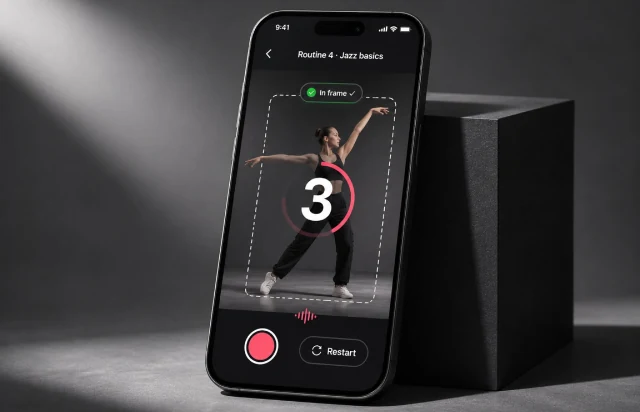
- The student records on a mobile device. A framing check confirms one person, full body in view, before the countdown starts.
- The pose model maps both videos into skeletons, and dynamic time warping matches each student's movement to the teacher's.
- Counts more than 120 ms off and joint angles more than 15° apart are marked, grouped by section, and scored.
- Up to three fixes appear with side-by-side replays, written in plain words rather than joint names.
- Each attempt, score, and note lands in the teacher's dashboard, with the clips most worth a human look on top.
How We Delivered the Dance Training App
- We define the project goal together, agree on priority features, and set a realistic delivery date and budget.
- We build a ranked list of everything the product needs, starting with what matters most to the business.
- Work is broken into 2-week cycles. At the start of each, we select the next set of features to deliver.
- The team builds, tests, and integrates features throughout the sprint.
- At the end of every sprint, you see working software and give feedback that shapes the next cycle.
- Each sprint produces a shippable piece of the product. We review what worked, adjust, and move forward.
Development Process Flow
Machine learning products rarely survive a big-bang release. A threshold that looks right on annotated clips can annoy real dancers, so teachers reviewed live output 16 times before launch, and four of those reviews moved the timing and posture limits.
UI/UX Design That Helps Students Learn Dance at Home
Students record in the middle of a living room, about three meters from the phone. So the recording screen has two controls, big enough to hit from a distance, and a five-second countdown with spoken counts over the music.
The results screen leads with one score and a timeline of the routine, split into sections and colored by match. Tap a weak section, and both videos play side by side at half speed, the teacher’s skeleton drawn in white over the student’s. Corrections sit under the player in plain language, with degrees and joint names hidden unless the dancer asks.
Teachers weren’t excited about one more app to check, so their dashboard is built for a five-minute pass. It lists each class, who practiced this week, the average score per routine, and the five attempts worth a closer look. Signing in as a studio admin adds class and teacher management, and nothing else changes.
— Timeline
Five Phases, Clearly Defined
Discovery & PoC
- Interviewing 9 dance teachers about how they correct students
- Testing pose models on 300 annotated clips
- Setting timing and posture limits with teachers
UX Prototyping
- Recording flow with framing check and countdown
- Side-by-side replay and section timeline
- Teacher dashboard for classes and flagged attempts
Agile Development
- React Native app for iOS and Android
- Python and TensorFlow analysis service behind a Node.js API
- Content library, roles, and progress tracking
QA & Beta Testing
- 1,200-clip regression set checked against teacher annotations
- Device testing on 14 iPhone and Android models
- Beta with 3 studios, 30 teachers, and ~650 students
Launch & Support
- Public release on the App Store and Google Play
- Weekly review of mis-flagged attempts
- New dance styles added on 2-week sprints
Results
Before
- ✕Students practiced from videos with no feedback between classes
- ✕Teachers spent ~10 minutes reviewing each clip sent by message
- ✕Feedback arrived 3 to 4 days later, often after the next class
- ✕No record of attempts, so progress lived in a teacher's memory
- ✕Timing mistakes were hard to explain without slow-motion replay
After
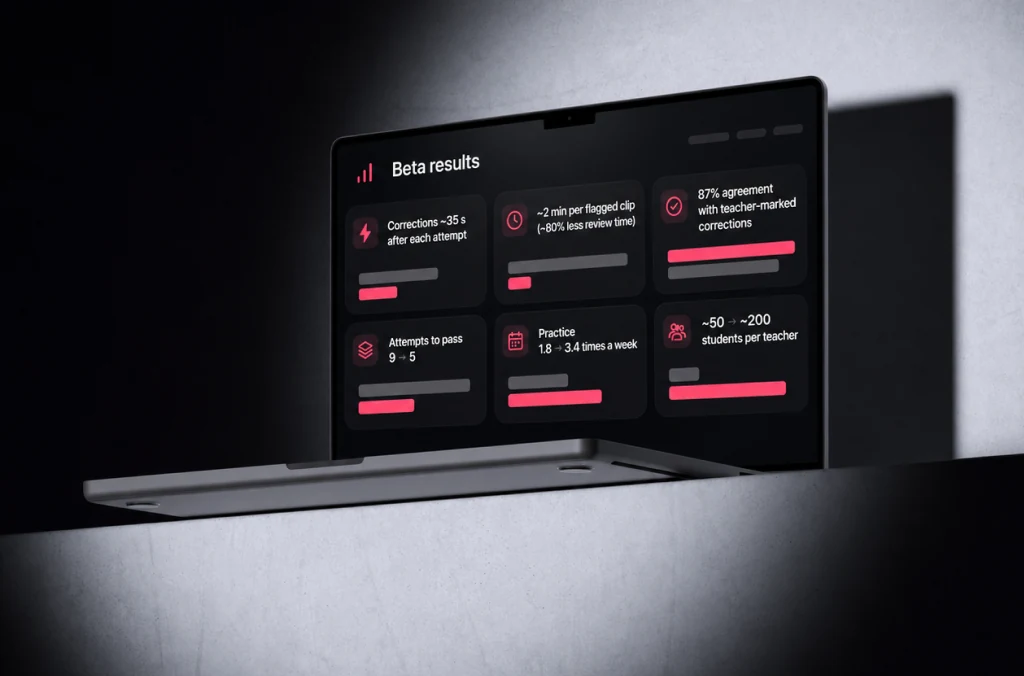
- ✔Corrections ~35 seconds after each attempt, at home
- ✔~2 minutes per flagged clip, about 80% less review time
- ✔87% agreement between system flags and teacher-marked corrections
- ✔Every attempt scored and stored, with progress per routine and section
- ✔Average attempts to reach a pass score down from 9 to 5
Impact: Faster Skill Development with Precise Guidance
— Verified Reviews
Our Reputation on Top Platforms
LITSLINK holds a 4.8 rating on Clutch and GoodFirms, with Top Developer badges on both. Clients point to our depth in AI and computer vision, clear communication, and a habit of testing ideas on real data before building around them.
Have a Learning App Project in Mind?
Planning a dance learning app, or adding movement feedback to a class platform you already run? We cover online dance class app development from MVP to a full mobile app release. Tell us about your users and content, and a LITSLINK specialist gets back to you within 48 hours.
Thank you for your message. It has been sent.