








Our own website revamp went through several rework cycles this year: test rounds that failed, forms that broke after a release, a stretch of bad UX we shipped and had to unship, and security fixes we chose to make properly rather than patch, each of which sent something back to zero.
Once you’ve paid that bill yourself, one question stops being abstract: what are Zoom, Atlassian, Microsoft, and the rest paying for their rollouts, and are frequent updates a return or a drain? This study is our attempt to answer that with filings, peer-reviewed research, and two of the most expensive releases in history, and to say where the line sits between a critical upgrade and a rebuild for its own sake.
The study at a glance
An observational study of public data on twelve products, from Zoom Workplace to Figma, with Sonos and CrowdStrike as failure cases.
- 12 products
- 5 tiers of sources
- 10 sections
- 42 min read
- $5.4B lost by the Fortune 500 to CrowdStrike’s broken July 2024 update. Sonos’s unpopular rewrite cost $20–30M and a CEO.
- $115.8B a year spent on R&D by the nine vendors in this study. None of it is labeled UI.
- 42% of a developer’s week goes to maintenance and bad code, and 80% of shipped features are rarely or never used.
- €284K for the same 30 minutes of relearning per 10,000 staff in Luxembourg, against €60K in Bulgaria.
- 3 of 3 of the most-quoted cost of bad UX statistics trace to a self-citing blog or to no source at all.
- 1,500–2,000 products in the category today, up from about 30 in 1980 and roughly doubled since 2020.
Section 1 of 10
Everyone quotes a number for what bad UX costs, and the number is made up
Three of the most-quoted statistics trace to a self-citing blog or to no source at all.
When you enter “cost of bad UX” onto Google in September 2026 the AI Overview provides you with a concise paragraph stating that poor design causes organisations to spend 8% to 15% of their total operating expenses, that clean interface updates lead to a reduction in IT support tickets by 20% to 40% within three months, and that each dollar invested in UX yields a return of one hundred dollars.
For most of a week I was searching for those three figures; that is as far as the trail goes.
The 8–15% figure comes from a blog article published by Nexoris Technologies in September 2026, in which that range is stated as applying to “enterprise UX audits carried out by Nexoris Technologies”. Here the source is referring to itself. The assertion regarding a 20–40% reduction in tickets is also on the same page and is linked to a company called Atico³, even though no supporting study can be located anywhere.
The “$1 returns $100” statement is generally attributed to Forrester; it has been circulating for over ten years and I have not been able to locate a Forrester document that includes it. What Forrester has published and allows you to read is a commissioned Total Economic Impact study for UserTesting which presents a composite of six companies, delivering a three-year ROI of 415%, a net present value of $7.6 million, and a 7.2% increase in conversion rates as a result of usability improvements. This is commissioned research, sponsored by the vendor and based on a composite company. However, it does have a method section, which places it in a higher category than the figure it is usually mistaken with.
This doesn’t imply that the cost of poor UX is zero or that the UX statistics that are commonly available are all without value. Rather, it shows that the industry has been basing its arguments on folklore. This folklore also claims that 60 to 80 per cent of the lifetime cost of a software product is attributable to maintenance. While that figure is valid, it comes from lifecycle studies carried out from the 1970s to the 1990s, and none of the companies mentioned in this article provide anything resembling that information nowadays.
The puzzle this study starts from is simple and applies to every software update you’ll ship this year. Software is a $1.44 trillion annual market; it changes constantly, and nobody has a defensible estimate of the changing costs. Vendors know what they spend. Users know what they lose. The two ledgers never meet.
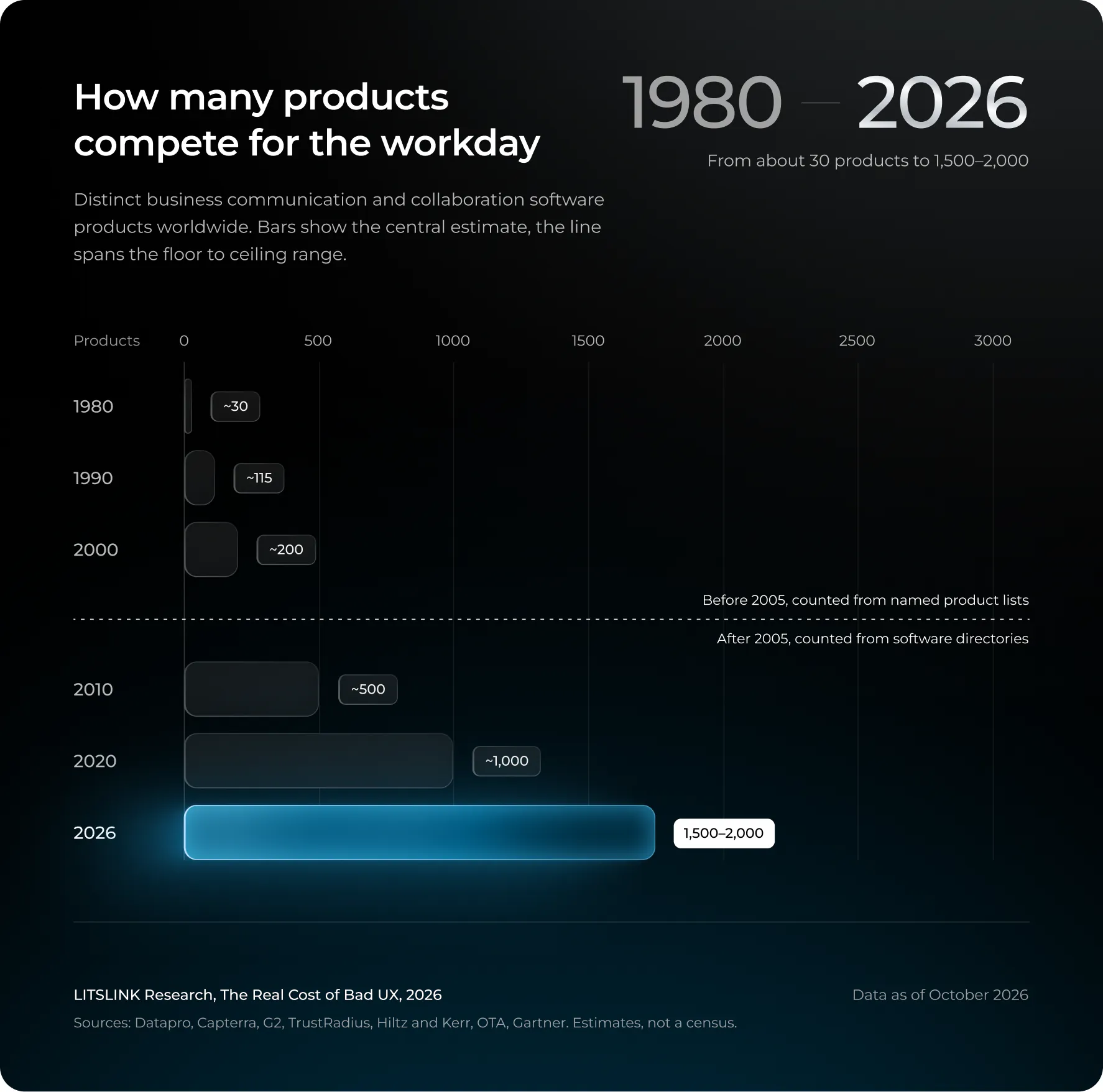
We began monitoring the number of commercial communication and collaboration software products every six years from 1980. In that year there were approximately 30 of these products, most of them being timesharing mail services. The number had risen to about 115 by 1990, a result of the Datapro survey which identified 34 LAN email packages from 23 vendors.
By the year 2000 the total was about 200, increased to 500 by 2010 and rose to 1,000 by the end of 2020, according to the archived G2 and Capterra category pages. The same sources indicate that on October 8, 2026 the number of products was between 1,500 and 2,000.
It is necessary to note two significant points before referring to the chart. On the one hand, each data point represents a range not a precise figure, the minimum being based on a verifiable list of named products, while the midpoint and the maximum are estimates.
From 2000 to 2010 our method shifted from looking at product lists to looking at software directories, as a result of which the range was reduced. Moreover, the number of products in this category increased almost double from 2020 to 2026. Updates are regularly provided for each product, and as the Okta 2025 Businesses at Work report points out, the average company now uses 101 applications. Hence, the baseline is not a dozen products but several thousand, all of which are changing independently.
Four ledgers that should never become one headline
A distinction should come before any number; when people say “this update cost us”, they generally have in mind one of four different things, and the errors in this area arise from combining these.
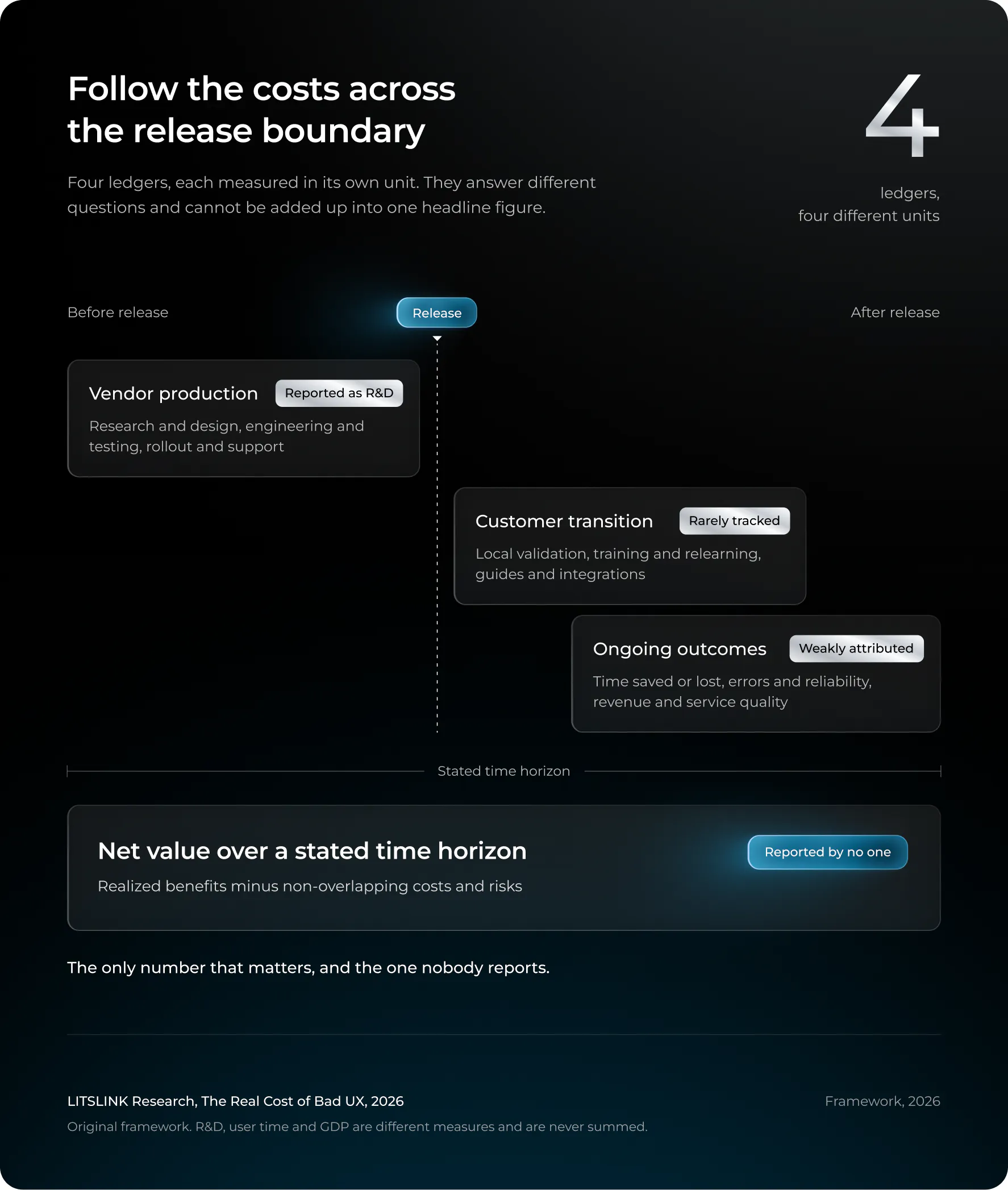
Vendor investment covers research, engineering, design, testing, and the rollout. It is shown in the 10-K under R&D. The fact that it is listed in that category does not imply that the funds were wasted or that they were all used for updates.
Customer transition cost is what an organization pays to absorb a change: IT validation, rewriting the internal guides, retraining, and the relearning that every employee has to go through when a button is moved. Very little of this is monitored.
Friction and failure loss is the ongoing drag: extra task time, errors, support tickets, and rare catastrophic outages. This item has the highest figures but provides the least amount of attribution.
Net effect is benefits minus all above costs over a stated horizon. It is the only number that matters and the one nobody reports.
A security patch doesn’t alter the visible interface. A SaaS provider is able to change your navigation without you having to install anything. A complete rewrite of the app carries out all these changes at once. When you divide a company’s R&D by its number of releases, the result is an “cost per update” that is arithmetic, not evidence.
Section 2 of 10
Method: what was counted, what was excluded, and why
Twelve products, five tiers of sources, evidence verified through September 25, 2026.
It is an observational study based on public data, the sample consisting of twelve products: Zoom Workplace, Atlassian Jira and Confluence, Microsoft Teams, Google Workspace, Slack (Salesforce), Adobe Acrobat, Figma, Canva, Dropbox, and ServiceNow, together with Sonos and CrowdStrike as examples of failures. The evidence was verified up to 25 September 2026.
Sources rank in this order, and the article says which tier a number comes from:
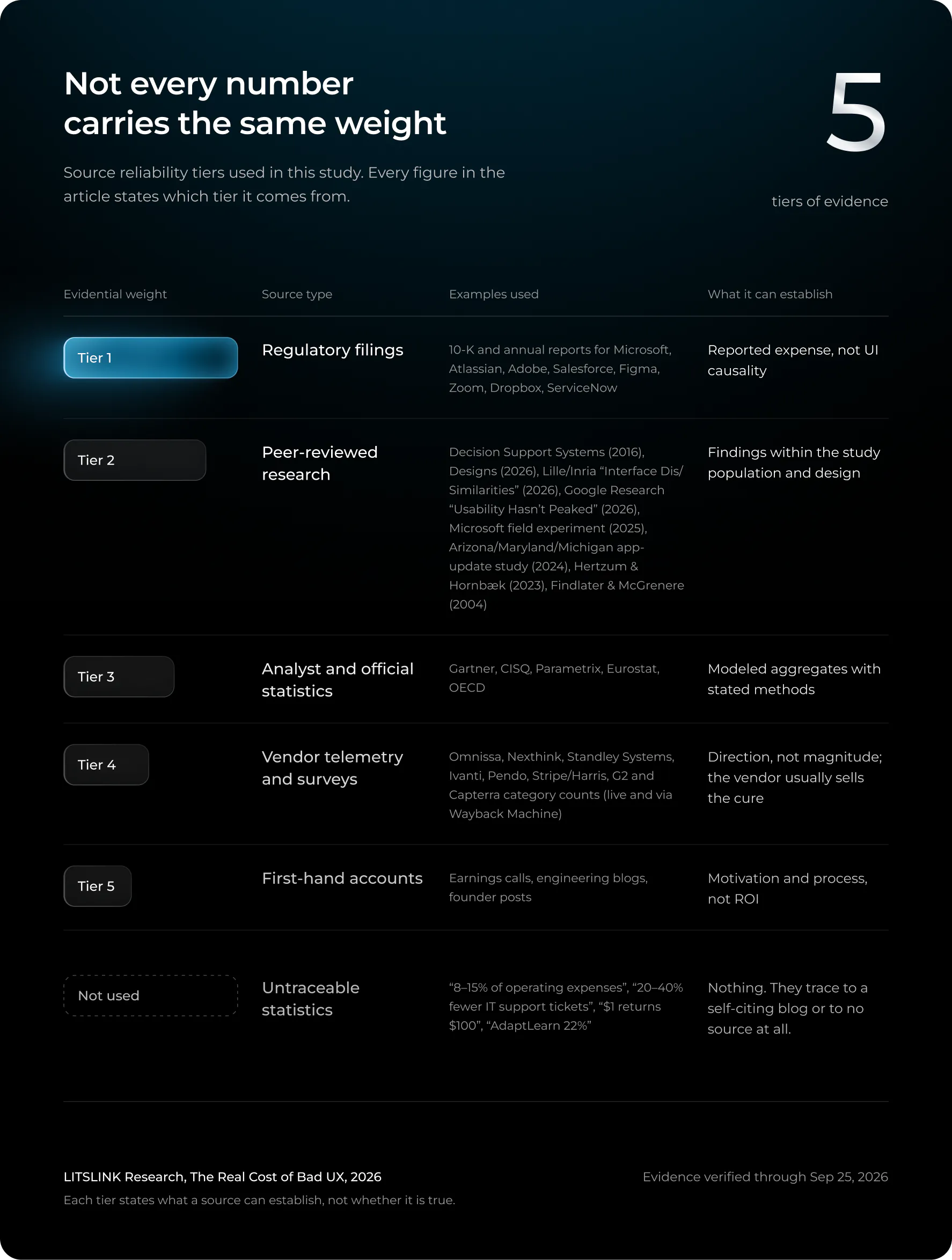
Excluded are all the statistics that cannot be traced back to a marketing page, such as those in Section 1, the ‘AdaptLearn 22%’ claim that goes along with them, and the ‘annual cost of usability waste’ formula which appears in the AI Overviews without an author. I am not attempting to prove that any of these claims are false, and I don’t need to do so; I simply won’t construct an argument based on a figure that has the marketing page as its only source.
Another rule is that the fiscal years are different (Zoom’s ends in January, Atlassian’s in June, and Adobe’s in November), so when comparing R&D the most recent full year of each company is used rather than annualising the partial 2026 results.
The number of products in Section 1 is dealt with in a separate note in the Methods; the 2020 figures are obtained from snapshots of the same directory pages used in 2026.
Section 3 of 10
Vendors spend $115.8 billion a year changing software, and none of it is labeled “UI”
Filings show the scale of the machine, not the cost of a redesign.
Begin by looking at the information companies actually provide regarding their spending on software updates. Of the twelve companies, nine report their R&D expenses in their regulatory filings. The tenth company, Canva, is a private company and therefore publishes no similar figure; Google Workspace and Slack are part of Alphabet and Salesforce respectively and so cannot be separated out.
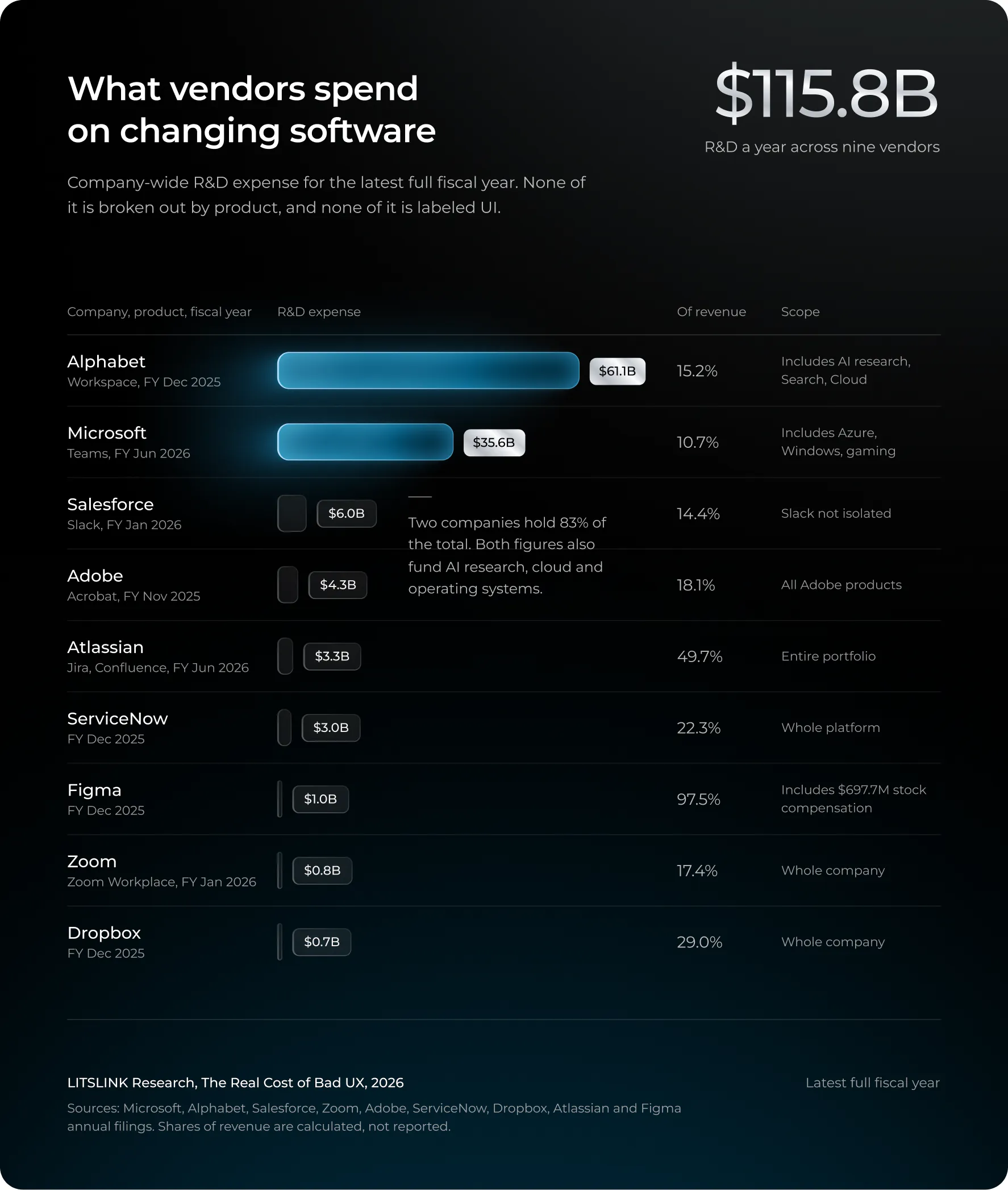
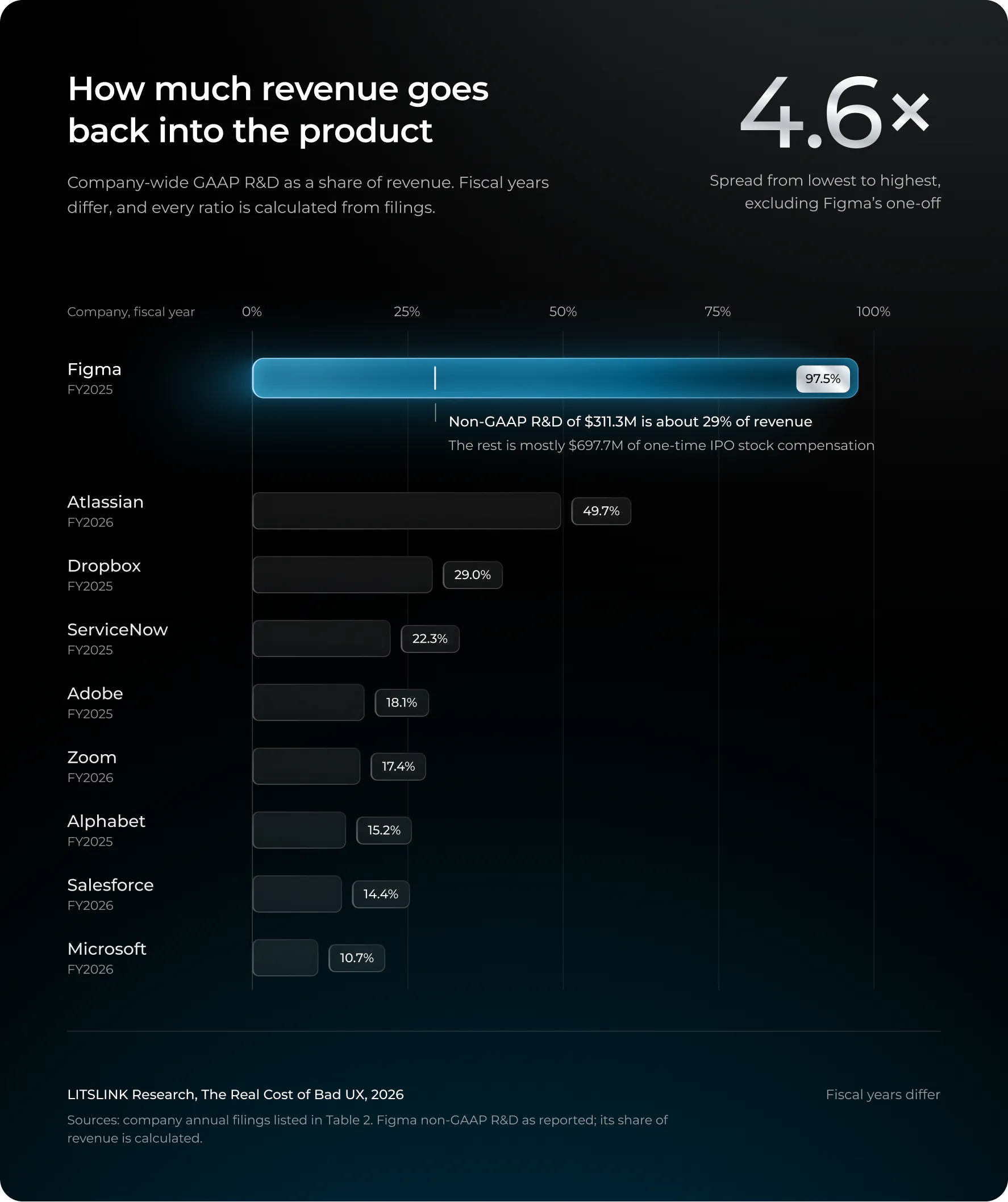
The total comes to about $115.8 billion, and this figure is of some use in that it illustrates the scale of the machine used to produce software updates. It does not represent the cost of the updates. To say that Figma ‘spent a billion dollars redesigning its interface’ is to confuse an accounting entry with a project budget. In its FY2025 R&D budget, $697.7 million was allocated to stock-based compensation linked to its IPO; once that amount is deducted, the figure is reduced to one third of the original headline amount.
This brings up the obvious question: if these companies either can’t or won’t state the cost of a redesign, then can anyone?
What effort looks like when nobody discloses hours
The only thing we have that resembles a project budget is the process; companies explain how they operate and these explanations reveal things.
The Chrome extension used to launch Atlassian’s 2025 navigation overhaul was first given to 160 users so that the team could observe them in action within a live prototype. After that, the change was rolled out internally to Atlassian’s own staff in mid-2024, and then an early-access programme was introduced in October 2024 involving 100 customer sites (more than 30,000 monthly active users) and 30 developer sites, with an opt-out rate of 2.7%. The open beta that came next attracted more than 1,500 sites and 485,000 monthly active users within two months, with an opt-out rate of 2.6%, before the phased rollout started on March 17, 2025. The company referred to the objective as “one navigation, one codebase”, and in its announcement it acknowledged that the one-size-fits-all navigation from 2018 “didn’t always work” across its products since the products had since evolved independently and required small navigation fixes to be applied simultaneously in several codebases. The point I would highlight is: “Consistency doesn’t mean that everything has to be identical.” Thus, we have a first-hand account of the two costs of an inconsistent UI – users having to search for the same action in different places and engineers having to implement the same change in different repositories – from the people who experienced both. What is missing, however, is a dollar figure, and I asked.
The third redesign of the Figma interface, UI3, which was announced at Config in June 2024, took the company over two years to develop, was released with a temporary option to opt out, and saw some of its decisions reversed after launch, such as those concerning floating panels. Marcin Wichary, Figma’s design director, stated that “craft and flow don’t have easy metrics.” That is true, and also convenient. Section 5 returns to the point of what Figma actually measured, since it turns out to be the best public example of a UI change having a negative effect on users and then being corrected before it was made generally available.
Craft and flow don’t have easy metrics.
Adobe’s revamped Acrobat tells the same story from the outset. In a document designed to explain the changes, the company states that users had difficulty locating the tools and experienced a different interface on each device, which is why the team has regrouped more than 250 tools around the actions that people actually carry out, while at the same time attempting to ensure that the familiar functions remain recognizable in the redesign. The figure of 250 tools is typical of a large-scale project. Adobe does not publish a before-and-after comparison of task times, and no one else on this list does either.
Zoom is the exception in this regard since it provides an ROI model rather than a story about a redesign. The financial-impact analysis for Zoom Workplace is based on five customers and a composite organization made up of 3,170 employees. This represents a model of the value of adopting the platform, not the cost of changing its interface. For our purposes, Zoom’s own migration guide for the new web interface is more useful in that it allows administrators to switch between versions temporarily as users get used to them and it points out that some branding settings have to be reconfigured. These are tangible administrative tasks, and they come at no cost.
The August 2023 redesign by Slack is the most open-minded of all the ones carried out. Two of its product managers, Miguel Fernandez and Jaime DeLanghe, referred to the redesigns in their retrospectives as “high effort, high variance, questionable benefit”. Yet they proceeded with them since an interface designed for messaging was being asked to accommodate a much larger product. I would regard that description as representing the honest view of the industry: a major redesign can be justified even if the benefits are not apparent before the launch.
High effort, high variance, questionable benefit.
The only instance in which a vendor has provided a performance figure in relation to a change is with Microsoft’s 2023 Teams rebuild: according to testing carried out by GigaOm for Microsoft, it is up to twice as fast and uses 50% less memory. This refers to waiting time, not to employees’ output. No one has ever been twice as productive as a result of Teams loading more quickly, although I would like to meet the person who makes that claim.
A simple production model indicates the order of magnitude without having to consider Atlassian’s payroll: six people working half-time for 16 weeks amounts to 48 person-weeks, or 1,920 hours; it does not include any management, customer transition, or support work. Since the elapsed time says nothing about the number of staff, the “two years” associated with UI3 is just a calendar fact and not a cost.
Forty-two percent of a developer’s week goes to maintenance, and 80% of what ships goes unused
This area is still based on two older datasets since no dataset of that scale has replaced them.
In 2018, Stripe and Harris Poll conducted a survey of more than 1,000 developers and 1,000 C-level executives in the United States, the United Kingdom, France, Germany, and Singapore. The developers said that they worked 41.1 hours each week, 17.3 of which were spent on maintenance—13.5 hours on technical debt and 3.8 hours on bad code—and Stripe estimated the global opportunity cost at about $85 billion solely due to bad code and approximately $300 billion in lost GDP as a result of developer inefficiency. French developers had the highest maintenance burden at 20.9 hours.
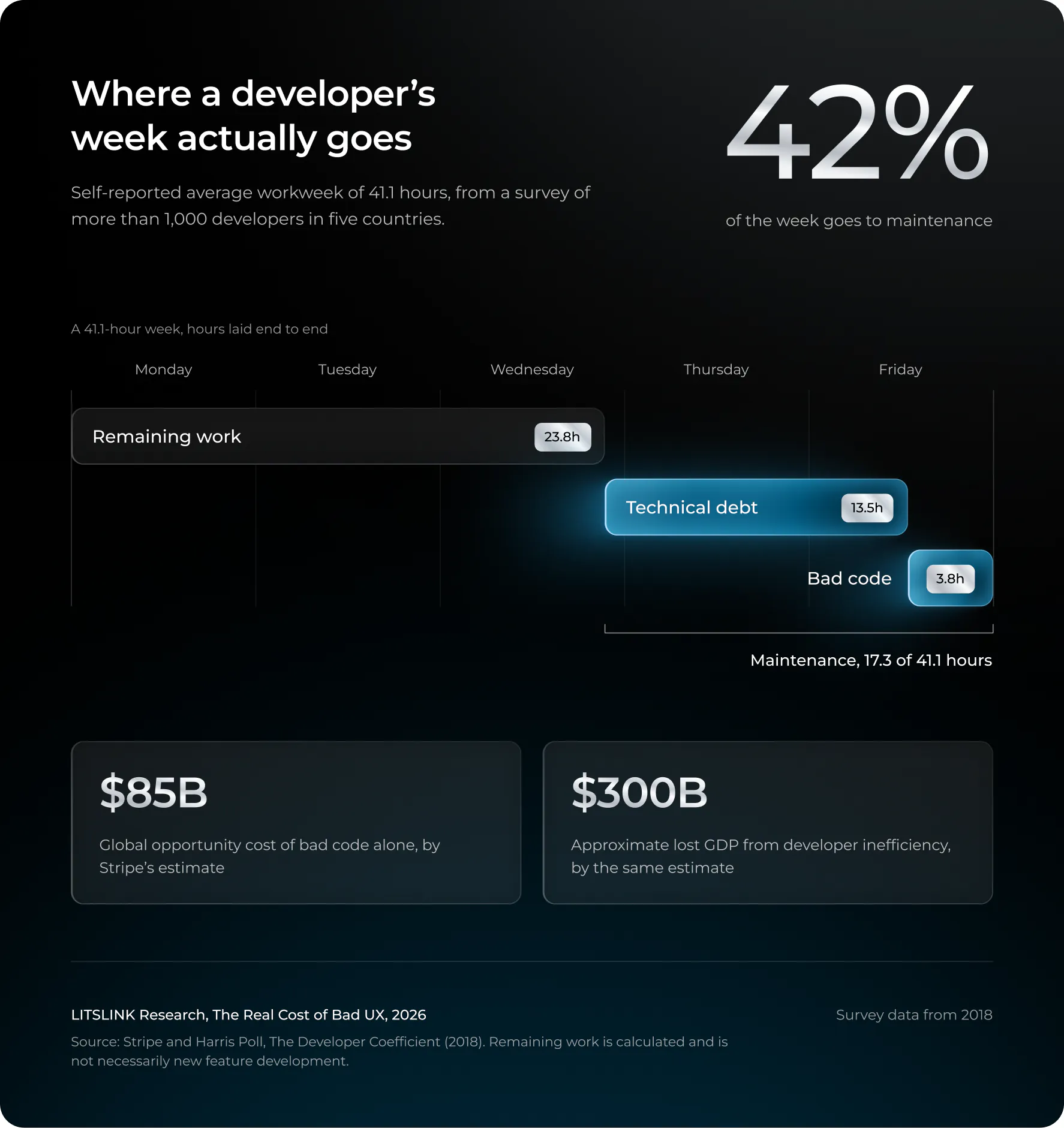
The analysis carried out by Pendo in its 2019 Feature Adoption Report looked at 615 SaaS subscriptions and discovered that 80% of features were either rarely or never used, whereas 12% of the features accounted for 80% of all daily usage. The company estimated that public cloud firms had spent $29.5 billion that year on developing the features which were never used. However, that report is based on data from vendors and is seven years old. In addition, it is the only one of its type that has ever been published, a fact which indicates how much the industry wants to know the answer.
If you combine the two factors, you have a clear picture of the problem. A large amount of engineering time is spent on ensuring that the existing software continues to function, and a great deal of the output from the rest of the team goes unutilised. Each update has to draw on that budget. The obvious redesign is the part you can point to, whereas the bill is the growing design debt beneath the surface, which makes each subsequent change more expensive, and no vendor has ever charged for it.
Not sure what your last three releases actually cost the people using them? We run pre-release UX baselines so the next one comes with numbers.
Book a UX cost audit →
Section 4 of 10
The costliest updates aren’t the ugly ones. They’re the ones that break
Broken updates cost two to three orders of magnitude more than unpopular ones.
The result which caused the study to be restructured midway was not the one I had anticipated. Among all the cases having a credible dollar amount attached to them, it is the more expensive ones that are due to a defective update, and the gap in question is not two or ten times as large; it’s two to three orders of magnitude.
CrowdStrike, July 19, 2024: $5.4 billion from one content file
On a Friday at 04:09 UTC, CrowdStrike sent out a standard content configuration update to its Falcon sensor on Windows. The file was incorrectly formatted. Microsoft later calculated that 8.5 million Windows devices ended up in a boot loop. Airlines grounded their fleets, hospitals canceled operations, and 911 dispatch systems in several U.S. states stopped working.
Parametrix, an insurer specializing in cloud-outage risks, estimated the direct financial impact on the US Fortune 500. According to its analysis, the total direct loss amounted to $5.4 billion, excluding Microsoft, among 125 companies, which represents a quarter of the index. The weighted average loss per company was $44 million, with the figure in the manufacturing sector being $6 million and $143 million for airlines.
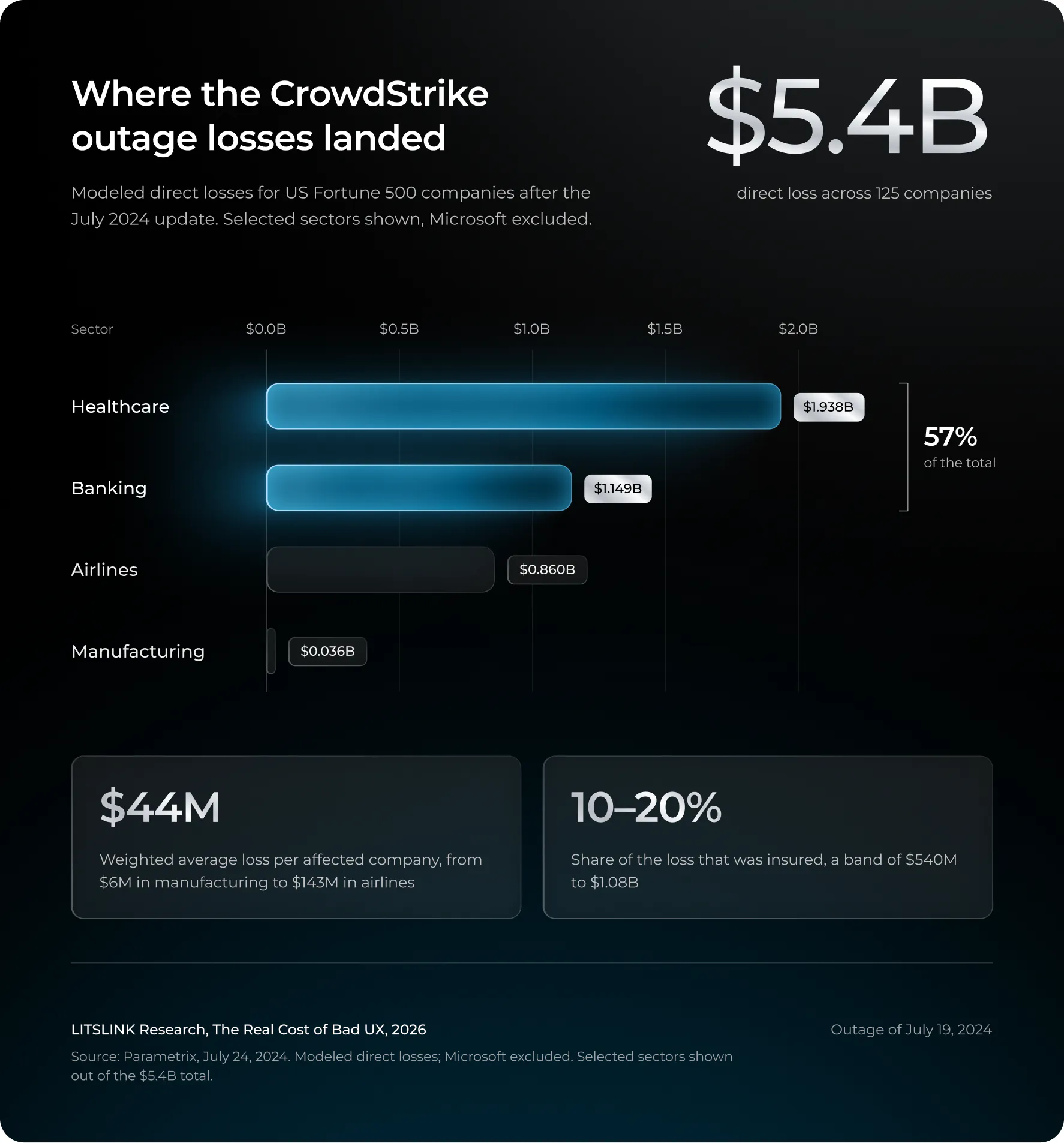
Only 10–20% of that loss was insured, a $540 million to $1.08 billion band. Guy Carpenter and CyberCube produced their own insured-loss estimates ($300 million to $1 billion, and $400 million to $1.5 billion). CrowdStrike’s stock fell 32% over the next eleven trading days, erasing about $25 billion in market value.
The aspect that I continually return to is the maths of exposure. The Parametrix model includes 500 companies in one country only. The update was installed on 8.5 million machines around the world. No one has produced a global figure, and I should be doubtful of anyone who had, since the necessary data (the exposure per company, the recovery time, and the overlap between a supplier’s loss and its customers’) are not present in any dataset.
Delta’s $500 million, decomposed
Delta Air Lines is the one company that itemized its cost of downtime. CEO Ed Bastian told CNBC the outage cost the airline about $500 million; the company canceled more than 7,000 flights and sued CrowdStrike. Delta’s filings break the figure into a $380 million revenue hit, $170 million in additional non-fuel expense, offset by $50 million in lower fuel costs from planes that never flew.
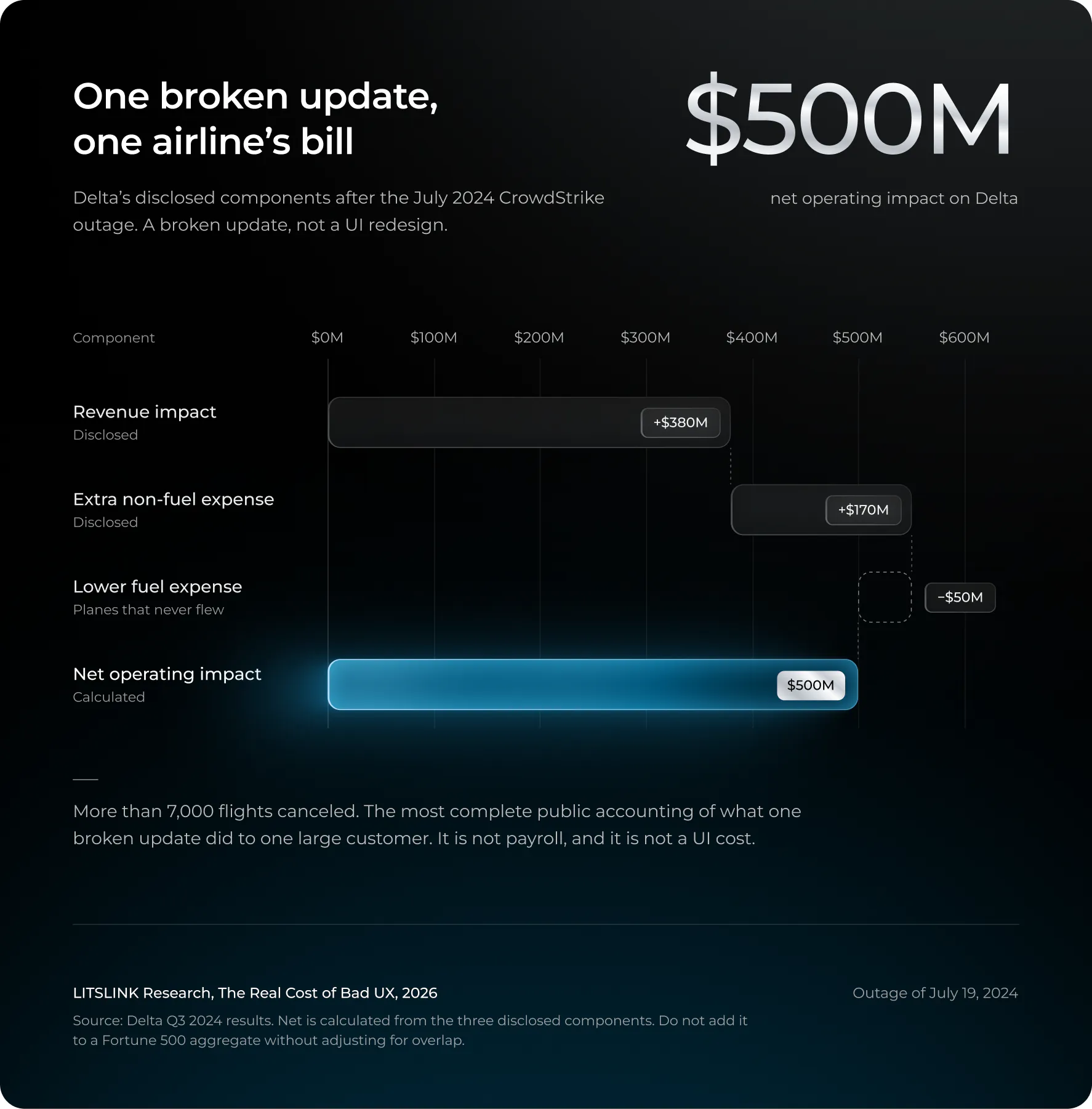
Let me be careful with that $500 million, because people won’t be. It isn’t payroll, and it certainly isn’t a UI cost. What it is, and the reason I’m spending a paragraph on it, is the most complete public accounting anyone has produced of what one broken software update does to one large customer.
Sonos, May 2024: the redesign that removed features
CrowdStrike is the boundary case. Sonos is the one that actually belongs in an article about UI/UX changes, because it was a deliberate redesign, not a corrupted file.
On May 7, 2024 Sonos released an updated version of its mobile app, which had the advantage of loading more quickly but did not include some features like sleep timers, the ability to edit alarms, local library playback, and a number of accessibility options. Older types of devices started to stop responding, and the company’s own forums were full of customers who had spent $2,000 on speakers and were now unable to queue a song.
For the next six months CEO Patrick Spence offered public apologies. When giving his Q3 FY2024 earnings update in August he said that the redesign “was and is the right thing to do” and then added that “our execution – my execution – did not meet the standard”. In that same week Sonos got rid of about 100 employees, which was approximately 6% of the company, postponed two hardware launches, and lowered its full-year revenue guidance from $1.6 to $1.7 billion to $1.503 to $1.523 billion. CFO Saori Casey stated that the cost of recovering the app was between $20 and $30 million and noted that this figure had not been included in the guidance. Revenue for fiscal year 2024 ultimately fell by 8%.
Nearly 20 corrective updates had been shipped by the company by the time the January 2025 10-Q was filed. The board decided to give up its bonuses until both app quality and customer trust had been restored and also appointed a ‘quality ombudsperson’. On January 13, 2025, Spence resigned and Tom Conrad, who is a board member, became interim CEO with the aim of ‘restoring the reliability and user experience that have defined Sonos’.
One should be careful as to what is meant by the figure of $20 to $30 million since that amount refers only to the budget assigned for the recovery program and not to the original budget for the redesign, and it fails to separate the interface problems from the reliability issues which were part of the original release. This situation should be used to show the cost of launching a poor new user experience. Instead of saying that a redesign is by its nature wasteful, Sonos’s mistake was not altering the app but rather making changes to both the app, the backend, and the feature set in one release with a test group that did not include the people most likely to cause problems.
Why one case is a UX lesson and the other is a quality lesson
According to a root cause analysis carried out by CrowdStrike, a content validator had accepted a file which it should have refused; in response, the company added further review stages and introduced staged rollouts. Nothing in that account has anything to do with a designer.
A designer took part in all aspects of Sonos’s story and the cost was still less than one per cent of that of CrowdStrike’s.
That asymmetry is the first real finding. When you budget for the risk of an update, the risk is dominated by breakage, not backlash. The redesign backlash is loud, it is real, and it is cheap compared with a boot loop.
When you budget for the risk of an update, the risk is dominated by breakage, not backlash.
Section 5 of 10
Redesigns that only annoyed people rarely show up in the P&L, and that’s the problem
The cost lands on customers, and customers do not publish 10-Ks.
If broken updates are the expensive ones, why do unpopular redesigns get so much attention? Partly because they are visible. Partly because the cost lands on customers rather than the vendor, and customers do not publish 10-Ks.
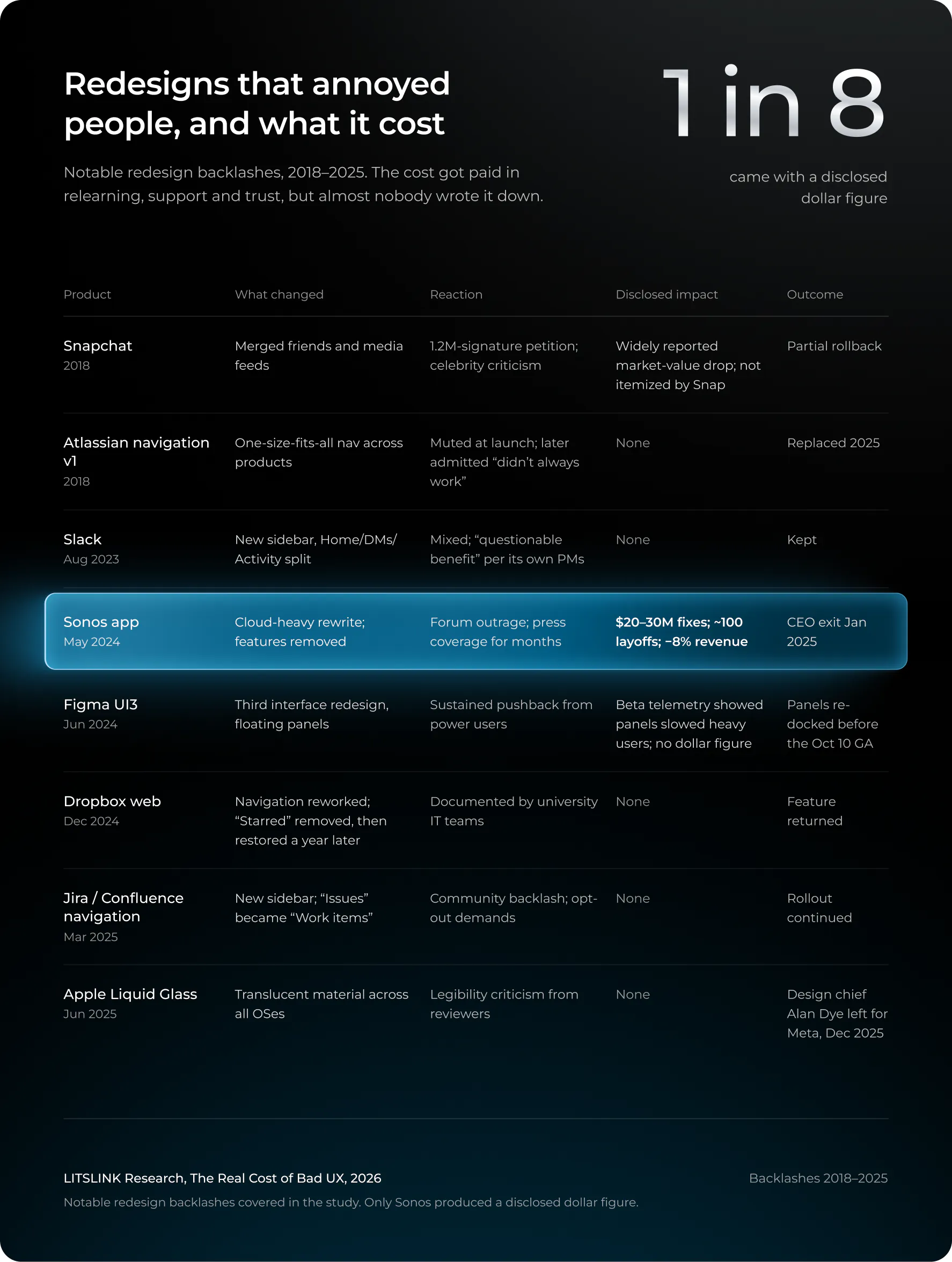
Look at the “Disclosed impact” column. Seven of eight rows say none, which for a list of the most famous bad UX moments of the decade is a strange thing to be true. Seven redesigns were not free. The cost got paid, in relearning time across tens of millions of users, in support tickets that customers’ IT teams absorbed, in trust, and none of that appears in the vendor’s accounts, because the vendor didn’t pay it.
Change aversion is real, temporary, and routinely used as an excuse
Google’s UX research team gave the pattern a name years ago: change aversion, the negative reaction users have to a redesign that fades as they relearn. The framing is useful because it is true. Most complaints about a moved button stop within weeks. It is also dangerous because it lets a product team wave away every complaint as temporary.
Atlassian made this point clear: following the criticism that had been directed at the 2025 navigation, the company published a post titled “We’re continuing with the new navigation rollout — here’s why”, citing the low opt-out rates seen during the early access period as evidence that only a small number of people had strong objections. Yet users contended that opt-out rates indicate the difficulty of using the opt-out button, not users’ actual feelings regarding the product. There was merit on both sides.
The method that I employ is simpler than the ones put forward by either side; it can be stated that change aversion exists when users are able to carry out all the things that they used to be able to do yet are still annoyed by the new arrangement, whereas it is wrong to regard change aversion as applying when users can no longer do something that they had previously been able to. Sonos customers could not set a sleep timer and therefore filed defect reports, but the company treated these as cases of change aversion for approximately five months before appointing a new CEO.
Figma measured the slowdown, and reversed it before general release
Figma’s own account of UI3 is the closest thing in this study to a controlled test of a UI change on working professionals, because Figma’s users are working professionals who bill by the hour.
The main concept was the floating panels. Once the open beta of UI3 had begun, the adoption figures, the performance data, and the feedback all showed that while the panels appealed to some users they caused problems for people who use the tool for long periods each day. They cramped the canvas on smaller screens, pushed the rulers away and caused designs to peek out from behind. KC Oh, the product manager, said, “Speed is a feature. The real turning point was realizing that they slowed people down.” Therefore, the panels were changed back to fixed for the release on October 10, 2024, with the option to resize as a compromise. As for a smaller example, during the beta clip content was a dropdown which required one extra click every time it was used and so it was changed back to a checkbox.
Speed is a feature. The real turning point was realizing that they slowed people down.
Figma does not publish the percentage drop in speed or the related costs. Rather, the company presents its decision regarding change management as one involving a cost: beta users could choose to revert to the old interface, which allowed them to say, ‘Should you be given UI3 on a Wednesday but have a deadline on Friday, you can always go back to the previous version and complete your work.’ The engineering cost of running both interfaces at the same time for months was a cost that the company decided to bear rather than place on users’ deadlines. Most vendors do not make such a decision or reveal it.
Users vote on updates with their install button
Information about how people respond to updates on a large scale is obtained through the use of mobile devices. A study from 2024, titled “Adoption of Recurrent Innovations“, was conducted by researchers from the University of Arizona, Maryland, and Michigan and involved the observation of millions of users as they adopted new versions of thousands of mobile applications. Three groups were identified: those who updated all at once, those who kept on using the old version, and those who updated and then rolled back. The rollback in this group was unintentional. Although the study keeps records of version installations, it cannot tell whether the rollback was due to the new interface or because of a crash; yet it shows that rolling back does occur regularly and not merely by accident. It therefore follows that any transition model which supposes that all people update on day one is wrong.
The update-frequency paradox has been peer-reviewed for a decade
There is indeed a controlled experiment concerning this matter, and it contradicts the general belief that users dislike updates.
Fleischmann, Amirpur, Grupp, Benlian and Hess published an article called “The role of software updates in information systems continuance” in the journal Decision Support Systems in 2016. In a laboratory study they changed the frequency and nature of the updates and then examined the users’ intention to continue using the software. They found that feature updates led to an increase in continuance intention. It was better to provide frequent, small feature updates than to make bundled releases. The reason for this was positive disconfirmation: users had expected less and ended up getting more, which in turn increased their perception of the usefulness and satisfaction of the software.
The issue lies with the second point: technical updates which introduced no new visible features brought about no benefit. The purpose of a security patch is to keep you safe and nobody falls in love as a result of such a patch. It is essential to grasp the nature of the result in question: it is based on intentions observed in a laboratory environment, not on actual revenue in the real world, and it was carried out in 2016 for software which has since been redesigned at least twice. Nevertheless, it is still the best evidence we have on the subject, and what it demonstrates is that the issue was not that updates were being issued too often. The real problem is that the updates are carried out in such a way that people do not see the point of them.
If one examines Slack’s method of carrying out a ‘high effort, high variance’ rollout and Atlassian’s approach of conducting a staged rollout, a clear pattern appears. The industry is gradually replacing the big-bang redesign with continuous, reversible and visible software updates. The next question that this article looks at is what this change means in terms of the cost to the people who receive the updates.
Section 6 of 10
What users actually lose: minutes, errors, and a recovery period nobody tracks
The customer ledger is only partly open. Here is what it shows, in order of reliability.
The vendor ledger is closed to us; the customer ledger—where poor UX actually ends up—is only partly open, thanks to a combination of academic studies, telemetry data from end points, and surveys carried out by companies which offer remediation. The following points are presented in order of their reliability.
Digital friction eats 11–20% of an hour
Morten Hertzum and Kasper Hornbæk ran a diary study with 234 crowdsourced participants in 2023, asking them to log frustrating episodes during one hour of ordinary computer use. Participants lost an average of 11–20% of the hour to frustration: slow responses, crashes, unexpected behavior, and things that had moved. Peer-reviewed, and about general computer friction rather than updates specifically. Please don’t multiply it by world GDP. People do, and then it ends up in a keynote.
The vendor telemetry all points the same direction
- The Omnissa State of Digital Workspace 2026, which is based on anonymized telemetry data collected from millions of devices in 17 different industries, shows that Windows fleets experience 3.1 times more forced shutdowns, 2.2 times more application crashes, and 7.5 times more application hangs than macOS fleets. Businesses consider Macs to be six-year assets while treating Windows PCs as three-year assets. The report’s frequently cited figure of 23 minutes and 15 seconds for the time it takes to refocus after an interruption is taken from previous studies on interruptions and was not determined by the telemetry itself. (The syndicated article in Yahoo and TechRadar is generally where people first come across these figures.)
- Standley Systems surveyed 500 desk workers in February 2026: 85% hit a technology slowdown every workday, 29% three or more times a day, and about half lost more than 30 minutes a week to it.
- Nexthink reported in September 2026 that sluggish virtual desktops affect about 20% of working time for VDI users, with 65% seeing slow applications.
- According to Ivanti’s 2025 Digital Employee Experience report, which drew on input from more than 3,300 respondents, technical interruptions amount to roughly $4 million per year for a company with 2,000 employees.
All four of them come from vendors who have a product to sell, so in the case of UX statistics they are of a weaker type. This does not mean that they are false; it only means that they are directional. They show that friction is daily and long-term; they are unable to show how much of it is due to updates rather than to outdated hardware, poor networks, or the eleven browser tabs which the survey respondent had forgotten to mention.
The peer-reviewed ergonomics evidence, read carefully
The only recent systematic review is worth reading in its entirety since it is being misquoted.
Vizcarra, Quiroz, and Cornejo published “The Impact of UI/UX Design on Visual Ergonomics” in Designs in January 2026. They reviewed 20 studies from 2020–2024 on industrial and professional interfaces and found that applying ergonomic principles (structured visual hierarchy, adaptive components, real-time validation feedback) was associated with 30–70% fewer operational errors and 20–60% faster task completion.
The ranges are so broad because the studies included are diverse and do not share a common baseline—for example, a control-room dashboard and a warehouse scanner are not comparable in this regard. The review should be seen as a research map and not as a causal estimate for enterprise SaaS. Moreover, the statistic that goes with it—that is, “100% of the non-ergonomic systems showed frequent user errors compared to 16.7% of the ergonomic ones”—is a classification of the studies reviewed (one in six, which is why it’s 16.7%) and not the actual probability that an individual user will make an error. The AI Overview version presents it as an error rate, but it does not.
Which changes actually force relearning
A 2026 study from the University of Lille and Inria, “Interface Dis/Similarities,” asked a question this whole field skips: when a redesign lands, what about it makes the new interface feel unfamiliar? The answer, measured through users’ perception of difference, was not color. Grouping of elements, modularity, viewing order, and whether functions were still recognizable drove perceived dissimilarity most; the color scheme mattered less. The study measures perception, not hours or dollars, so don’t read it as a cost estimate. Read it as a map of where the relearning tax is levied. A palette refresh is cheap for users. Regrouping 250 tools, as Adobe did, is where the bill comes from.
There is also a direct study concerning an enterprise upgrade carried out by the University of Johannesburg in 2025, titled ‘The Impact of ERP Upgrades on Employee Productivity’. This study surveyed the staff of a single university as a result of an Oracle ERP upgrade: 60% of the respondents said that they had difficulty in submitting their work reports on time, 73.3% were dissatisfied with the way the upgrade had affected their productivity, and 53.3% stated that they had experienced serious inconvenience due to disruption of their workflow. The authors identify training and implementation time as the key factors. One institution provided this information on its own initiative, and the percentages refer to the respondents, not to a measured decline in productivity of 73%. Yet it is the type of data that this article had been hoping for: a genuine upgrade, real employees, and the right question asked at the right moment.
Static beats adaptive, and generative UI has to answer for it
Another study, older and more clumsy in the context of the future-of-design section. In 2004, Leah Findlater and Joanna McGrenere compared menus which rearranged themselves according to usage with those which remained fixed. The static menus proved to be faster. The user-customisable menus performed well in certain situations and most of the participants preferred them. The automatically adapting menus failed on both counts.
Twenty-seven subjects, desktop menus, that was the situation two decades ago. The step towards generative interfaces in 2026 is merely an inference, not a discovered fact. However, the mechanism that was identified—that is, spatial memory—has remained the same. If an interface rearranges itself it wipes out the mental map the user has built up, and any AI which promises to generate a new layout for each session is in effect promising to deliberately do that.
The design principles which our team have adopted begin from the same premise: the user’s memory of where things are is a resource that the product does not control and should not waste.
Which of your product’s screens do users rebuild from memory every day?
If you can’t answer, a two-week usability baseline will.
Talk to our product design team →
Section 7 of 10
A defensible formula for the hidden cost of an update
Boring on purpose, because boring formulas pass audits.
As no one else does, we’re publishing our own. On purpose, we make it boring since boring formulas tend to pass audits.
Transition labor value = affected users × relearning hours per release × relevant releases per year × loaded hourly labor cost
Recurring friction value = affected users × extra minutes per working day ÷ 60 × working days × loaded hourly labor cost
Net value of a change = realized benefits − production cost − deployment cost − transition cost − recurring friction − residual expected failure cost
It remains honest because of a number of rules. Instead of counting registered accounts, count the number of active users who have been affected. The transition period should be distinguished from the period of persistent friction since the two overlap and a sluggish model would then count them twice. Moreover, when dealing with time that is valued in terms of compensation, treat it as a proxy for opportunity cost rather than as actual money; if the work is carried out later or the minutes saved never result in any output, the real financial situation is less than what the model suggests.
Ten thousand employees, five scenarios
Let us assume that there are 10,000 affected employees with a cost of $50 per hour; these are calculations and not observations regarding any of the companies in the sample.
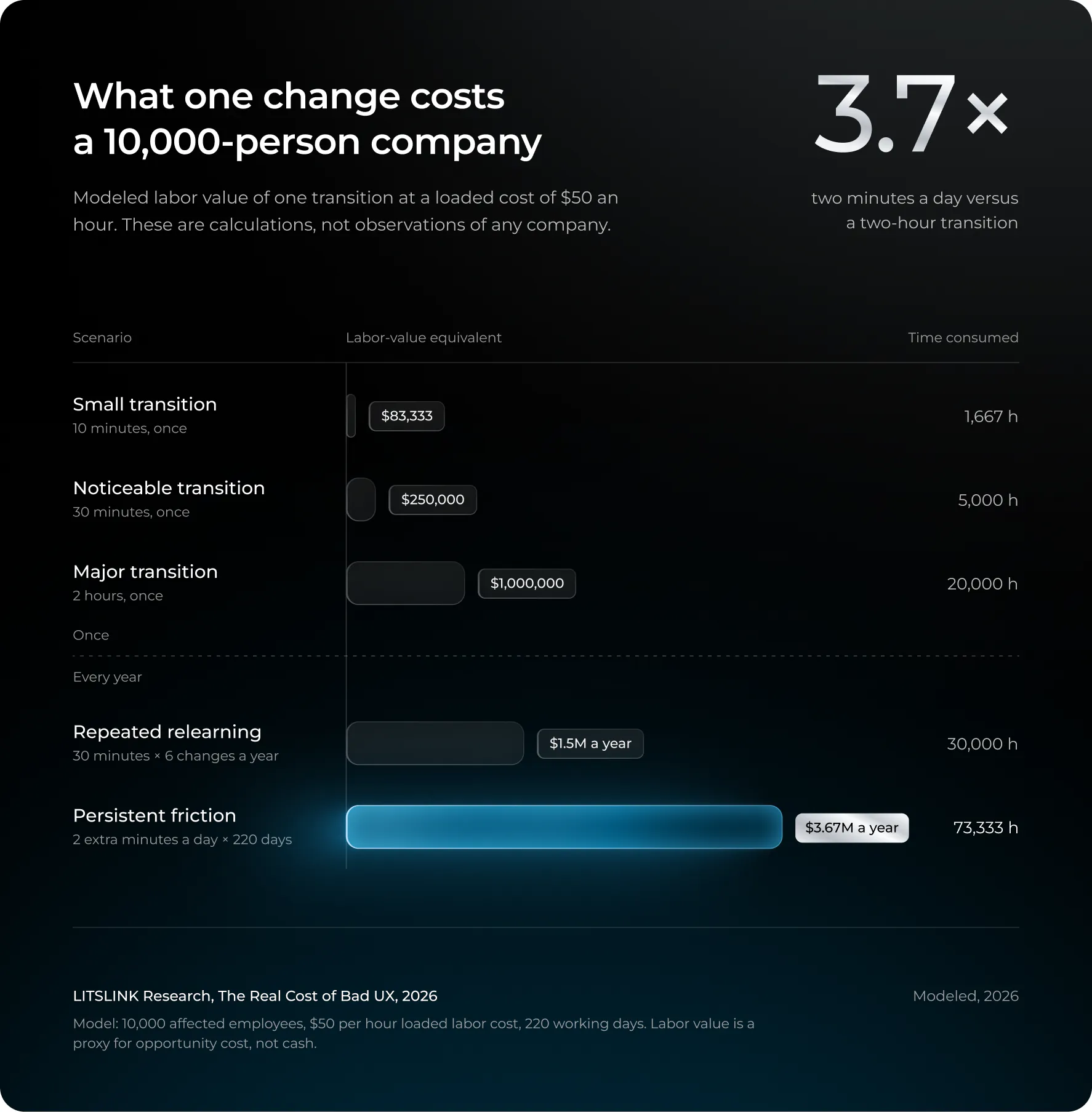
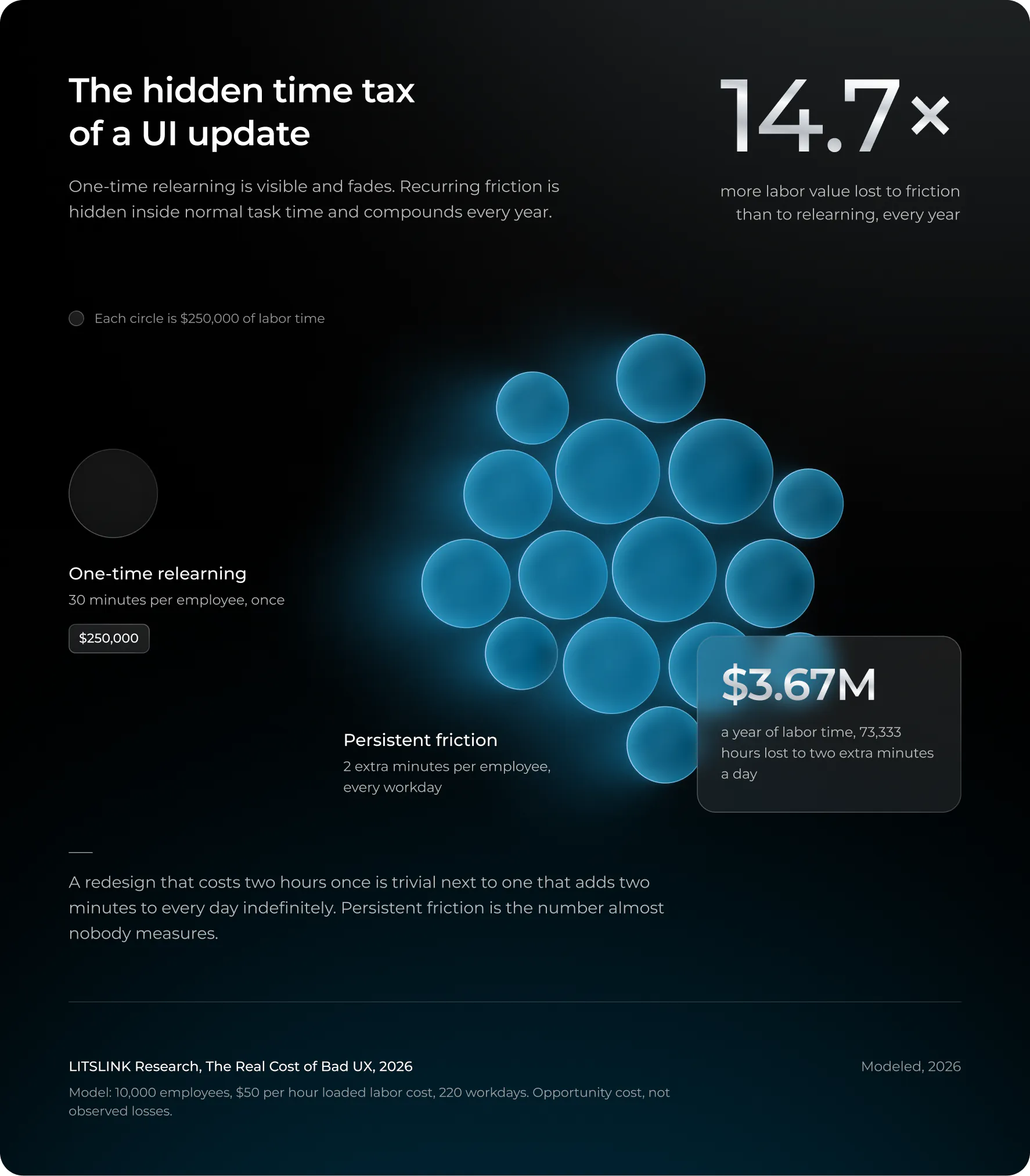
The one at the end is the one that ought to concern a CTO; a redesign which takes only two hours to carry out is a trivial amount when compared to one that adds two minutes to every day indefinitely. It is persistent friction which consumes the money, and it is the figure that almost no one measures since it is concealed within “normal” task time.
When a redesign pays back
On the other hand there is the payback which is the reason for carrying out a redesign in the first place. Let an alteration take 30 minutes per person together with $100,000 worth of internal rollout effort. With 10,000 employees and a rate of $50 per hour, the initial cost works out at $350,000. If the new workflow then saves two minutes per person each working day, the gross labor-value saving amounts to $16,667 per day. The change will break even after about 21 working days having taken into account the savings. If only half of the saved time results in useful output, then it will take 42 working days.
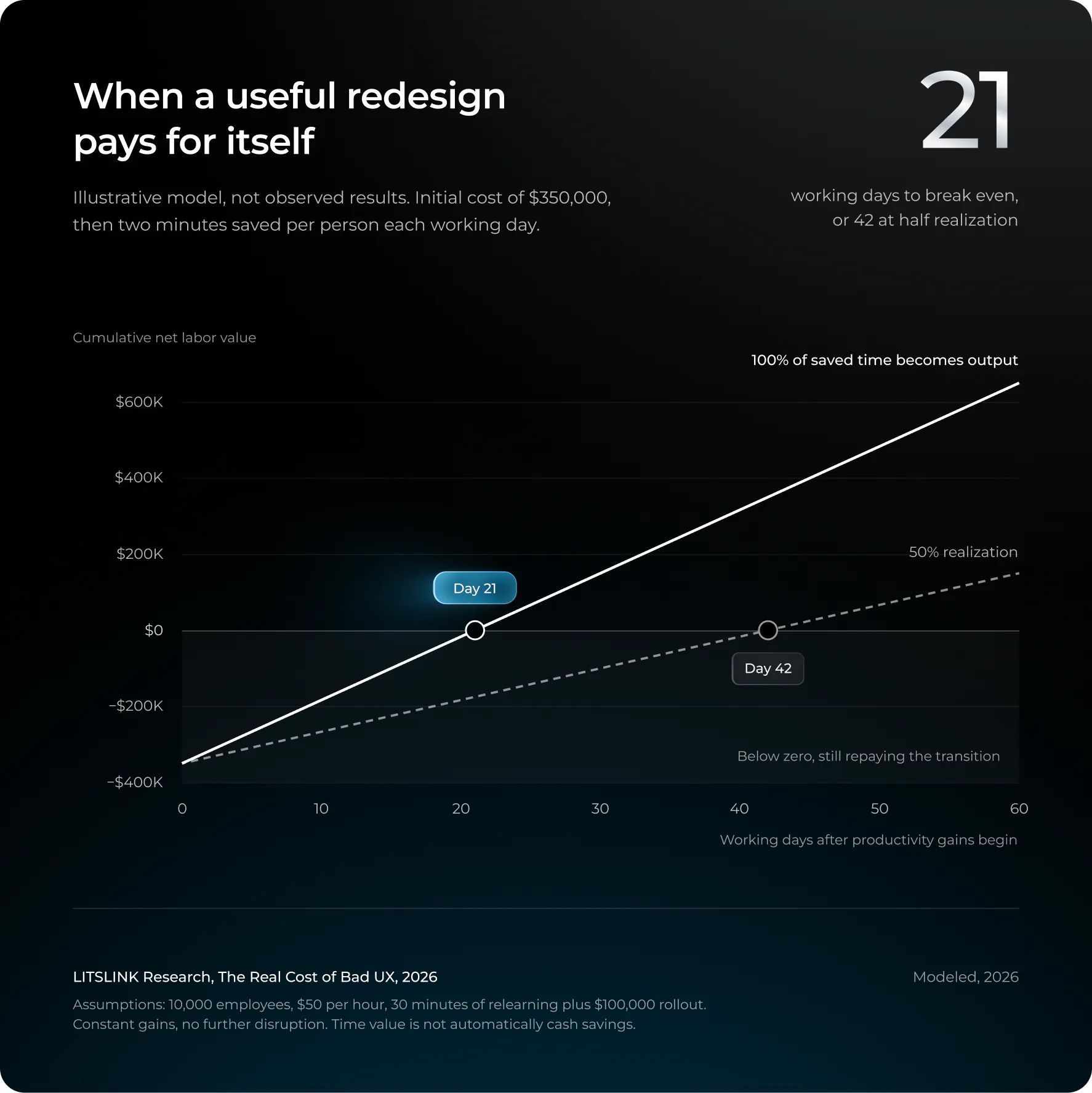
It is a generally sound model with one drawback. It supposes that any gains are immediate and permanent. In reality, the curves showing adoption begin at below-zero levels. A redesign which doesn’t save any time can still be worthwhile for reasons such as accessibility, security, or revenue, but those cases would have to be measured separately. A redesign that makes a task slower forever brings about no return in terms of productivity, and the model states this without having to ask anyone’s permission.
What to measure before and after a release
If a team focuses on only one aspect, then it should look at the distribution of completion times for the same tasks both before and after the change, making sure to include the attempts that were abandoned. When only the successful outcomes are measured, a more difficult interface appears to be faster, since the people who gave up are left out of the average.
Beyond that, you should look at the error and rework rates, the time taken to search for moved commands, the number of support contacts per active user (not per seat), the crash and performance figures, accessibility task success, and the one aspect which is not monitored (at least not closely) time needed to return to the old baseline. The groups of users should be separated whereby novices, experts, occasional users, administrators, and those who use assistive technology are all considered separately. A general average is normally unable to reveal a serious regression affecting one of these groups.
If possible, go for a staged randomized rollout since feature flags are available for that purpose; if that isn’t possible, then use matched cohorts or an interrupted time-series approach and make sure to log every other change that took place during the same week. The majority of the stories that claim ‘the redesign hurt productivity’ collapse when it is noted that the redesign was released in the same fortnight as a network migration.
Section 8 of 10
The same lost half-hour costs €284,000 in Luxembourg and €60,000 in Bulgaria
No honest country ranking of update losses exists. The exposure can still be shown.
This is the section which should have ranked the countries according to the extent of their losses due to software updates, just as people rank the cost of downtime by industry.
To build a credible global model it is necessary to have the number of workers affected, the level of each worker’s exposure to the various applications, the annual changes, the extra time taken for each task, the recovery trajectories, the local labour costs, and the actual effects on output.
The model also has to prevent the same worker from being counted in relation to different products or in adding a supplier’s outage loss to that of its customers as though they were independent entities. None of these inputs are available in any publicly available dataset and all the country rankings you can find online are merely composed of surveys carried out by different vendors, most of whom refer to the same three vendors.
What can be demonstrated is the issue of exposure. Since Eurostat publishes the hourly cost of labour, you can obtain the monetary value of the same hypothetical loss by multiplying it by each country’s respective rate and thus arrive at the monetary weight of identical friction.
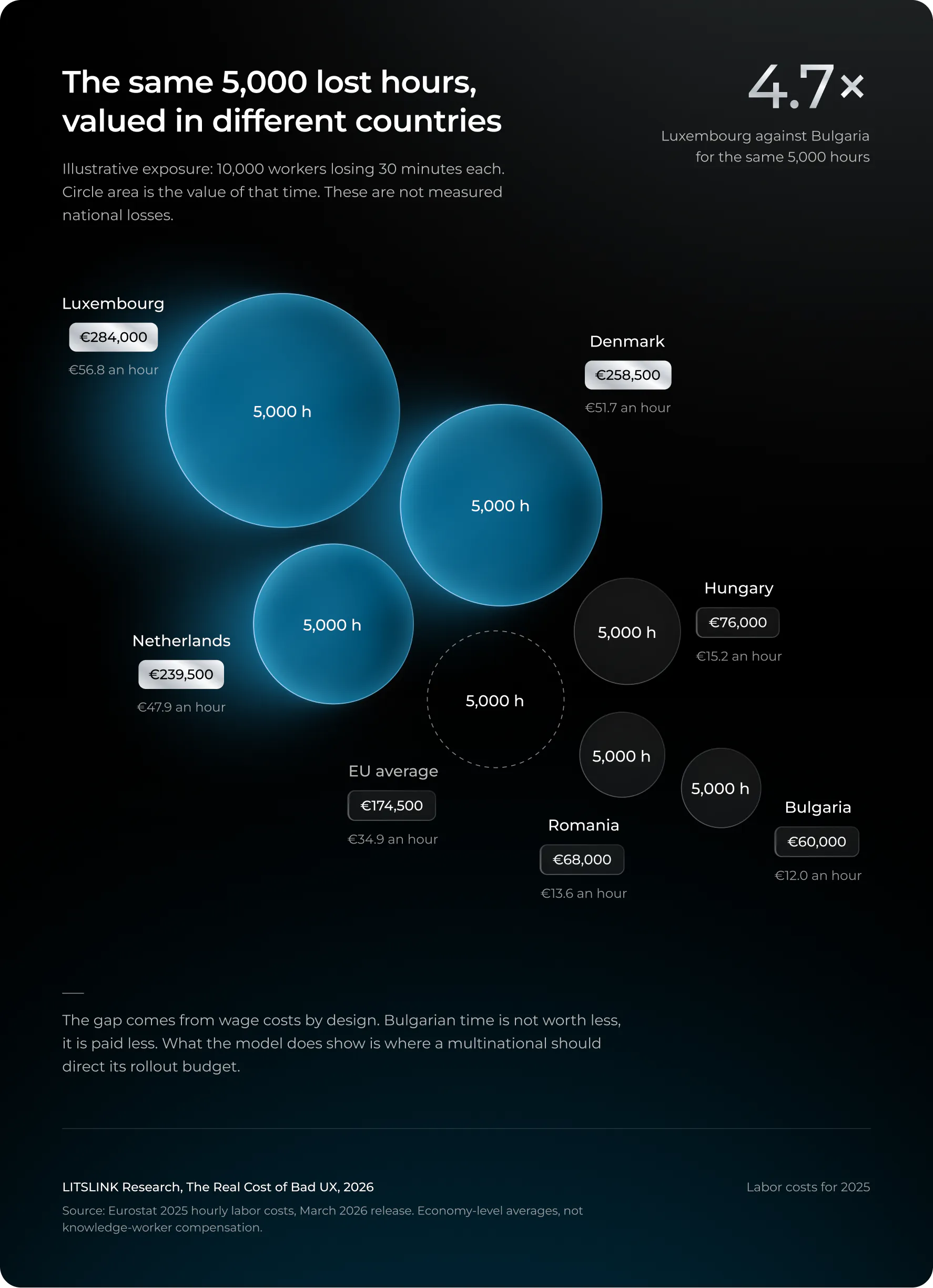
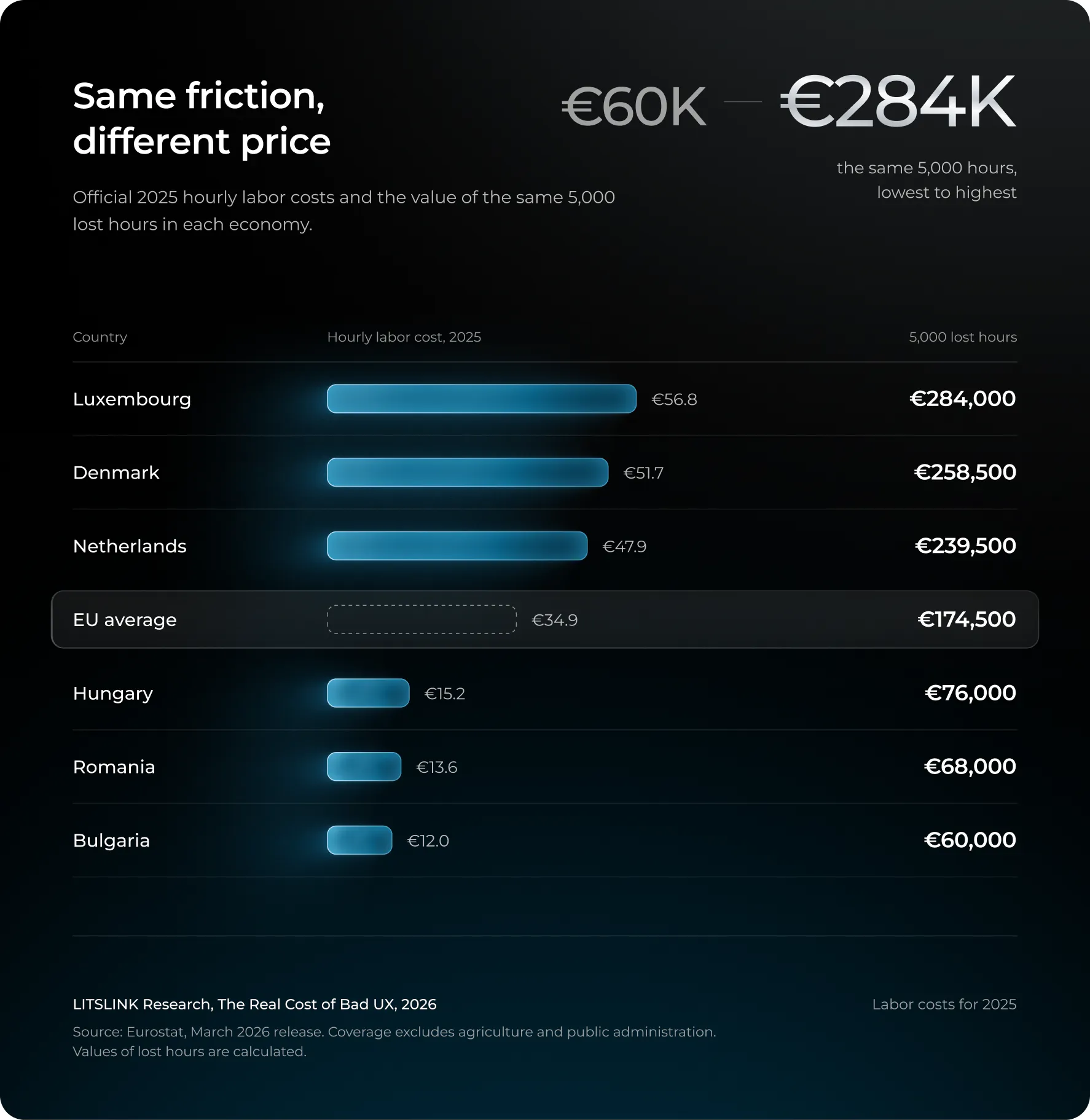
The chart is interpreted in two ways, although both interpretations are incorrect. One view is that the time of Bulgarian workers is of less account; that is not true, what is true is that their time is paid less. The other view is that Luxembourg has poorer software; however, the data does not support this claim. The difference derived from the model is by design a result of wage costs. What the chart does show is where a multinational should direct its rollout budget: the Frankfurt office has a higher cost per lost minute than the Sofia office, and any estimate from headquarters will miss the mark.
The macro frame, with the numbers that don’t add
Gartner raised its 2026 worldwide IT spending forecast four times in nine months: $6.08 trillion in October 2025, $6.15 trillion in February, $6.31 trillion in April, and $6.37 trillion in July 2026. Software alone is about $1.44 trillion, growing 15.1%. Roughly the GDP of Spain, spent every year on programs that will get a software update before the invoice clears.
Against that spend, and against the cost of downtime that broken updates create, the Consortium for Information & Software Quality estimated the cost of poor software quality in the United States at $2.41 trillion for 2022, up from $2.08 trillion in 2020, with a further $1.52 trillion in accumulated technical debt. Two cautions, since this number gets abused more than any other in the field. The $2.41 trillion is dominated by cybercrime losses ($1.44 trillion of it), so relabeling it as “the cost of bad updates” is wrong by about a factor of three. And the technical-debt figure is a stock, not a flow. Adding it to the annual number, which people do constantly, is like adding your mortgage balance to your monthly payment.
The productivity aspect is the most uncertain. According to the OECD’s 2025 G7 report, AI’s contribution to annual labour-productivity growth in high-exposure, high-adoption economies such as the United States and the United Kingdom is 0.4 to 1.3 percentage points, although the gains could be up to 50% smaller in a number of the other G7 countries. Once again, these figures refer to AI in a general sense.
Philip Lane, a member of the Executive Board of the ECB, spoke in March 2026 about how wide the range of productivity estimates for AI is and emphasised that the outcome depends on diffusion, skills, and complementary investment. In other words, merely producing an interface at a low cost represents one stage lying between a model’s capability and a national productivity figure, and it is not the difficult part.
The best example of that gap is a field experiment, not a forecast. A six-month randomized trial involving about 6,000 workers at 56 companies, titled “Shifting Work Patterns with Generative AI” (2025), had half the participants use Copilot within the apps they were already using. Those who used it spent roughly three hours a week less on email, amounting to about 25 per cent, and completed documents somewhat more quickly. Meeting time didn’t change in any significant way. Since this was an AI feature and not a redesign of the user interface, none of the three hours should be included in a UX column.
What the experiment demonstrates is the realization problem mentioned in Section 7 in real-world conditions: a personal task became quicker, but the collaborative structure of the week remained unchanged. Individual speed does not translate into team output unless something else also changes.
For scale only: 100 million people losing one hour at $25 an hour is $2.5 billion. Every input in that sentence is invented except the multiplication. Anyone who quotes it as a measured global loss has misread this section.
Section 9 of 10
Analysis: platforms converge, AI homogenizes, and brands have to diverge on purpose
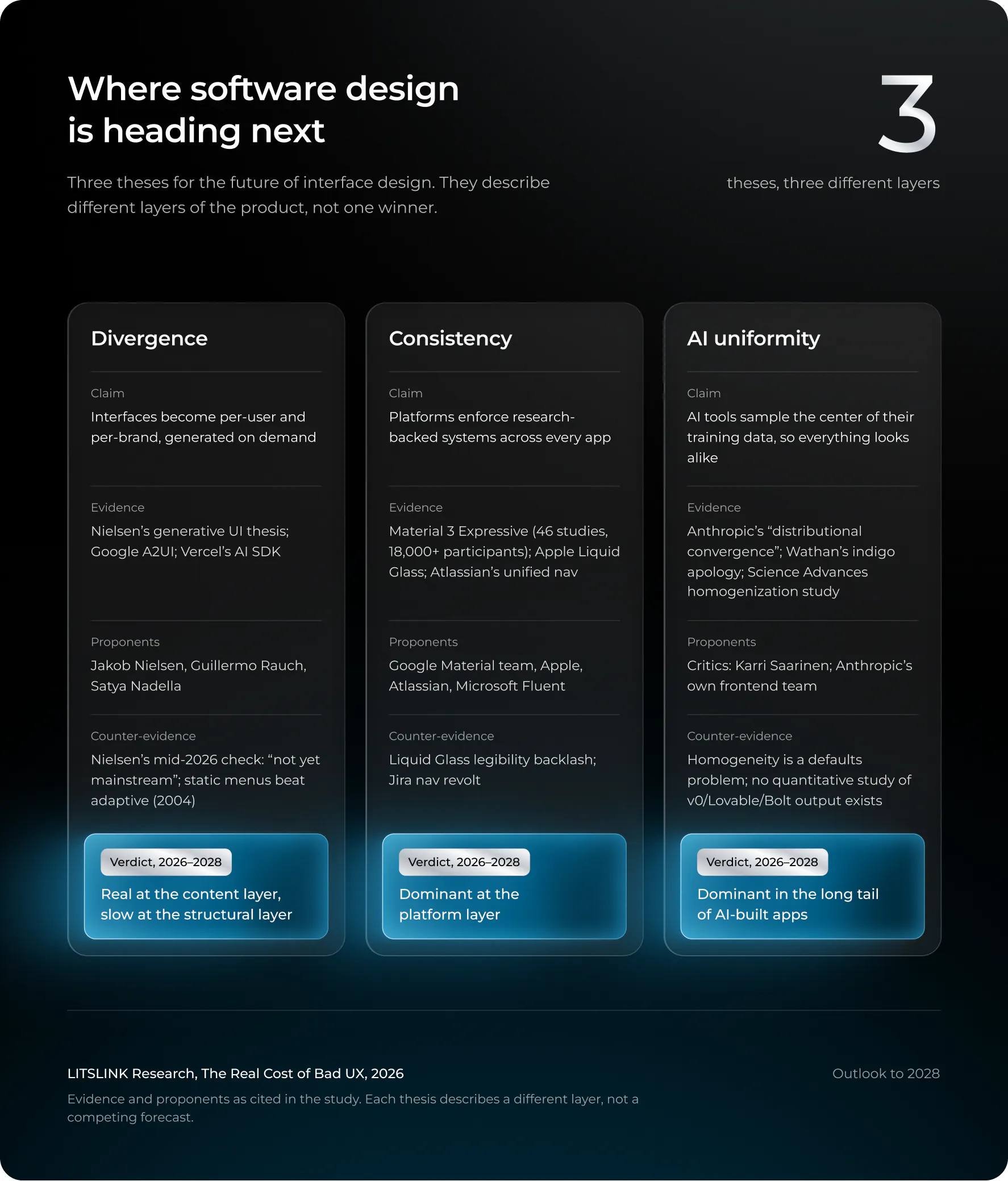
Three theses compete for the future of interface design. Each is right about a different layer.
Now the forward-looking part, and the reason this study was commissioned. Three theses compete for the future of UX design, and of interface design generally. Each has serious proponents. Each is partly right about a different layer.
Design consistency is winning where it matters: the platform layer
The Expressive version of Google’s Material 3, which was introduced in May 2025, was backed by the most extensive body of research ever published by a design system—namely, 46 studies and more than 18,000 participants, as stated by Google’s design team. Users were able to identify key features up to four times quicker in the expressive versions. In a subsequent paper published by Google Research in 2026, titled “Usability Hasn’t Peaked”, the researchers presented the controlled results: 48 participants using 10 apps completed the tasks 20% faster and focused on the target element 33% sooner when using the expressive versions as compared to the same apps based on the previous design system.
This lab-based comparison of the different design variants—rather than being based on data from millions of users after a live update—is the most compelling evidence in this article that a redesign can make work faster rather than merely making it different. The reason given by the team is the clue: “Why did all these apps look so similar? Because they were so boring?” Google developed a system in order to combat sameness, and the system itself is a form of consistency.
Apple went further. Liquid Glass, unveiled June 9, 2025, spans iOS, iPadOS, macOS, watchOS, and tvOS 26 in one stroke; Alan Dye, then Apple’s VP of human interface design, called it “our broadest software design update ever.” It also drew months of criticism about legibility, and Dye left for Meta in December. (Whether those two facts are related is the kind of thing nobody at Apple will say and everybody at Apple knows.)
Atlassian’s “one navigation, one codebase” is the enterprise version. Consistency in design at this layer reduces duplicate engineering and cross-app relearning. It is also the layer where forced change triggers revolts, because the platform owner changes everything at once.
Consistency doesn’t mean that everything
has to be identical.
AI-generated interfaces are measurably converging on a center
The strongest evidence that AI homogenizes design comes from the companies building the AI. In November 2025 Anthropic published a post on improving frontend design that named the problem: “Distributional convergence… Safe design choices dominate web training data,” so without direction the model samples from a high-probability center, producing interfaces that are “immediately recognizable, and dismissible.” Inter, Roboto, a purple-to-blue gradient, rounded cards. You have seen it. You saw it this morning.
Adam Wathan, creator of Tailwind CSS, put it more bluntly in August 2025: he apologized for making every button in Tailwind UI bg-indigo-500 five years earlier, “leading to every AI generated UI on earth also being indigo.”
There is a mechanism behind the joke. A 2024 Science Advances experiment found generative AI improved individual creative-writing outputs while making the collection of outputs more similar to each other. Homogenization, measured, in prose. Nobody has run the same study on v0, Lovable, or Bolt output. If I had a research budget this quarter, that’s where it would go.
The productivity evidence on AI-assisted design is real but narrow. Figma’s own 2026 experiment with Figma Make, on 50 designers and 50 product managers across three constrained tasks, reported roughly 20% shorter completion times, conditional on the task being completed at all. METR’s early-2025 randomized study found AI access made experienced maintainers 19% slower on familiar codebases; its February 2026 follow-up said newer tools probably help more but selection effects prevent a clean estimate. A 2026 meta-analysis across 23 studies (Maier et al.) puts coding-assistant productivity at a moderate Hedges’ g of 0.33, which is not 33% faster, whatever LinkedIn says. And DORA’s 2025 research found higher AI adoption associated with both greater delivery throughput and greater instability. Faster production does not mean more reliable releases. It may mean more of them.
Generative UI is real, and by mid-2026 its loudest advocate says it isn’t mainstream yet
Jakob Nielsen opened the year with a prediction: “2026 is the year we start the shift to Generative UI,” interfaces assembled per user, per moment, by a model. Guillermo Rauch of Vercel calls generative UI “AI’s final form.” Satya Nadella, on a podcast in December 2024, said business applications “are essentially CRUD databases with a bunch of business logic” and that “that’s probably where they’ll all collapse, in the agent era.”
Then Nielsen published a mid-year reality check and conceded the individualized web “is not yet mainstream.” Credit to him for grading his own paper.
The critics are designers with shipping products. Karri Saarinen, CEO of Linear, wrote in April 2025 that “a chat interface is a very weak and generic form,” and then the line I’d put on the wall: “Unbounded AI, much like a river without banks, becomes powerful but directionless. Designers need to build the banks.” In December he went after the whole premise: “I’m skeptical of the industry’s drive toward grand unification, collapsing a nuanced process into code and calling it progress.” Ivan Zhao at Notion, whose product now ships an agent that works for twenty minutes unattended, still described the current state as “AI chatbots which mimic Google search boxes. We’re now deep in that uncomfortable transition phase.”
Unbounded AI, much like a river without banks, becomes powerful but directionless.
Designers need to build the banks.
Google’s own answer is instructive. Its A2UI protocol lets agents describe an interface using a client-controlled catalog of approved components. Different task layouts, one component vocabulary. Neither divergence nor uniformity, then; more like a shared grammar with room for accents.
Whether people want the agent to take over at all is its own question, and there’s an early answer. An ETH Zurich study from 2025, “Do It For Me vs. Do It With Me,” compared an assistant that did the task outright against one that walked users through it step by step in complex software. Full automation saved time on the simpler visual tasks. Step-by-step help preserved users’ sense of control and, more to the point, their learning of the software. Twenty participants, two specific assistants, so treat it as a signal. The signal is that the “UI disappears” future has a ceiling: people learn tools by using them, and an agent that does the work for you also does the learning for you.
Four layers, not one trend
“Uniform design” conflates at least four things, and once they are separated the three theses stop contradicting each other.
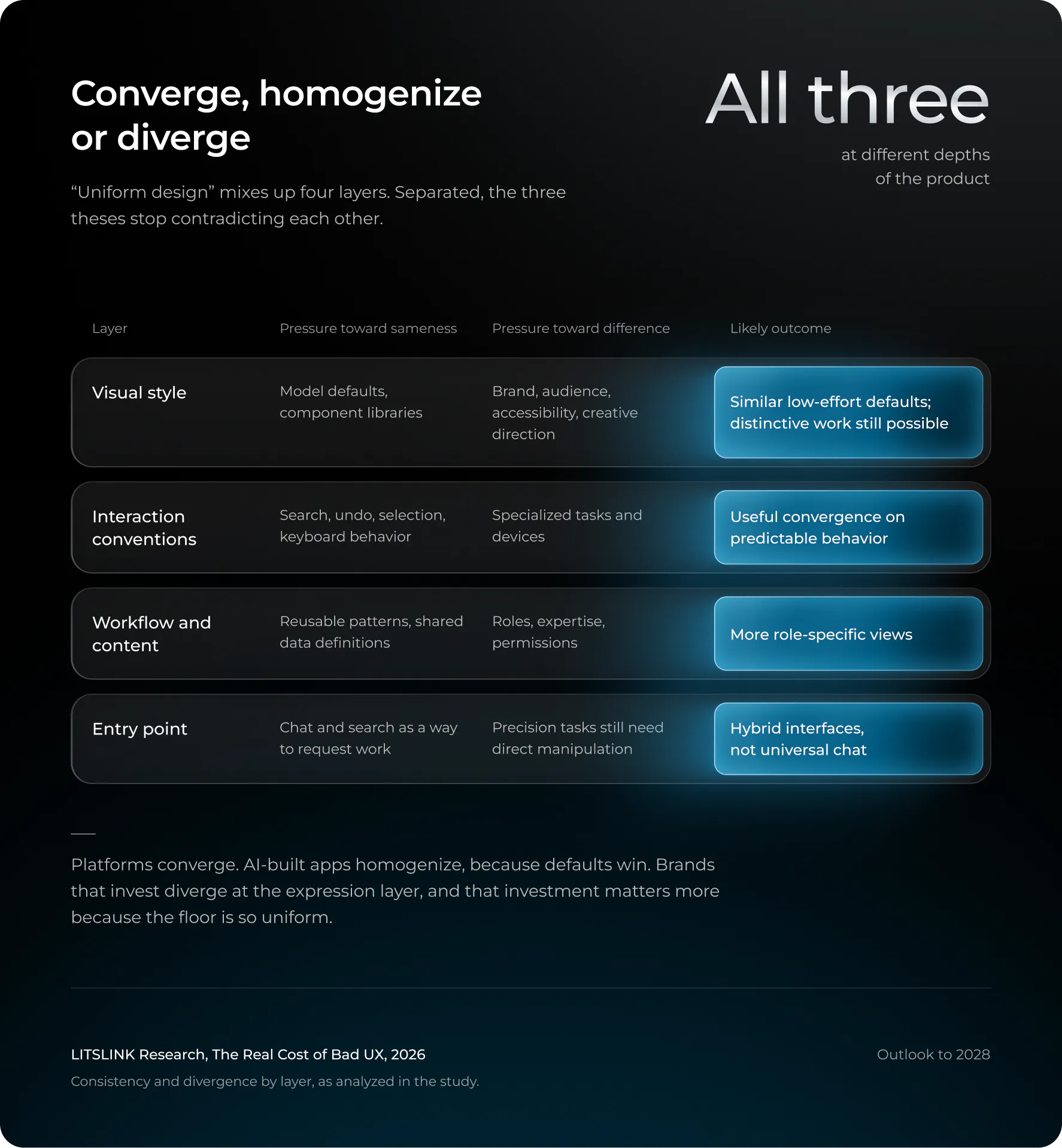
So, the question this article was asked, will design diverge, converge, or flatten into AI uniformity? The answer I’ve landed on is yes, all three, at different depths. Platforms converge. AI-built apps homogenize, because defaults win and most builders accept defaults. Brands that invest diverge at the expression layer, in motion, typography, voice, and custom components, and that investment is now a differentiator precisely because the floor is so uniform.
The chart in Section 1 is what “growing exponentially” looks like in one category: the more products a worker moves between, the more each one’s departure from convention costs, which is the economic case for consistency and the reason uniformity is more than an aesthetic complaint.
Dylan Field said as much at Config 2025: “In a world where software is growing exponentially, design is a differentiator that will make great companies and products stand out.”
I’d reframe that slightly. Design was always a differentiator. What changed is that the cost of not differentiating fell to zero, so the default became indistinguishable.
Four scenarios for the future of UX to 2030, and what would tell you which one you’re in
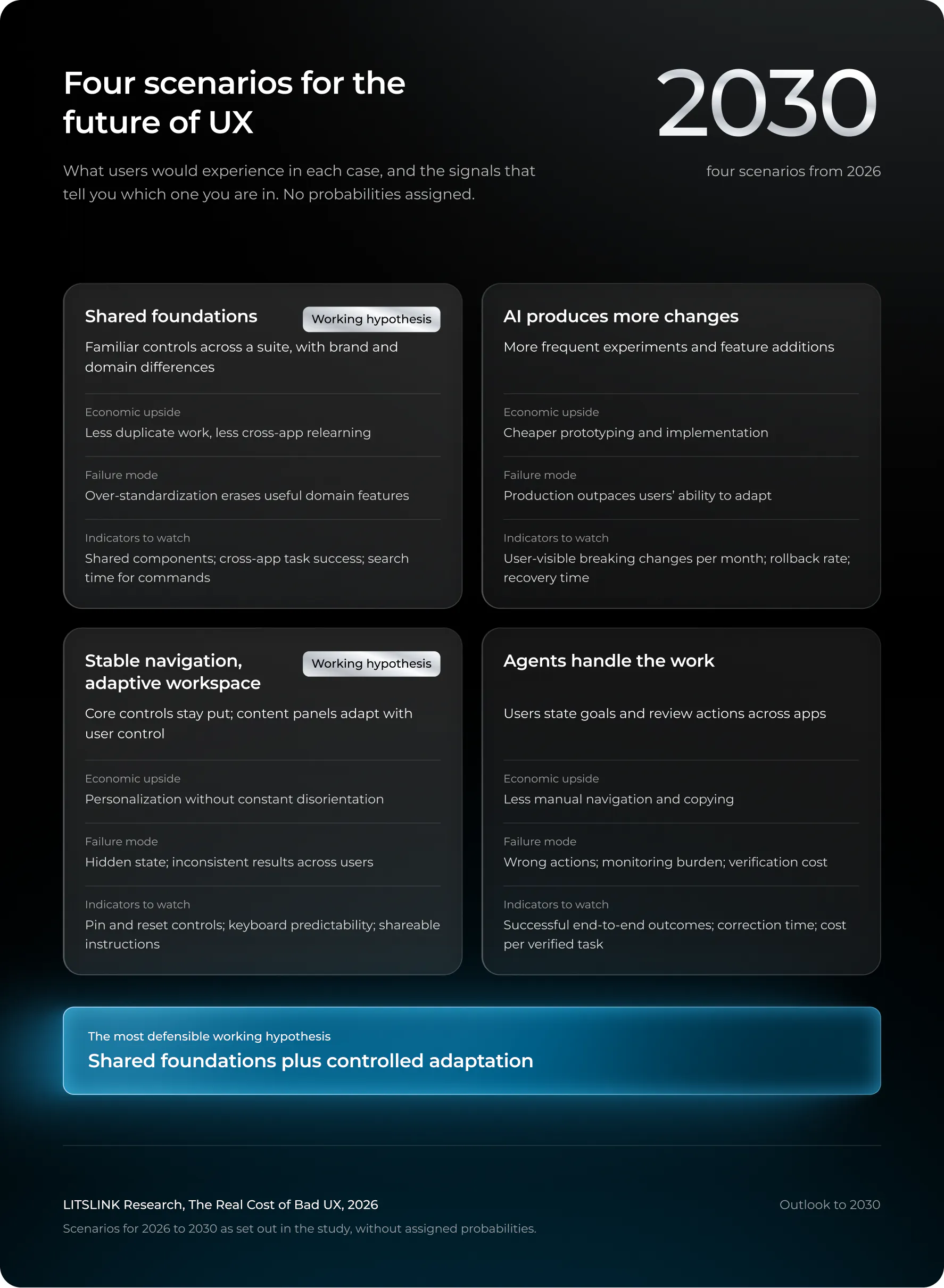
The most defensible working hypothesis is a hybrid of the first and third: shared foundations plus controlled adaptation. There is product evidence for both today. There is no evidence for “AI-generated UI makes design completely uniform” or “traditional interfaces disappear,” and there won’t be by 2030 either, because the 2004 menu study still holds and humans still have spatial memory.
One angle worth adding to the discussion, because nobody in the research raised it: the regulatory layer. The European Accessibility Act has applied since June 28, 2025. An update that removes accessibility options, as Sonos did, is now a compliance event in the EU, not just a support event. Generative interfaces that rearrange themselves per session will have to prove they stay accessible per session. That may do more to enforce stable navigation than any design principle.
Limitations, and what would settle the question
This study could not obtain an isolated UI budget from any company. The friction data comes mostly from vendors with products to sell. The Stripe survey is from 2018. The lab studies measure intentions and menu speed. The CrowdStrike model covers 500 US companies, so the global figure is larger by an unknown multiple.
What would resolve it is unglamorous: one company, one transition, baseline task measurements before and after, full cost attribution across all four ledgers, and permission to publish. If that company is yours, my inbox is open, and the article you’d get would be more valuable than another untraceable trillion-dollar estimate.
Are you shipping a redesign before the EAA audit or after it?
Either answer has a cost. We’ll model both.
Get a compliance-aware UX review →
Section 10 of 10
What this means for anyone shipping updates
Eight rules drawn from the findings, not from someone else’s checklist.
Based on the findings mentioned above and not according to a checklist that had been drawn up by someone else.
Decouple the frequency of releases from the visible impact. As the 2016 study showed, users prefer frequent software updates when they can see the improvements; the Sonos example shows that users dislike losing features. You should release fixes and carry out backend work as frequently as you want; instead, treat significant changes to workflow separately and allocate them accordingly.
You should take into account the cost of the customer’s transition even if you don’t actually pay that cost. The work involved in onboarding, providing documentation, handling support requests, and carrying out local admin tasks are all real costs associated with your release. When you’re selling to enterprises, the customers’ IT teams are already monitoring these items and will remember them when the contract is renewed.
Guard the established workflows. Leave the shortcuts and spatial landmarks in their current position. According to the Lille study, it is the grouping, the order, and the recognizability that cause an interface to seem foreign; therefore, you should freely alter the appearance but rarely regroup. If an item has to be moved, then for at least one release cycle the new location must be discoverable from the old one. Make sure there is an exit path. The approach used by Atlassian—with its staged rollout, admin opt-in, sandbox previews, and phased enforcement—is a sensible model; Sonos’s practice of releasing an update every two weeks after the crisis with a wider test group is the corrective approach.
Check out the recovery period. At what point do experienced users get back to their previous speed, and is the new baseline in fact better? If you can’t answer both of these questions, then you have shipped a change without having formed a hypothesis.
Check the solution across different groups; it’s possible that beginners will benefit while experts suffer, or else that the opposite will happen; the floating panels in Figma performed well until users who used the tool for eight hours a day started using it. Accessibility as well as situations involving infrequent use must be tested specifically, not just using an average.
It is better to spend the AI cost-savings on more validation than on increasing the volume. For example, if Figma Make makes your designers 20% faster, the cheapest way to make use of that 20% is to carry out more testing before releasing, not to release 20% more frequently. The finding by DORA regarding throughput and instability is a warning label.
Choose the layer on which you want to focus for the differentiation; ensure consistency in the foundational elements while giving the upper level a distinctive appearance. Apply the design system provided by the platform when it comes to controls and established practices, and allocate your design budget to the areas where users can perceive a difference. That is the approach we adopt when designing mobile products, and after having been inside this data for three weeks I now hold that view even more strongly than before.
Re-read every UX statistic you have in a deck. If it starts with “studies show” and ends without a link, it probably came from Section 1.
That’s the final thought, followed by the frequently asked questions. Over the course of two decades the software industry has become better at releasing changes but has almost never put in any effort to measure the cost of those changes to the people affected by them. The tools for making such measurements do exist; the reason they aren’t used is that the answer might sometimes have to be “don’t ship this”. It is a more difficult statement to make during a roadmap review than “high effort, high variance, questionable benefit”, and it is the one that this study consistently reaches.
Whether the five years ahead see divergence, consistency, or uniformity will depend less on what AI is able to generate and more on whether or not anyone takes into account the cost of having to relearn.
Ready to put numbers on your next release instead of adjectives?
Tell us what you’re changing and who it lands on.
Start with a 30-minute scoping call →
FAQ
What is bad UX, in practical terms?
Bad UX refers to any behavior of an interface that makes a task take longer, be more likely to result in errors, or become impossible for people who were able to carry it out before. The evidence from this study shows that the repeated cost amounts to a number of minutes each day per user, this total being the biggest item in the model and exceeding the one-off cost of having to relearn the material.
What is the economic cost of software updates?
No defensible global figure exists. What can be verified: broken updates produce the largest losses (CrowdStrike, $5.4 billion across the Fortune 500), poor software quality costs the US about $2.41 trillion a year by CISQ’s model, and software spending is $1.44 trillion in 2026. The specific share caused by UI changes has never been measured.
What is change aversion?
Change aversion is the negative reaction users have to a redesign, which typically fades as they relearn. It is a fair diagnosis when users can still do everything they did before. When a change removes a capability, the complaints are defect reports, not aversion.
Is AI making all software design look the same, and does design consistency still matter?
At the default level, yes: AI tools sample the most common patterns in their training data, and their own makers say so. At the platform level, design systems are converging on purpose. Brands that invest in a distinctive surface layer still stand out, and the gap between them and the defaults is growing.
How do I calculate the cost of a redesign for my company?
Multiply affected active users by relearning hours by loaded hourly cost for the one-time transition, then separately estimate extra minutes per day times working days for persistent friction. Compare against measured time savings after release, and count abandoned tasks, not just completed ones.