






Ask nine different assistants the same question and you get nine answers of roughly equal quality. Ask them to cite where each claim came from, hold a 200-page contract in context, or read the email thread you are replying to, and the field thins out fast.
That is the useful way to compare them. Not on general capability, where the frontier models have largely converged, but on the one job each was built to do better than a generalist.
This guide covers nine AI alternatives to ChatGPT, with current pricing, the models behind them, and what each one is actually good at. If you searched ChatGPT alternatives 2026 or alternatives for ChatGPT, this is the list.
Why Look For Better Alternatives to ChatGPT?
If generic ChatGPT hits a wall in your workflow, this guide lays out nine proven alternatives. We cover true plan costs, the core architecture behind them, and what each tool actually delivers when put to work.
A generalist model rarely wins in the weeds. When a task calls for exact, specialized execution, ChatGPT’s limitations show up fast.
Here is where users run into trouble:
- Citations and source links are weaker than purpose-built research tools
- Marketing teams need brand voice controls and templates it does not offer
- Microsoft and Google users get more from assistants inside their own suites
- Academic literature review needs tools built for papers, not chat
Enterprise security teams rarely approve consumer-grade privacy terms. Each tool below addresses those policy gaps, whether by outperforming ChatGPT on narrow, high-precision tasks or fully taking over specific parts of your tech stack.
What changed in 2026: model lineups moved fast. OpenAI shipped the GPT-6 family across September, Anthropic released Claude Sonnet 5.5 on 28 September, and Google moved to Gemini 3.1 Pro and 3.8 Flash. Several tools in this guide also shifted materially, and we flag the major changes in their profiles.
ChatGPT vs Alternatives: Summary Comparison
This table covers the differences that decide which tool fits.
| Tool | Current model | Free plan | Entry paid plan | App availability | Strongest at |
|---|---|---|---|---|---|
| ChatGPT | GPT-6 family (Astra, Sol, Luna) | Yes | Go $8/mo, Plus $20/mo | Web, iOS, Android, Mac, Windows | General-purpose work |
| Claude | Claude Sonnet 5.5 | Yes | Pro, $20/mo or $17 annual | Web, iOS, Android, Mac, Windows | Long documents, analysis, coding |
| Google Gemini | Gemini 3.1 Pro, Gemini 3.8 Flash | Yes, with limits | Google AI Plus $4.99, AI Pro $19.99 | Web, iOS, Android, in Workspace apps | Google Workspace integration |
| Perplexity | Routes across GPT, Claude, Gemini | Yes | Pro, $20/mo or $200/yr | Web, iOS, Android, Mac, Windows | Cited research and sourced answers |
| Microsoft Copilot | OpenAI's current generation plus Microsoft models | Yes, limited | M365 Premium $19.99/mo | Web, iOS, Android, Windows, in Microsoft 365 apps | Microsoft 365 workflows |
| Jasper | Multiple frontier models | No, 7-day trial | Pro, $59/mo annual or $69 monthly | Web, browser extension | Brand voice and marketing campaigns |
| Writesonic | Multiple | Trial | Starter, $79/mo annual | Web | AI search visibility, repositioned in 2026 |
| Elicit | Multiple research models | Yes, Basic | Plus from $11/mo academic, annual billing | Web | Academic literature review |
| Rytr | Multiple | Yes | Unlimited, $9/mo or $7.50 annual | Web, browser extension | Short-form copy on a budget |
| DeepSeek | DeepSeek V4, V4.1 Flash | Yes, fully free app | No paid consumer tier | Web, iOS, Android, open weights for self-hosting | A capable assistant at no cost |
Three entries need a caveat before you shortlist them. Writesonic repositioned during 2026 from a cheap writing tool into an AI-search-visibility platform, and its entry price moved from under $20 to $79. Microsoft closed Copilot Pro to new subscribers and now points individuals to Microsoft 365 Premium. Jasper removed its permanent free tier and now starts at Pro, with a 7-day trial only.
What Are the Best Free ChatGPT Alternatives in 2026?
Seven of the nine tools here have a free tier worth using, and one of them has nothing else.
DeepSeek is the outlier. Its web and mobile apps are free in full, including the current V4 model, web search and file uploads, with no Plus or Pro plan to upgrade to. Everywhere else on this list, free means a limited version of a paid product. With DeepSeek, free is the product, and paid usage exists only through the metered API for developers.
Claude and Google Gemini offer the most generous free tiers among the major assistants. Claude gives free access to Sonnet 5.5, the same model class paid users get, with daily usage limits rather than a weaker model. Gemini runs current models on its free tier with basic Workspace integration, which makes it the fastest free path to your own Google files.
Perplexity and Elicit round out the research picks. Perplexity's free tier gives unlimited basic searches with citations plus a small daily allowance of Pro searches. Elicit's free Basic covers paper search and summaries across more than 138 million papers. The detailed breakdown of what each free plan includes sits further down this guide.
9 Best ChatGPT Alternatives: An Overview
Before the details, here is each tool's focus and entry price.
| AI Tool | Category | Entry pricing |
|---|---|---|
| Claude | Analysis, long documents, coding | Free, Pro from $20/month |
| Google Gemini | Google integrations | Free, AI Plus from $4.99/month |
| Perplexity | Sources, links and statistics | Free, Pro $20/month |
| Microsoft Copilot | Microsoft 365 integration | Free, M365 Premium $19.99/month |
| Jasper | Marketing campaigns | 7-day trial, Pro from $59/month annual |
| Writesonic | AI search visibility | Starter from $79/month |
| Elicit | Academic research | Free Basic, Plus from $11/month annual |
| Rytr | Short-form copy | Free, Unlimited from $7.50/month |
| DeepSeek | Free assistant, open weights | Free, no paid consumer tier |
1. Claude: Best for Long Documents and Analysis

Creator: Anthropic Launched: March 2023 Current model on free tier: Claude Sonnet 5.5, released 28 September 2026 Strongest model: Claude Opus 5.5, on Max plans and the API Web access: Yes
Claude is an AI assistant built by Anthropic to read, write and reason over natural language. It handles summarization, analysis, writing and code, and it holds context across long documents better than most alternatives to ChatGPT.
The work it is best known for is engineering. Claude Code runs in a terminal and an editor, and development teams use it for multi-file refactors and code review rather than snippet generation.
The design priority is following complex instructions accurately. That shows up most in work with many constraints. A document rewrite with five rules, a code review across several files, an analysis that has to stay inside a defined scope.
Main Features
Long context. Claude reads and reasons over long documents without losing the thread, which is where many assistants start to drift.
Web search. Claude can search the web and cite what it finds, so answers are not limited to training data.
Projects and files. Upload documents, code and data, and keep them available across a conversation.
Developer tools. Claude Code for terminal and editor work, plus an API for building on the model directly.
Pros and Cons
| + Pros | – Cons |
|---|---|
| Strong on long documents and analysis | Image generation not included |
| Accurate instruction following | Usage limits on lower tiers |
| Web search with citations | Fewer third-party integrations than Microsoft or Google |
| Coding and developer tooling | |
| Clear data handling terms |
Subscription Plans
| Free | Pro | Max 5x | Max 20x |
|---|---|---|---|
| $0 | $20/month, $17 annual | $100/month | $200/month |
Team and Enterprise plans are available for organizations, with central billing and administration.
Who Is the Tool Best For?
Anyone working with long documents: analysts, lawyers, researchers and developers. It is also a strong general alternative to ChatGPT for writing and reasoning work.
2. Google Gemini: Best for Google Workspace Users
Creator: Google
Launched: Bard in March 2023, renamed Gemini in February 2024
Current models: Gemini 3.1 Pro and Gemini 3.8 Flash
Web access: Yes
Google Gemini is the assistant built into Google's ecosystem. If your documents, email and calendar live in Workspace, this is the alternative to ChatGPT with the shortest path to your own data.
Note the naming history. Bard was the original product, renamed Gemini in February 2024 when it moved onto the Gemini model family. Older guides referring to Bard describe the same product under its previous name.
Main Features
Creator: Google Launched: Bard in March 2023, renamed Gemini in February 2024 Current models: Gemini 3.1 Pro and Gemini 3.8 Flash Strongest model: Gemini 3.1 Pro, on AI Pro and Ultra plans Web access: Yes
Google Gemini is the assistant built into Google's ecosystem. If your documents, email and calendar live in Workspace, this is the alternative to ChatGPT with the shortest path to your own data.
What it is used for most visibly is Workspace work at scale. Gemini drafts in Docs, builds formulas in Sheets and summarizes long Gmail threads, which is ordinary work until you have a thousand employees doing it.
Note the naming history. Bard was the original product, renamed Gemini in February 2024 when it moved onto the Gemini model family. Older guides referring to Bard describe the same product under its previous name.
Main Features
Workspace integration. Gemini works inside Docs, Gmail, Sheets and Drive, with access to your files.
Real-time information. Answers draw on current web data rather than a fixed cutoff.
Multimodal. Text, images and audio in the same conversation.
Large context. Gemini handles very long inputs, which suits document-heavy work.
Pros and Cons
| + Pros | – Cons |
|---|---|
| Deepest Google Workspace integration | Requires a Google account |
| Lowest paid entry point among the major assistants at $4.99 | Business value depends on already using Workspace |
| Strong multimodal support | Output quality varies more by task than some rivals |
| Generous free tier |
Subscription Plans
| Free | Google AI Plus | Google AI Pro | Google AI Ultra |
|---|---|---|---|
| Current Gemini models with usage limits | $4.99/month | $19.99/month | Higher tier |
For businesses, Gemini is bundled into Google Workspace Business plans rather than sold separately.
Who Is the Tool Best For?
Anyone already working inside Google Workspace, plus budget-conscious users. Google AI Plus at $4.99 is the lowest paid entry point among the major assistants.
3. Perplexity: Best for Research With Sources
Creator: Perplexity AI Launched: August 2022 Current models: Routes across GPT, Claude and Gemini Strongest model: Whichever frontier model you select, on Pro and Max Web access: Yes, by default
Perplexity is built around citation. Every answer comes with links to where the information came from, which makes it the practical choice when you have to check or quote a source.
Journalists and analysts use it for source tracing, which is the work it was built for. A claim in a report leads back to the page it came from in one click, and that is harder in a general chat window than it sounds.
Perplexity also routes between models rather than running one. That means answers can draw on different systems depending on the question, and paid users can switch models within a thread.
Main Features
Source attribution. Citations and links on every answer, so claims can be verified.
Follow-up context. Conversations hold their thread, so you can narrow a question across several turns.
Multi-model access. Paid plans let you pick which underlying model answers.
File handling. Upload PDFs, images and spreadsheets for analysis.

Pros and Cons
| + Pros | – Cons |
|---|---|
| Citations on every answer | Not coding-first |
| Strong free tier | Source quality varies with what is online |
| Multiple models in one interface | Computer tasks now need separate credits |
| Good for verifiable research |
Subscription Plans
| Free | Pro | Max | Education Pro |
|---|---|---|---|
| $0 | $20/month or $200/year | $200/month or $2,000/year | $10/month |
Enterprise plans are available separately for organizations.
Who Is the Tool Best For?
Students, researchers, journalists and anyone who has to show where an answer came from. The free tier is unusually capable for this use case.
4. Microsoft Copilot: Best for Microsoft 365 Workflows
Creator: Microsoft Launched: February 2023 Current models: OpenAI's current generation, which moved to the GPT-6 family during September 2026 Strongest model: The GPT-6 tier available through Microsoft 365 Copilot Web access: Yes
Microsoft Copilot sits inside Word, Excel, Outlook, PowerPoint and Teams. For organizations already on Microsoft 365, that placement matters more than any single capability.
One change to note in 2026. Microsoft closed Copilot Pro to new subscribers, with existing subscribers supported until 1 August 2026. Individuals are now directed to Microsoft 365 Premium at $19.99 per month. That plan bundles Microsoft 365 with Copilot features.
Main Features
In-app assistance. Drafting in Word, formulas and analysis in Excel, slide design in PowerPoint, inbox work in Outlook.
Tenant data access. The Microsoft 365 version reads your own files, mail and meetings.
Content generation. Emails, reports and presentations drafted from a prompt.
Free tier. Basic Copilot is available in Windows and Edge at no cost.
Pros and Cons
| + Pros | – Cons |
|---|---|
| Unmatched Microsoft 365 integration | Higher total cost when a qualifying Microsoft 365 subscription is also required |
| Uses current OpenAI and Microsoft models | Requires an existing Microsoft 365 licence |
| Reads your own organizational data | Copilot Pro closed to new individual subscribers |
| Free basic tier in Windows and Edge |
Subscription Plans
| Free | Microsoft 365 Premium | M365 Copilot Business | M365 Copilot Enterprise |
|---|---|---|---|
| Basic in Windows and Edge | $19.99/month | $21/user/month list, $18 discounted annual rate | $30/user/month |
Business and Enterprise tiers require a qualifying Microsoft 365 subscription underneath. That pushes the real cost higher.
Who Is the Tool Best For?
Organizations already paying for Microsoft 365. Outside of that, the economics rarely work, because the Copilot license sits on top of a subscription you also buy.
5. Jasper: Best for Brand Voice and Marketing Campaigns
Creator: Jasper Technologies Launched: January 2021 Current models: Multiple frontier models Strongest model: Selected per task, with no single model exposed to the user Web access: Yes
Jasper is built for marketing teams rather than general chat. The difference is brand voice: you train it on how your company writes, and it holds that across every writer and every piece.
Change in 2026. Jasper no longer offers a permanent free plan. There is a 7-day trial on the Pro plan, and pricing is displayed annually on the site.
Main Features
Brand voice. Define tone and style once, apply across the team.
Marketing templates. Ad headlines, blog outlines, email subject lines, social posts.
Integrations. Works with Google Docs, WordPress and a browser extension.
Campaign tools. Multi-asset campaigns generated from one brief.
Pros and Cons
| + Pros | – Cons |
|---|---|
| Brand voice across a whole team | No permanent free plan |
| Marketing-specific templates | Expensive next to a $20 general assistant |
| Campaign and collaboration features | Facts still need checking |
| Strong team workflows | Overkill for a solo writer |
Subscription Plans
| Pro | Business |
|---|---|
| $59/month annual, $69 monthly | Custom |
Who Is the Tool Best For?
Marketing teams producing content at volume, where brand consistency across writers is a real problem. A solo creator usually gets better value from a general assistant at $20, since Jasper now starts at $59.
6. Writesonic: Repositioned for AI Search Visibility
Creator: Writesonic Launched: January 2021 Current focus: AI search visibility and content Web access: Yes
This tool changed category in 2026. Writesonic repositioned from a low-cost AI writer into an AI-search-visibility platform. It now tracks how brands appear in AI-generated answers, and its entry price moved from under $20 to $79 per month.
That makes it a different proposition from the one most older guides describe. It is no longer a cheap alternative to ChatGPT for writing. It now competes with SEO and brand-monitoring tools rather than with Rytr.

Main Features
AI search visibility tracking. Monitors how a brand surfaces in AI answer engines.
Article generation. Long-form content production, with article allowances per plan.
SEO tooling. Keyword and optimization features alongside the writing.
Pros and Cons
| + Pros | – Cons |
|---|---|
| Covers a category few rivals address | No longer a budget option |
| Combines writing and visibility tracking | Extra seats cost $50/month |
| Article allowances are clearly defined | Entry price is four times a general assistant |
Subscription Plans
| Starter | Basic | Growth |
|---|---|---|
| $79/month annual | $199/month annual | $399/month annual |
Who Is the Tool Best For?
Marketing teams that want to track brand presence in AI search results. If you only need writing, the pricing no longer works against the alternatives in this list.
7. Elicit: Best for Academic Literature Review
Creator: Elicit Research, PBC Launched: January 2023 Current models: Multiple research-focused models Strongest model: Varies by task, with heavier extraction on Pro and above Web access: Yes
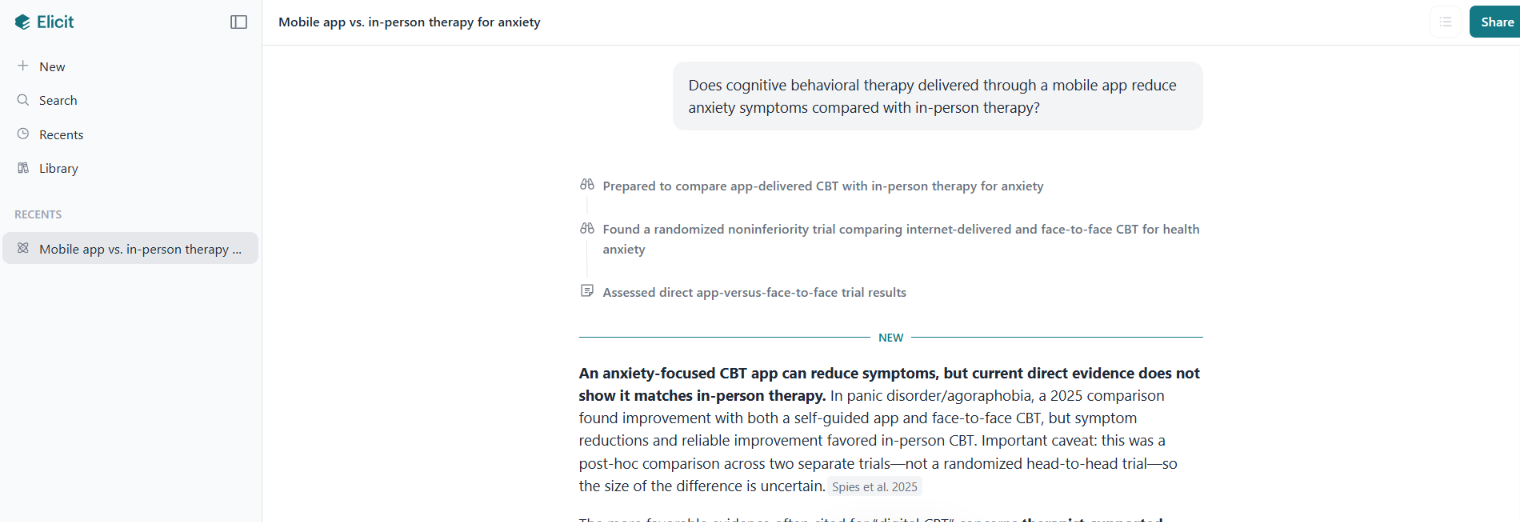
Elicit stands out among AI alternatives to ChatGPT because it restricts its data to verifiable academic papers rather than the open web. It finds relevant research, extracts findings into tables, and summarizes papers, which is a different job from general chat.
Systematic reviewers use it to screen hundreds of papers against inclusion criteria, work that otherwise takes a research assistant several weeks.
For a literature review, that difference is the whole point. A general assistant will describe a field. Elicit returns the papers and lets you compare methods and results side by side.
Main Features
Paper search. Searches across a large body of academic literature, including papers a keyword search would miss.
Data extraction. Pulls methods, results and conclusions into comparable tables.
Summarization. Condenses multiple papers at once.
Reference export. Works with citation managers.
Pros and Cons
| + Pros | – Cons |
|---|---|
| Built specifically for literature review | English-language focus |
| Extracts structured data from papers | Findings still need human validation |
| Finds papers keyword search misses | Narrow use case outside research |
| Free Basic tier covers search and summaries |
Subscription Plans
Elicit has separate Academic and Industry pricing, so the cost depends on which plan track applies.
| Plan | Academic, billed annually | Academic, billed monthly | Industry, billed annually | Industry, billed monthly |
|---|---|---|---|---|
| Basic | Free | Free | Free | Free |
| Plus | $11/month, $132/year | $19/month | Not offered | Not offered |
| Pro | $39/month, $468/year | $69/month | $49/month, $588/year | $75/month |
Higher Scale and Enterprise tiers exist for teams, with collaboration features and larger screening limits. Basic includes unlimited search across more than 138 million papers, unlimited summaries and paper chat, with limited automated reports. Exports to RIS, CSV and BibTeX start at Plus.
Who Is the Tool Best For?
Students, academics and researchers conducting literature reviews. It is popular in health and science, where the volume of published work makes manual review impractical.
8. Rytr: Best Budget ChatGPT Alternative
Creator: Rytr LLC Launched: April 2021 Current models: Multiple Strongest model: Not disclosed per plan Web access: Yes
Rytr is the lowest-cost dedicated writing tool in this comparison. At $9 a month, or $7.50 billed annually, it costs less than half of most general assistants. It still covers day-to-day drafting.
The trade is depth. It handles short-form copy, outlines and social posts well, and it shows its limits on long-form work.
Main Features
Tone selection. A long list of tones, from convincing to humble.
Templates. Predefined formats for common content types.
Multilingual. Supports a wide range of languages on higher tiers.
Plagiarism checking. Built in on paid plans.
Pros and Cons
| + Pros | – Cons |
|---|---|
| Lowest-cost paid writing tool in this list | Weak on long-form content |
| Genuine free tier | Interface is dated |
| Commercial rights on all plans | Fewer team features than Jasper |
| Good for outlines and short copy |
Subscription Plans
| Free | Unlimited | Premium |
|---|---|---|
| $0, limited characters | $9/month, $7.50 annual | Higher tier with more languages |
Who Is the Tool Best For?
Freelancers, solo creators and small business owners drafting at volume on a tight budget. It is one of the lowest-cost paid options for anyone looking for a budget ChatGPT alternative focused on writing.
9. DeepSeek: Best Free ChatGPT Alternative With No Paid Tier
Creator: DeepSeek Launched: Chat app launched January 2025 Current models: DeepSeek V4 and V4.1 Flash Strongest model: DeepSeek V4, available free in the consumer app Web access: Yes
DeepSeek is the only assistant among the alternatives for ChatGPT in this list with no paid consumer tier at all. The web app and mobile apps are free, including the V4 model, web search and file uploads, with no Plus or Pro plan to upgrade to.
That makes it a different proposition from the other free tiers here. Everywhere else, free means limited. With DeepSeek, free is the whole consumer product, and paid usage exists only through the metered API for developers.
The models are also open weight, which matters for teams that want to self-host or audit what they are running.
Main Features
Full chat at no cost. Current models, web search and file uploads without a subscription.
Open weights. The models can be downloaded and run on your own infrastructure.
Reasoning modes. Thinking and non-thinking modes for different task types.
Cheap API. For developers, per-token rates among the lowest of any serious lab.
Pros and Cons
| + Pros | – Cons |
|---|---|
| No paid consumer tier, the app is free | No subscription means no guaranteed capacity or SLA |
| Open-weight models can be self-hosted | Data handling and applicable privacy terms may differ by jurisdiction and provider |
| Very low API rates for developers | Fewer integrations than the suite assistants |
| Web search and file uploads included | Availability varies by region |
Subscription Plans
| Consumer app | API |
|---|---|
| Free, no paid tier | Pay per token, V4.1 Flash from $0.15 per million input tokens off-peak |
Who Is the Tool Best For?
Anyone who wants a capable assistant without a subscription, and development teams that need low-cost inference or want to self-host open-weight models. Check your organization's data policy before using it for sensitive work.
Best Free ChatGPT Alternatives in 2026
Seven of the nine tools above have a genuinely usable free tier. These are the best free ChatGPT alternatives 2026 has to offer, and what each one gives you without paying.
Claude. Free access to the current Sonnet-class model, Claude Sonnet 5.5 since 28 September 2026, with daily usage limits. A strong free tier for writing and analysis.
Google Gemini. Current Gemini models with usage limits, plus basic Workspace integration. A strong free option if you use Google products.
Perplexity. Unlimited basic searches with citations, plus a small daily allowance of Pro searches. The best free research tool in this list.
Elicit. Free Basic covers academic paper search and summaries, with paid plans adding higher limits and exports.
Microsoft Copilot. Basic Copilot in Windows and Edge at no cost, without the Microsoft 365 app integration.
DeepSeek. The full consumer app at no cost, with current models, web search and file uploads. The only tool here with no paid consumer tier at all.
Rytr. A limited character allowance each month, with commercial rights included.
What free plans do not give you. Higher usage limits, the newest models on some platforms, team features and priority access. For occasional use the free tiers are enough. For heavier daily use, paid plans generally offer higher usage limits, newer models, team features and priority access.
Best ChatGPT Alternatives by Task
The right answer depends on what you are doing. These are the picks by job.
| Task | Best alternative | Why |
|---|---|---|
| Long documents and analysis | Claude | Holds context and instructions across length |
| Research with citations | Perplexity | Sources on every answer |
| Academic literature review | Elicit | Searches papers, not the open web |
| Google Workspace work | Google Gemini | Reads your Docs, Gmail and Drive |
| Microsoft 365 work | Microsoft Copilot | Works inside Word, Excel and Outlook |
| Marketing at team scale | Jasper | Brand voice across every writer |
| Budget drafting | Rytr | $9 a month, free tier available |
| AI search visibility | Writesonic | Tracks brand presence in AI answers |
| Using an assistant at no cost | DeepSeek | Full consumer app free, no paid tier |
Two patterns are worth noting. Suite assistants win on proximity to your data. That is why Gemini and Copilot are hard to beat for organizations already committed to Google or Microsoft. Specialists beat generalists on narrow work. That is why Elicit and Perplexity outperform general chat on research despite being smaller products.
To Sum Up
There is no single best alternative to ChatGPT. There is a best one for the job in front of you, and the table above is the short version of that answer.
Three things changed in 2026 that older guides still get wrong. Writesonic moved into a different category and price bracket. Microsoft closed Copilot Pro to new individual subscribers. Jasper removed its permanent free plan.
If none of the nine fits what you need, custom development is the other path. Companies like LITSLINK can build a custom GPT chatbot around your own data and workflow.
FAQ
What are alternatives to ChatGPT?
The main alternatives to ChatGPT apps are Claude, Google Gemini, Perplexity, Microsoft Copilot, DeepSeek, Jasper, Writesonic, Elicit, and Rytr. Each covers a different job, from research with citations to brand-voice marketing content.
What are some alternatives to ChatGPT that are free?
Claude, Google Gemini, Perplexity, Elicit, Microsoft Copilot, DeepSeek, and Rytr all have free tiers. DeepSeek is the only one with no paid consumer tier at all, so free is the whole product rather than a limited version of it.
What are the best alternatives to ChatGPT in 2026?
For general work, Claude and Google Gemini are the closest substitutes. For research, Perplexity. For Microsoft or Google environments, Copilot and Gemini reach your own files.
What are the best AI chatbot alternatives to ChatGPT?
Claude, Google Gemini and Microsoft Copilot are the three closest AI chatbot alternatives in capability and interface. Perplexity is a chatbot too, built around search and citation rather than open conversation.
Are there better alternatives to ChatGPT?
Better at specific tasks, yes. Perplexity beats it on sourced research, Claude on long documents, Elicit on academic papers. Suite assistants beat it on access to your own data. No single tool beats it across everything.
Which ChatGPT alternative is cheapest?
Among the paid options in this comparison, Google AI Plus starts at $4.99/month. Rytr is the lowest-cost paid writing-focused option at $9/month or $7.50/month billed annually. DeepSeek has no paid consumer tier.
Which factors matter when choosing an alternative to ChatGPT?
What you work on daily, which ecosystem holds your files, and whether you need citations. Usage volume and your organization's data handling requirements matter too. Price is usually the least decisive of the five.
Which alternative is best for content and creative writing?
Jasper for marketing content at team scale, because of brand voice. Rytr for short-form work on a budget. Claude for long-form writing where structure and instruction-following matter most.
Did any ChatGPT alternatives change a lot in 2026?
Yes. Writesonic repositioned from a budget AI writer into an AI-search-visibility platform starting at $79 a month. Microsoft closed Copilot Pro to new subscribers and now points individuals to Microsoft 365 Premium. Jasper removed its permanent free plan in favor of a 7-day trial.