




Building a Speaking Character for Hebrew Text-to-Speech
- 95% of test words pronounced correctly
- <60 seconds from pasted text to video
- 4 Hebrew voices, 3 speaking styles
- 11,000 clips generated in the first quarter
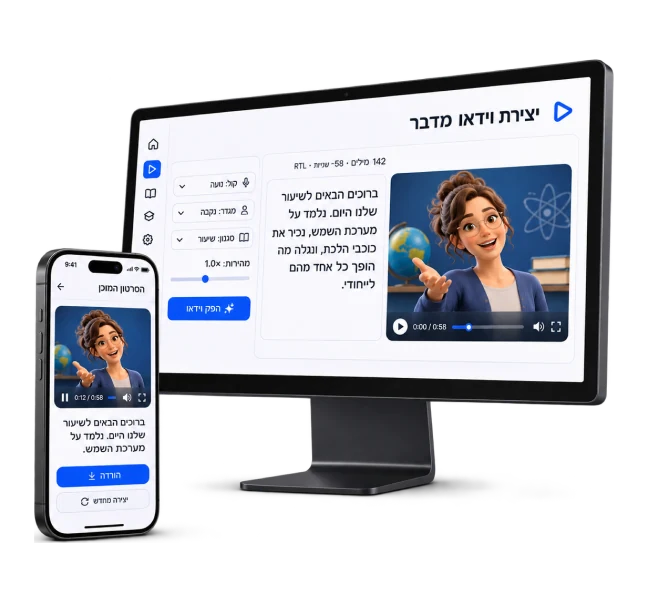
Most Hebrew is written without vowels, so a text-to-speech engine has to guess, and one wrong guess can turn a word into another. We built a Hebrew text-to-speech engine that reads Modern Hebrew the way people in Israel speak it, wired to AI lip-syncing so a single photo becomes a character that says the text out loud. Paste Hebrew text, pick a voice, get a video in under a minute.
Project Details: Hebrew Text-to-Speech & Lip-Synced Avatars
An EdTech startup in Israel asked us to build a Hebrew TTS engine and connect it to an AI lip-sync tool, so their users could turn any static image into a character that speaks Hebrew. Before this project, every Hebrew voiceover went through a voice actor and a studio: about 40 finished minutes a month, four to six days per script, and a video editor to cut it together. The same pipeline had to serve three use cases at once: lessons, digital assistants, and storytelling content.


Business Challenge: Making Hebrew Speech Look Right, Not Just Sound Right
The startup wanted on-screen characters that generate Hebrew speech for lessons, assistant replies, and stories. Most text-to-speech tools are built for English first, and their Hebrew voices often get a vowel or the stress wrong. Native speakers hear it straight away. Put a face on that voice, and the mistakes get harder to ignore, because now the lips can be off too.
We measured the gap before writing a line of code. Nine native speakers from Tel Aviv, Haifa, and Jerusalem listened to four commercial Hebrew TTS tools reading a 300-word sample heavy with homographs, loanwords, and names. The best of the four misread 29% of those words and scored 3.1 out of 5 for naturalness. The client’s own voice actor recordings scored 4.6. That is the distance the engine had to close, and the studio bill it had to replace: roughly $180 per finished minute of recorded Hebrew audio, by the client’s estimate.

Accurate Modern Hebrew Pronunciation & Prosody
Hebrew is mostly written without vowels, and stress is never written at all. The same letters can be "BI-ra" (beer) or "bi-RA" (capital city). Add slang, English loanwords, acronyms, and verbs that change with gender, and a Hebrew voice has to resolve all of it from context before intonation even comes up.

From Static Image to a Believable Hebrew-Speaking Avatar
Users did not want to film anyone. They wanted to upload a photo or a drawing and have it talk. Lip-sync models trained on English video have barely seen the Hebrew "ch" or the throaty "r," and in our tests viewers noticed a lip offset above 80 ms. The target was half that.

Scaling for EdTech, Assistants, and Storytelling
A lesson has to be slow and clear, an assistant has to answer fast, a story needs some feeling in it. Booking a voice actor every time a script changed cost too much and took four to six days, so the startup wanted one pipeline, one speech API, and voices that adjust speed and tone per use case.
Technologies Behind Our Hebrew TTS Solution


Our Hebrew Text-to-Speech & Lip Sync Solution
We built a pipeline that takes Hebrew text and one image and gives back a video of that image speaking. The speech is generated first, then the mouth movements are built from that same speech, so the lips never follow a different version of the words. The Hebrew voice is trained on 42 hours of studio recordings from four voice actors, two female voices and two male, in the he-IL locale.
Hebrew text-to-speech earns trust one homograph at a time. Discovery produced a test set of 2,400 words and phrases: 640 homographs that differ only in vowels or stress, 520 names, 450 gendered verb forms, 380 loanwords, 210 acronyms, and 200 phone numbers, dates, and addresses. The first prototype read 71% of them correctly. After three evaluation cycles with the nine-speaker panel, the figure was 95%, and naturalness moved from 3.4 to 4.2 out of 5. Our machine learning development team owned the voice; the lip-sync work ran on the same sprints.
Hebrew Text-to-Speech Conversion
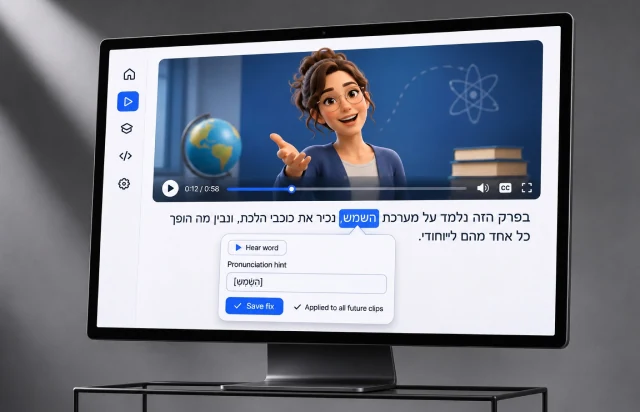
Users paste regular Hebrew text with no vowel marks. The G2P model adds vowels and stress from sentence context, so "BI-ra" and "bi-RA" each get read correctly where they appear. StyleTTS2 then voices the text with natural rhythm. A user can add niqqud or a phonetic hint for a word, and the system keeps that fix for every later clip; about 900 such fixes were saved in the first quarter.
Four Natural Sounding Voices, Three Styles
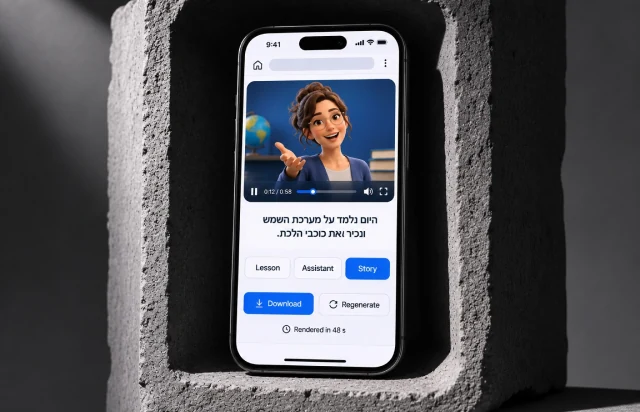
Two female voices and two male, each in a lesson style (slower, clearer, 0.9x), an assistant style (neutral, 1.0x), and a story style (wider pitch range, more pauses). Users adjust speed from 0.7x to 1.4x and pick the gender and tone per clip. Listeners rated the female voices slightly higher for lessons, 4.3 against 4.1.
Numbers, Dates, and Mixed Text
Phone numbers, prices, addresses, and dates are read aloud the way an Israeli would say them, with 97% of the 200 test items correct. English words inside Hebrew text, which is most product names, switch accent automatically, so an English to Hebrew text to speech handoff inside one sentence sounds like one speaker.
Lip-Sync from a Static Image
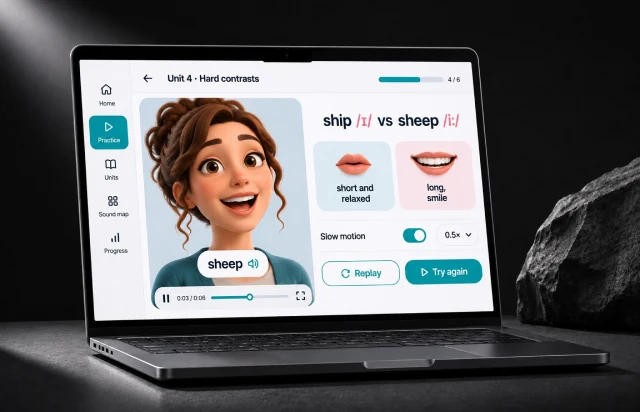
A single photo or illustration is all it needs. The model finds the face and animates the mouth, jaw, and cheeks along with the audio. The rest of the image stays still apart from blinking and a slight head turn, which keep the character from looking frozen. No video shoot, no 3D model, no motion capture.
Realistic Mouth Movements for Hebrew
Most lip-sync models learn from English video, so we remapped Hebrew sounds to 14 viseme classes. Throat sounds like "ch" barely move the lips; rounded vowels like "o" and "u" move them a lot. The lip-sync reads the same phoneme timeline the TTS produced, so each mouth shape lands within 40 ms of its sound.
One Pipeline, Several Use Cases
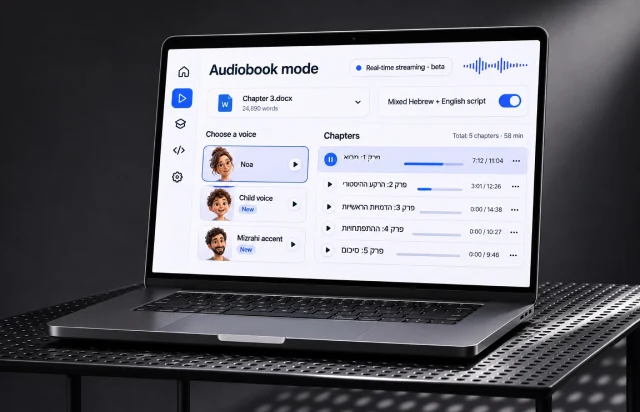
Lessons, assistants, and stories all run on the same engine. A teacher turns a vocabulary list into a talking tutor; a product team gives its assistant a face and a Hebrew voice; a children's author has an illustrated character read the story aloud. Most users work in the web studio, and partners who want it inside their own app use the REST speech API and SDK, which carried about 40% of clip volume by month three.
Export and Download
Generated audio downloads as MP3 or WAV, video as MP4 at 720p or 1080p, and a subtitle file comes with every clip. Anyone can try three clips on the demo page with no registration required.
— Agile Development Methodology
Project Journey
Seven months from kickoff to launch, in two-week sprints. Discovery began with a list of the words Hebrew TTS gets wrong most often, which became the 2,400-item test set, and native speakers rated every new version of the voice against it. The first internal Hebrew voice prototype was ready in week six; lip-sync joined it in sprint five.
How We Delivered This Hebrew TTS Project
- We define the goal together, agree which use cases come first, and list the Hebrew features the voice must handle.
- We rank what matters most, such as pronunciation accuracy, voice style, and how natural the avatar looks.
- Work is broken into 2-week cycles. We pick the next features and collect the Hebrew text and audio needed to train and test them.
- The team builds features, and native speakers evaluate the voice against the test set.
- At the end of every sprint, the client hears and sees working results and gives feedback for the next cycle.
- We release, track which words still cause trouble, and keep improving the Hebrew voice after launch.
Development Process Flow
AI development for a language most tools handle badly cannot be judged by a loss curve. A Hebrew voice that scores well on a benchmark can still say “beer” when it means “capital,” and only native listeners catch it. The two-week cadence meant the client heard a new voice 14 times before launch, and three of those sessions changed the pronunciation rules outright. The 95% figure was reached in sprint 11 and held through launch.
How the Hebrew Text-to-Speech System Works
- The user types or pastes Hebrew text into the studio, or sends it through the speech API, and uploads a photo or illustration with a face in it. Ordinary unvocalized Hebrew works fine. The studio shows the clip length and checks that the face is clear and facing forward.
- The model reads the whole sentence and decides how each word should sound: vowels, accent, stress, gender agreement, and whether a Latin-script word is an English loanword. User-saved fixes override the model.
- The engine speaks the phonetic text in the chosen voice and style at 24 kHz, about 1.8 seconds for a 20-word sentence, and keeps a timeline of which sound plays at which moment.
- The lip-sync model maps each phoneme to one of 14 Hebrew viseme classes. "B," "p," and "m" share a closed-lip shape; "ch" barely moves the lips. Shapes blend into each other so speech never looks jerky.
- The face is animated frame by frame at 25 fps and combined with the audio into a video. From pasted text to a finished 45-second clip takes under 60 seconds on a cloud GPU.
- The user listens, flags any word, adds a hint, and regenerates. Audio downloads as MP3 or WAV, video as MP4, with subtitles attached. API users get the same files back as a URL.
UI/UX Design: A Simple Studio for Hebrew Speech & Avatars
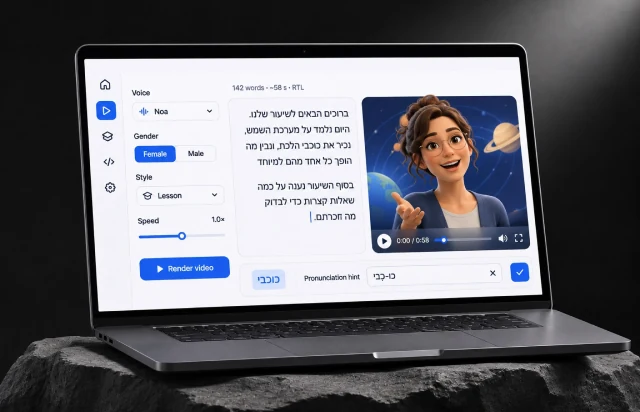
Users should know what they will get before they press render. The main editor has a right-to-left text area with a clear Hebrew font on the left, an avatar preview on the right, and voice settings in a sidebar: voice, gender, style, speed, and a play button that previews the first sentence in about two seconds. Above the text field sit the word count, the estimated clip length, and a reading direction indicator. We built this web studio to feel like a document, not a control panel, and the median first clip in the pilot took 3 minutes 40 seconds from signup to download.
Every control has a hover tip in Hebrew and English, worded the way EdTech creators and assistant builders already talk. Accessibility was a requirement, not a checkbox: keyboard shortcuts for play, pause, and regenerate, screen reader support on all controls, a high-contrast mode, and playback speed controls that work without a mouse. Roughly one in six studio users in the pilot used a screen reader or the high-contrast mode, because many people who rely on Hebrew text-to-speech have visual impairments.
The flag-and-fix loop got the most design attention. A user clicks any word in the transcript under the preview, hears it in isolation, and types a hint. That hint is saved to their account and applied to every clip after, which is where the 900 first-quarter fixes came from. Testing with 12 users cut the flow from five clicks to two.
— Timeline
Five phases, clearly defined
Discovery & Hebrew Test Set
- Building the 2,400-item test set across six error categories
- Recruiting the nine-speaker evaluation panel
- Ranking the three use cases: lessons first, assistants second, stories third
Voice Prototyping
- Benchmarking four commercial Hebrew TTS tools (best: 71% on the sample, 3.1/5 naturalness)
- Recording 42 hours of studio Hebrew audio with four voice actors
- Training the first G2P and StyleTTS2 models; week-six prototype at 71%
Agile Development
- Context model for homographs, stress, and gendered verbs
- Lip-sync with 14 Hebrew viseme classes and a 40 ms sync target
- Web studio, REST speech API, SDK, and export formats
QA & Native Review
- Three full evaluation cycles on the test set, 71% to 88% to 95%
- Lip-sync checks on 120 clips across photos, illustrations, and cartoons
- Load testing at 60 concurrent renders on the GPU pool
Launch & Support
- Pilot with 6 content partners, 3,800 clips in the first two months
- Weekly review of flagged words and monthly voice retraining
- Streaming voice work started in month eight
Results
Before
- ✕Off-the-shelf voices misread 29% of a homograph-heavy Hebrew sample and scored 3.1/5 for naturalness
- ✕Every new script meant a voice actor, a studio slot, and four to six days of turnaround
- ✕About $180 per finished minute of recorded Hebrew audio, around 40 minutes a month
- ✕A talking character meant filming a person or animating by hand
- ✕Separate workflows for lessons, assistants, and stories
- ✕No way for users to correct a mispronounced name or loanword
After
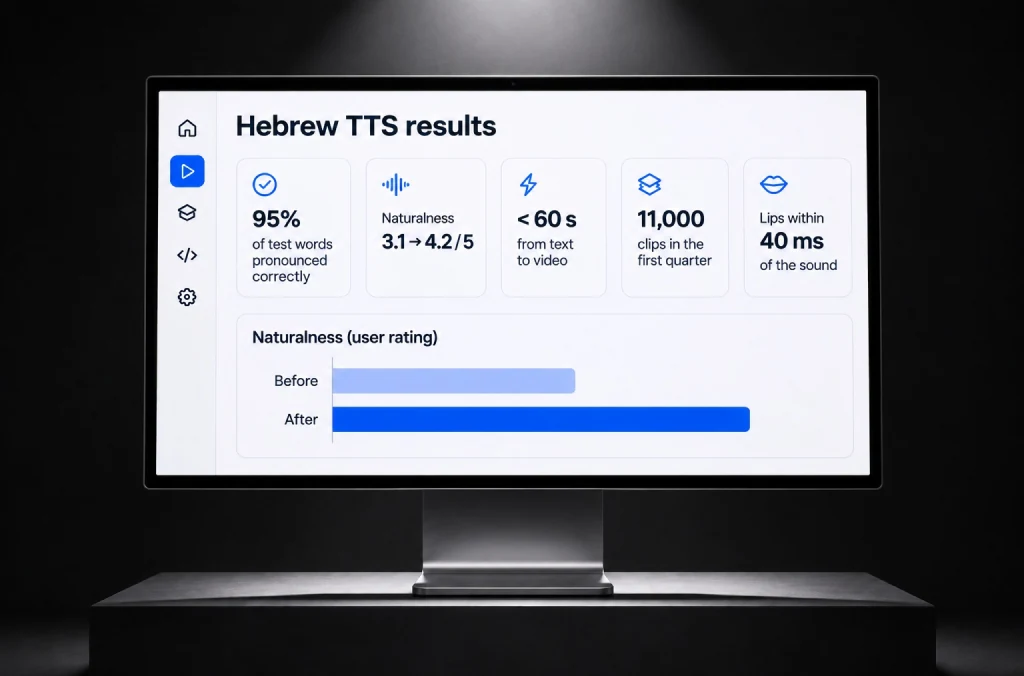
- ✔95% of 2,400 test words pronounced correctly; 4.2/5 naturalness from the same native panel
- ✔A finished clip from pasted Hebrew text in under 60 seconds, any hour of the day
- ✔Roughly $0.40 of GPU time per minute; 11,000 clips in the first quarter
- ✔One photo or illustration is enough; lips land within 40 ms of the sound
- ✔One pipeline with three styles, in the web studio and through a REST speech API and SDK
- ✔Click a word, add a hint, and the fix sticks; about 900 saved in the first quarter
Impact of the Hebrew TTS Engine After Launch
— Verified Reviews
Our Reputation on Top Platforms
LITSLINK holds a 4.8 rating on Clutch and GoodFirms, with Top Developer and Top Company badges on both. Clients who review our AI work usually bring up the same few things: we say early when a feature is not worth a sprint, our estimates hold, and the people they meet at kickoff are the ones who ship. Teams building in-house can hire AI developers from the same bench.
Have a Text-to-Speech Project in Mind?
Maybe you need Hebrew text-to-speech, a voice in another language most tools handle badly, or a character that can speak your content without anyone filming it. Tell us the language, who will listen, and where the speech will be used. A LITSLINK specialist gets back to you within 48 hours with a scope and a number.
Thank you for your message. It has been sent.