



Building an English Pronunciation Trainer with TTS and Lip-Sync
- 12,000+ learners practicing every month
- 44 English sounds voiced and animated
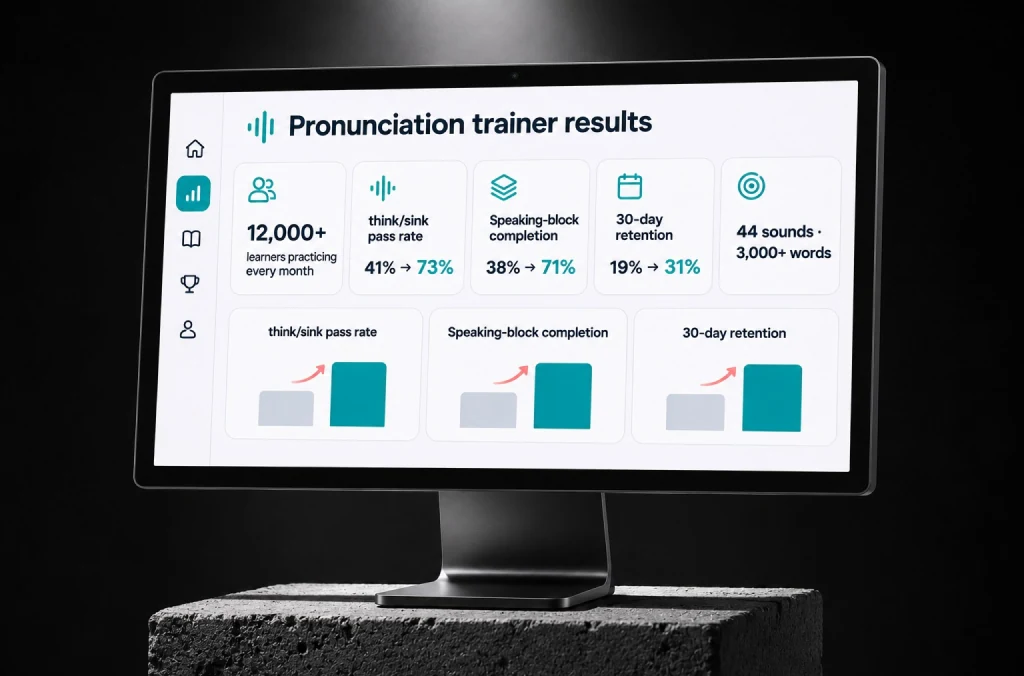
- 73% pass rate on "think/sink," up from 41%
- 3,000+ words and phrases in the course
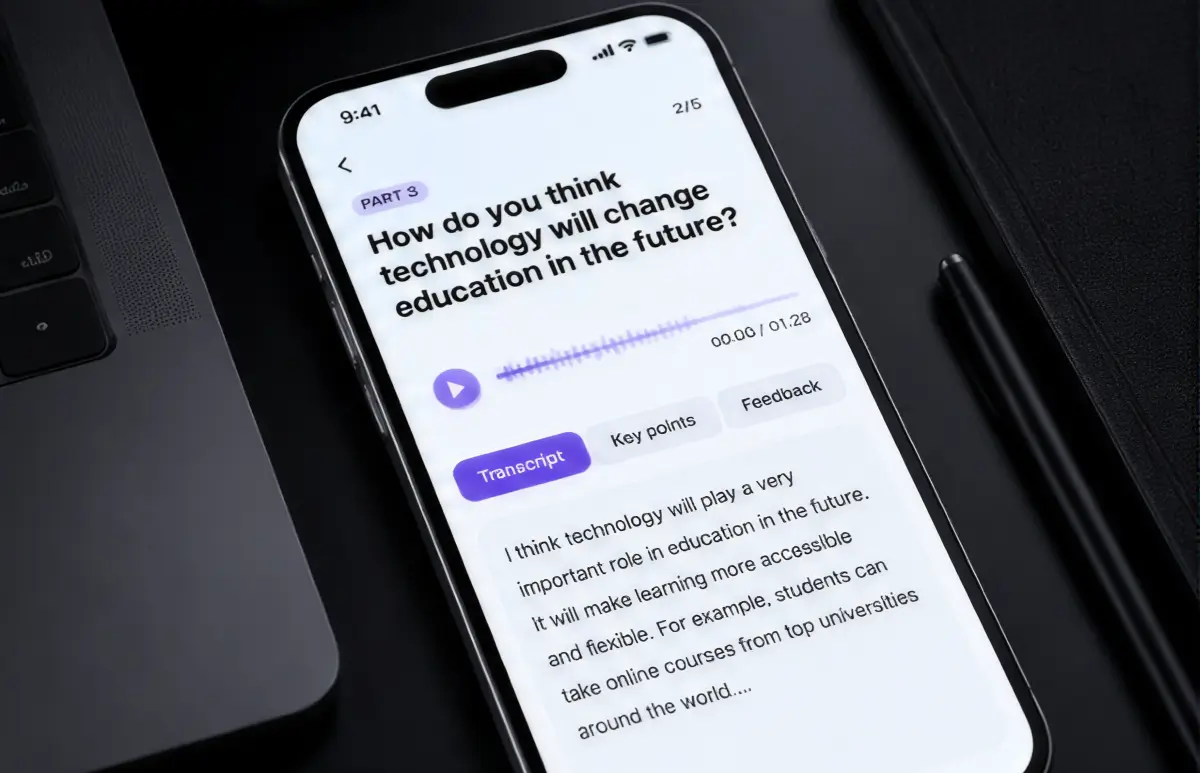
Many adults learning English can read "think" long before they can say it clearly, usually because nobody ever showed them where the tongue goes. This language learning app development project put a speaking character at the center of the course: a TTS voice with lip-synced mouth movements, so learners see how a sound is formed before they try it. It runs on iOS, Android, and the web, and 12,000+ learners practice with it every month.
Project Details
An EdTech startup in the EU asked us to build an English pronunciation trainer: a speaking character that shows language learners how each sound is formed, with text-to-speech for the voice and lip-sync for the mouth. Before this, the startup ran a web-based English course for adult learners at A2 to B1 level, with about 9,000 monthly users on text lessons and pre-recorded audio clips. Speaking practice was the weakest part of the feature set and the most requested one in user feedback.


Business Challenge: Teaching Sounds You Cannot Hear Properly
If your first language has no “th,” your ear files it under “s” or “f.” You can listen to native speakers a hundred times and still hear the wrong sound, because the brain fills the gap with something familiar. Learners need to see the tongue between the teeth, the rounded lips on “w,” the jaw dropping for the vowel in “cat.” Audio on its own cannot show any of that.
The old course had the numbers to prove it. Only 38% of learners finished the speaking block at the end of a unit, against 81% for the reading block. In the startup’s exit survey, “I still can’t say the words” was the top reason for canceling a monthly or annual subscription. And every new batch of audio recordings took about two weeks of studio time and editing, so the 300-word lesson backlog sat untouched for most of a year.

Misaligned Content and Skills
Speaking was a "listen and repeat" block at the end of each unit, with no way to see how a sound is made. A learner could finish a whole topic without saying its key words out loud. The trainer had to sit inside the lessons and use the vocabulary practice learners were already doing.

Limited Control Over Experience and Data
Off-the-shelf pronunciation tools decide how sounds are explained and what data comes back. The old course gave the startup no per-sound data at all, so nobody could say which sounds learners struggled with. The client wanted to control both the teaching and the progress tracking.

Recording That Does Not Scale
A human teacher on video for every word meant a new recording for every lesson, accent, or speed. At about $1 per word and two weeks per batch, the content team added roughly 40 new words a month. The target was ten times that, with no studio.
Technologies Behind Our Language Learning App



Our Pronunciation Training Solution
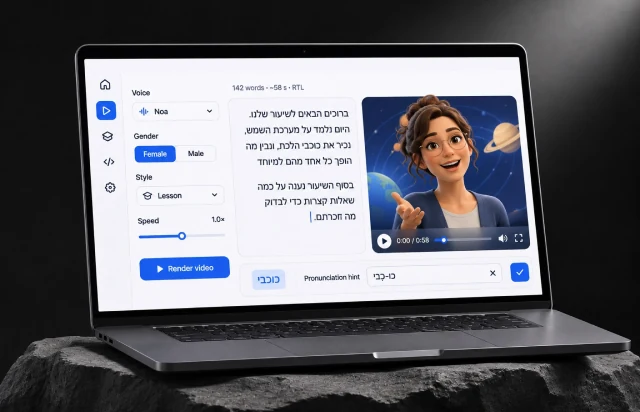
Instead of recording a human teacher, we built one AI language learning coach that can say any word in the course. The voice comes from text-to-speech and the mouth from lip-sync, so a new word only needs its text. Language learning app development usually stalls on content: every feature is cheap next to the cost of recording it. This design made the content pipeline nearly free, and that changed what the startup could afford to teach.
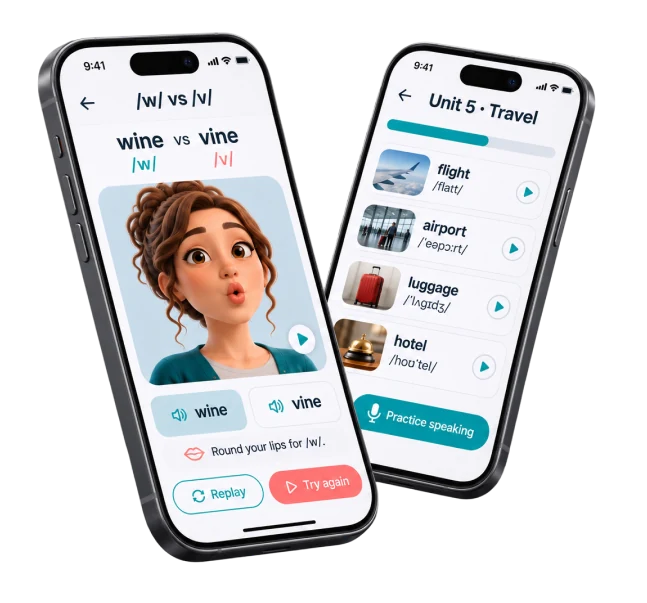
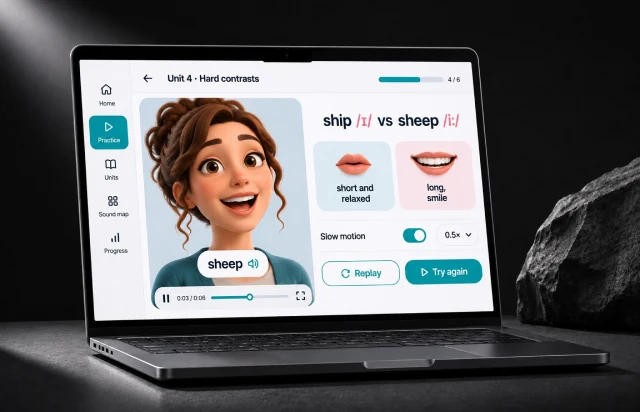
The trainer covers all 44 English sounds, 3,000+ words and phrases, and the five contrasts teachers ranked hardest for the target audience: /θ/–/ð/ (“th”), /r/–/l/, /w/–/v/, /æ/ (“cat”), and /ɪ/–/iː/ (“ship” and “sheep”). Learners speak Spanish, Italian, Portuguese, Polish, or German as their own language, and none of those has the English “th.” Our AI development team owned the voice and animation pipeline; the mobile and web work ran on the same sprints.
Text-to-Speech for English Sounds
Words, phrases, and individual sounds are voiced with TTS, so no video lessons have to be recorded. When the content team adds a word, it is voiced and animated in under 2 seconds and uses the same clear voice as every other word in the course. The team now adds about 300 new words a month without a recording session.
Lip-Sync for Realistic Articulation
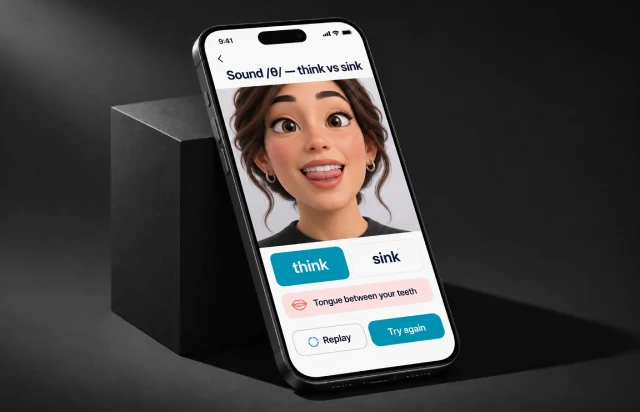
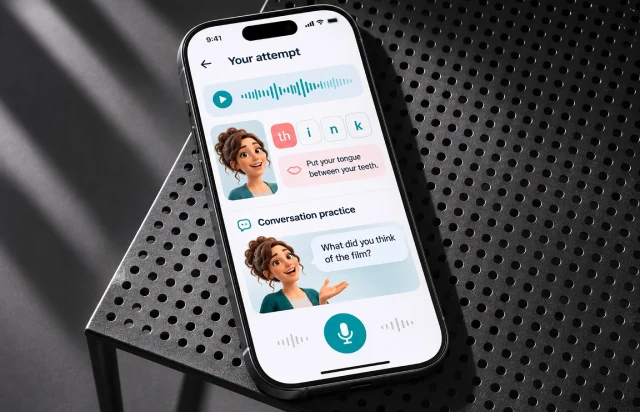
Each sound in the audio maps to one of 21 mouth shapes, so the character's lips and jaw move in time with the voice. Mouth shapes stay within 40 ms of the audio, one frame at 25 fps, and learners in testing started noticing an offset at about 45 ms. On "th" the tongue sits between the teeth; on "v" the top teeth rest on the lower lip.
Six Speaking Styles
The character does not speak in one flat tone. Six styles set through SSML (neutral, friendly, cheerful, calm, excited, serious) let the same sentence land differently, which is part of learning to sound natural in real conversations. Lessons in the story style were replayed 1.6x more often than neutral ones.
Visual Cues for Faster Acquisition
On-screen cues point visual learners to the part of the face that matters for the sound: lips, tongue, or jaw. Useful hints appear on the second failed attempt, not the first, after testing showed learners ignored them when they came too early.
Practice Inside the Lesson
Pronunciation practice is tied to the vocabulary each unit teaches, so learners practice speaking the words they just learned instead of a generic drill. Daily lessons include five to eight new words with the sounds they contain, and each one ends with a missing-word check.
Per-Sound Analytics
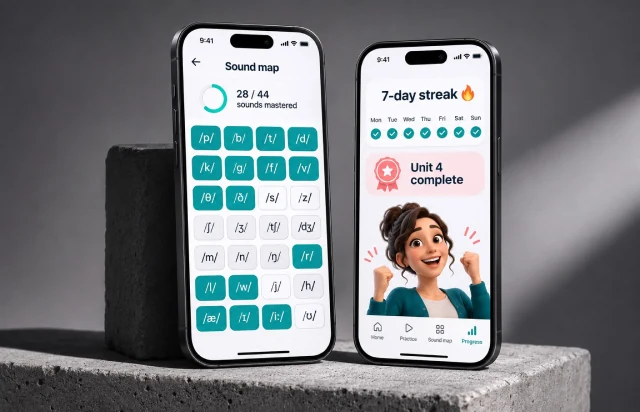
Replays, attempts, and drop-off are logged for every sound, so the content team sees which ones learners avoid. Progress tracking surfaces to the learner as a sound map that fills in over time.
Freemium Business Model
The first two units and ten sounds are free; the rest sit behind premium features on a monthly or annual subscription, with no in-app advertising. Free-to-paid conversion moved from 4.1% to 6.8% in the two quarters after launch.
— Agile Development Methodology
Project Journey
About 11 months: three weeks of discovery and 24 two-week sprints. Discovery focused on which English sounds the target learners find hardest. We interviewed 12 learners and 4 teachers, and the teachers’ ranked list of five contrasts became the first release scope. The first speaking character was in front of real learners by sprint 3, and beta testing with 400 users ran from sprint 9 through sprint 14.
How We Delivered This Language Learning App
- We define the project goal together, agree on priority features, and set a realistic delivery date and budget.
- We build a ranked list of everything the product needs, starting with what matters most to the business.
- Work is broken into 2-week cycles. At the start of each, we select the next set of features to deliver.
- The team builds, tests, and integrates features throughout the sprint.
- At the end of every sprint, you see working software and give feedback that shapes the next cycle.
- Each sprint produces a shippable piece of the product. We review what worked, adjust, and move forward.
Development Process Flow
A pronunciation trainer is easy to get almost right and hard to get exactly right, which is why software development on this product never ran more than two weeks without a build in a learner’s hands. The client reviewed the character 24 times before launch, and four of those reviews changed how a sound is taught. Two of the six speaking styles came from a teacher’s request in sprint 7.
How the Pronunciation Trainer Works
- Practice starts small: one tricky sound like "th," then words that use it, then phrases where it appears in natural speech. A learner who cannot yet make the sound will not fix it by repeating whole sentences.
- Text-to-speech voices the text the moment it is added, so no word waits for a recording. Along with the audio, the engine marks which sound is spoken at which moment, which the lip-sync step needs.
- Once a word has been generated, the audio is cached. More than 95% of plays come straight from Redis, so a replay starts instantly even on a slow connection.
- The engine reads the audio sound by sound and sets one of 21 mouth shapes for each. "P," "b," and "m" all start with closed lips. Shapes blend into each other within 40 ms of the voice.
- The learner hears the sound and watches it being made at the same time, the way people pick up sounds from a face in real conversations. They copy the mouth position, try it, and replay as often as they like, at their own pace.
- Every replay, attempt, and skip is logged per sound. The content team sees which sounds learners avoid, and the learner's sound map fills in as they go.
UI/UX Design: A Face That Teaches
The character is the center of the visual design because its mouth is the lesson. Everything else on the screen supports it without competing. On a phone, the face takes about 55% of the screen height, so small details, like the lips closing on “b” or the teeth touching the lip on “f,” are easy to see at arm’s length. The controls a learner uses most often, replay and try again, stay within thumb reach so they can practice without looking away from the character.
The character’s style mattered as much as its placement. Too cartoonish, and mouth shapes get exaggerated and harder to copy; too realistic, and the face feels strange to watch for a long session. We ran two rounds of character-style testing with 40 learners, and a semi-stylized face scored highest on a 5-point “watchability” scale, 4.3 against 3.1 for the realistic option. The user interface had to work on a small phone screen and on a laptop, where the extra room goes to the word being practiced and its cues. Design took about 200 hours across both.
We kept gamification elements deliberately light: a streak for daily lessons, a sound map that fills in, and a unit badge for completing lessons. Learners who kept a seven-day streak were 1.8x more likely to still be active a month later, which is why the streak reminder is the only push notification the app sends.
— Timeline
Five phases, clearly defined
Discovery & Research
- Interviewing 12 learners and 4 teachers across five first languages
- Ranking the five hardest sound contrasts for the target audience
- Mapping the old course: 9,000 monthly users, 38% speaking-block completion, 40 new words a month
Design & Prototyping
- Two rounds of character-style testing with 40 learners
- Wireframes for mobile and web, face at 55% of the screen
- First TTS plus lip-sync prototype on 44 sounds, 40 ms sync target
Agile Development
- React Native apps for iOS and Android, web client, Node.js backend
- Content pipeline: word in, voiced and animated clip out in under 2 seconds
- Six speaking styles, per-sound analytics, freemium gating
QA & Beta Testing
- 320 test cases on 22 device and OS combinations
- Frame-by-frame lip-sync review at 60 fps
- Beta testing with 400 learners, 14 teaching fixes from their feedback
Launch & Support
- Store release on iOS and Android, web rollout the same week
- 8-week pilot with 1,500 learners
- Monthly review of per-sound drop-off with the content team
Results
Before
- ✕Learners could hear English sounds but not see how they were made
- ✕New audio recorded in a studio: about two weeks and ~$1 per word, roughly 40 words a month
- ✕No per-sound data and no control over how sounds were taught
- ✕Speaking practice was a "listen and repeat" block at the end of each unit; 38% completion
- ✕"Think/sink" minimal-pair pass rate of 41%
- ✕Web only, about 9,000 monthly users
After
- ✔A speaking character shows how each of the 44 sounds is formed, with TTS audio and lip-synced mouth movements
- ✔New words voiced and animated from text the same day, under $0.01 per word, about 300 words a month
- ✔The startup controls the teaching and sees replays, attempts, and drop-off for every sound
- ✔Practice tied to the lesson vocabulary; speaking-block completion at 71%
- ✔73% pass rate after the 8-week pilot with 1,500 learners
- ✔iOS, Android, and web; 12,000+ learners practicing every month
Impact: What Changed for the Business
— Verified Reviews
Our Reputation on Top Platforms
LITSLINK holds a 4.8 rating on Clutch and GoodFirms, with Top Developer and Top Company badges on both. Clients who review our EdTech and AI work tend to mention the same things: we say early when a feature is not worth the sprint, our estimates hold, and the team they meet at kickoff is the team that ships. Teams building in-house can hire AI developers from the same bench.
Have an E-learning Project in Mind?
Building a language app, a speaking tutor, or any product where learners need to see and hear something before they get it right? As a language learning app development company, we start with the skill your users avoid. Tell us who your learners are and which platforms you need, and a LITSLINK specialist gets back to you within 48 hours.
Thank you for your message. It has been sent.