


Building an AI-Powered Pronunciation Checker for English Learners
- 92% agreement with human raters
- 7% word error rate on learner audio
- 44 English phonemes scored separately
- 1,100 hrs of training audio collected
An international EdTech company came to us with one ask: grade spoken English like a trained examiner, in seconds. We built the pronunciation checker behind it, an ML solution that handles English speech transcription, scores every recording, and shows the learner exactly which sounds cost them points.
Request similar solution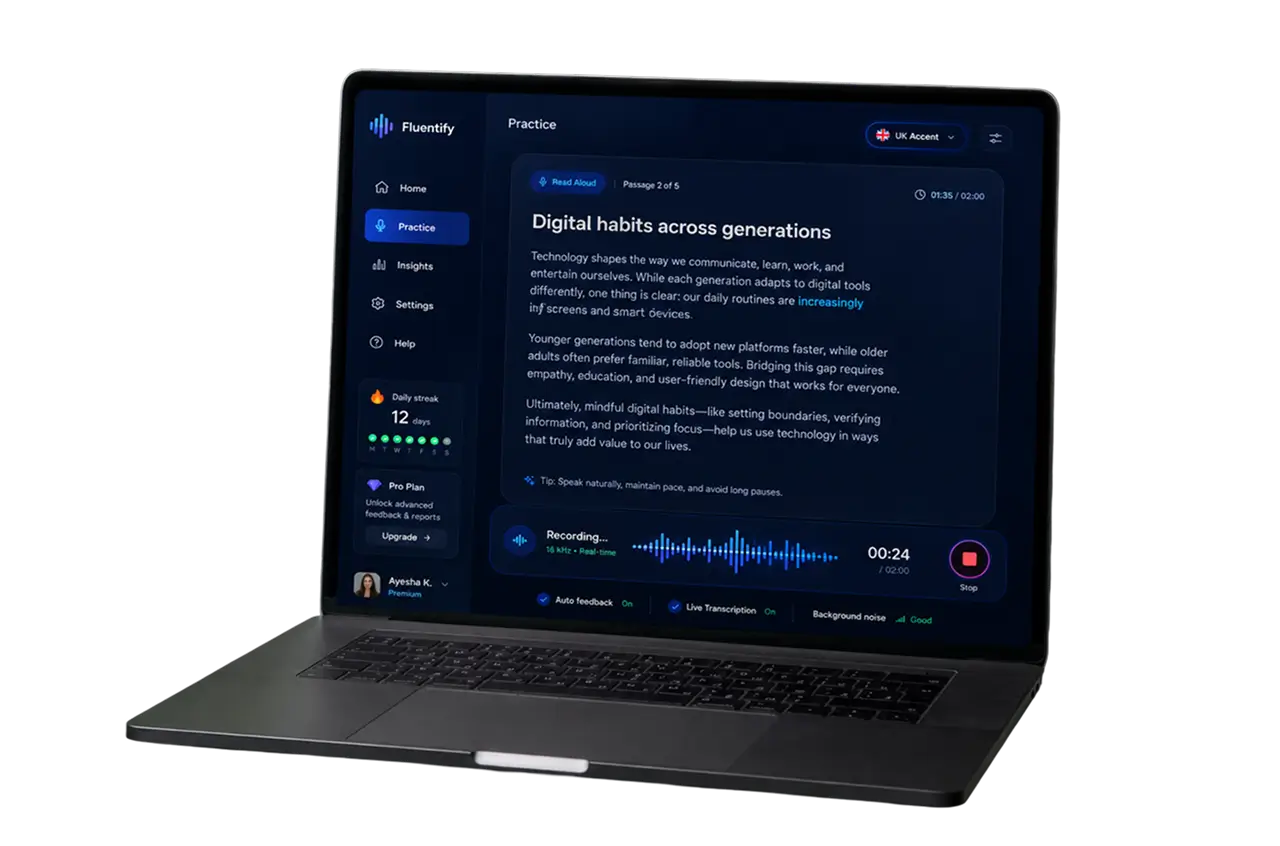
Project Details
The client runs exam preparation courses for adults and university students working toward English tests, including the PTE speaking test, and for professionals who need English for job interviews and presentations. Their platform already graded reading, listening comprehension, grammar, and vocabulary exercises on its own, and learners liked those tools well enough. Speaking was the gap, because every spoken answer sat in a queue until a human rater got to it.
 Client
- International EdTech company
 Industry
- EdTech & Language Learning
 Solution
- AI-based pronunciation assessment platform
 Service
- ML Dev + Speech Recognition + Cloud Deployment
 Platform
- Web app + REST grading API
 Scope
Scope- ML Engineering, Data Engineering, Backend, QA, DevOps
 Duration
- ~7 months
 Location
- US & EU
Business Challenge: Creating an Advanced Speech Recognition Platform for Language Education
Speaking is the one skill an online course cannot assess on its own. A reading task has right answers. A spoken English sentence has forty ways to be almost right, and only a trained ear tells you which one the learner produced.
So the client’s raters listened by hand. Turnaround ran 24 to 48 hours per batch, cost roughly $0.35 per recording, and still produced a single number with nothing attached to it. A learner would record once, wait two days, read a score of 62, and have no idea whether the problem was their vowels, their pacing, or a word they skipped entirely. Practice volume stayed low as a result. Across a pilot cohort of about 3,000 language learners, the average was four recordings a week, well under what the course design assumed.
Volume made it worse. The platform collected roughly 18,000 spoken practice exercises a month, and close to a third of them arrived in the ten days before an exam sitting. Nine part-time raters covered that load. When two of them took holiday, the queue stretched past 72 hours, and the support tickets that followed were variations of one question: what did I actually get wrong?
Doubling the cohort meant doubling raters, retraining each of them on the rubric, and living with the fact that the same recording could come back with two different scores depending on who opened it.
-

Scarce Graded Speech Data
Public corpora cover native speakers reading clean scripts. Nothing matched exam rubrics or real learner audio, so the model had no way to learn what a 68 sounds like next to a 79 across twelve first-language groups.
-

Two Models, One Verdict
Transcribing and grading answer different questions. The transcript records the words. The score has to reflect how those words sounded, and both models had to agree on the same recording instead of contradicting each other.
-

Audio of Unpredictable Length
Practice clips ran from five seconds to six minutes. Whisper reads audio in 30-second windows, so the pipeline had to split, process and stitch every recording back together without losing a syllable at the seams.
Technologies Behind the English Pronunciation Checker






Our AI Speech Assessment Solution
The design question was narrow: what does a model need to hear to score the way a human rater does? Not the words alone. Rhythm, stress, vowel length, the gap between one sound and the next. A transcript tells you what a learner said and nothing about pronunciation quality, so intent lived in the text while the evidence lived in the audio signal. That split shaped the architecture.
The grader listens for five things: whether each phoneme is present, whether stress lands on the right syllable, how words link together, how long the pauses run, and whether intonation moves where the sentence expects it. Pronunciation errors cluster by first language, and they repeat. Spanish speakers flatten the gap between /ɪ/ and /iː/. Japanese speakers merge /l/ and /r/. Because those errors are predictable, we can write the feedback once and reuse it across thousands of learners.
We start with MFCC features pulled from the raw audio, 40 coefficients on a 25 ms window. Whisper’s encoder turns them into an embedding; convolutional layers with residual connections read it, and dense layers produce the grade. Transcription runs in parallel through Whisper’s base model. Long recordings are split into 30-second windows with a two-second overlap and merged on word-level timestamps, so a six-minute answer still comes back as one transcript and one set of grades.
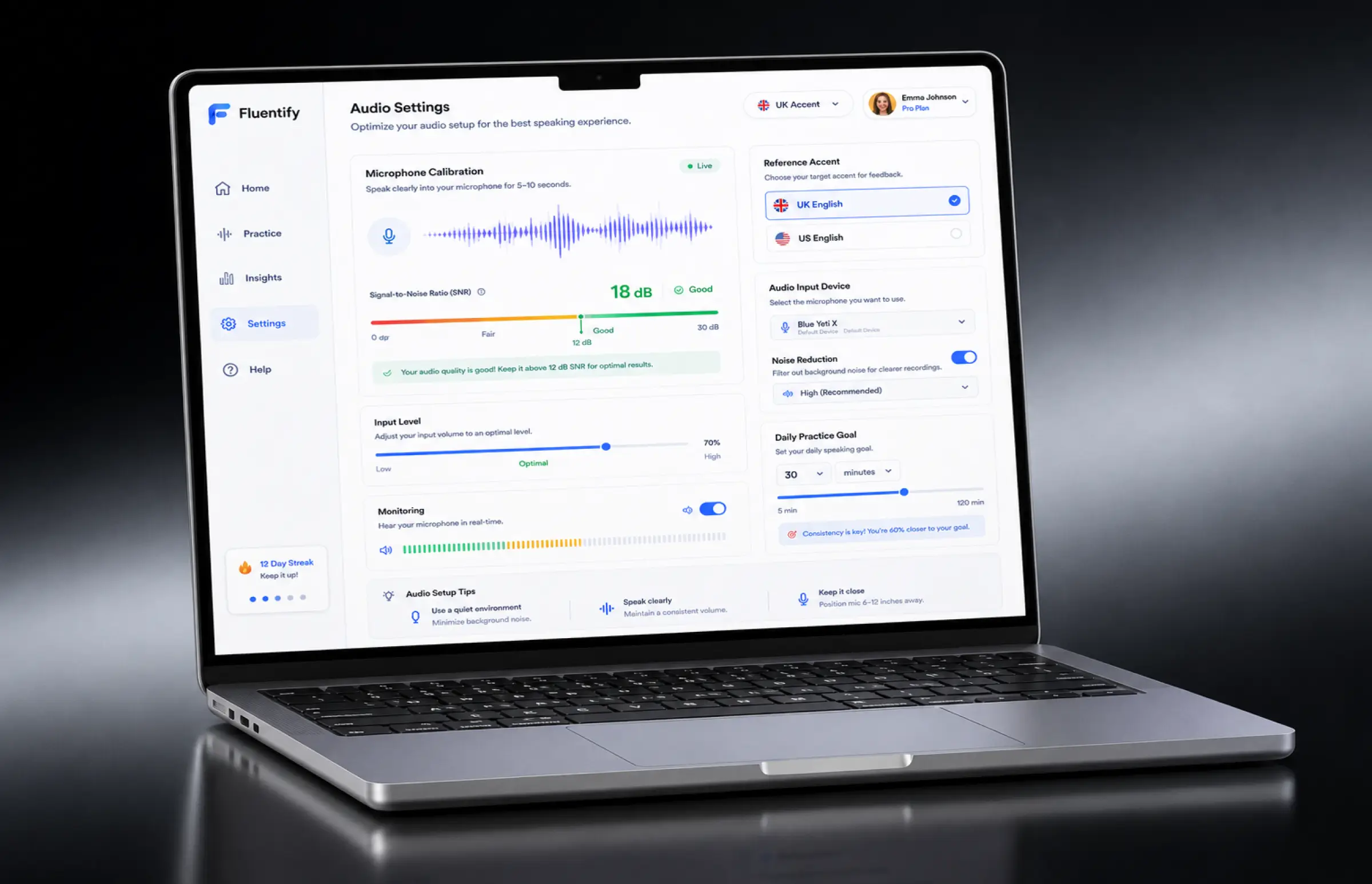
Pronunciation, fluency, and completeness get separate heads, because a blended number hides the learner who is strong on one and weak on another. Training used roughly 1,100 hours of English audio and 180,000 graded utterances. Calibration took longer than training: 5,000 held-back recordings, two raters each, thresholds tuned until the model landed within one band of the human average on about 92% of the set. It works above roughly 12 dB signal-to-noise, which is why the browser warns before it accepts a noisy take.
-
Word and Phoneme Scoring
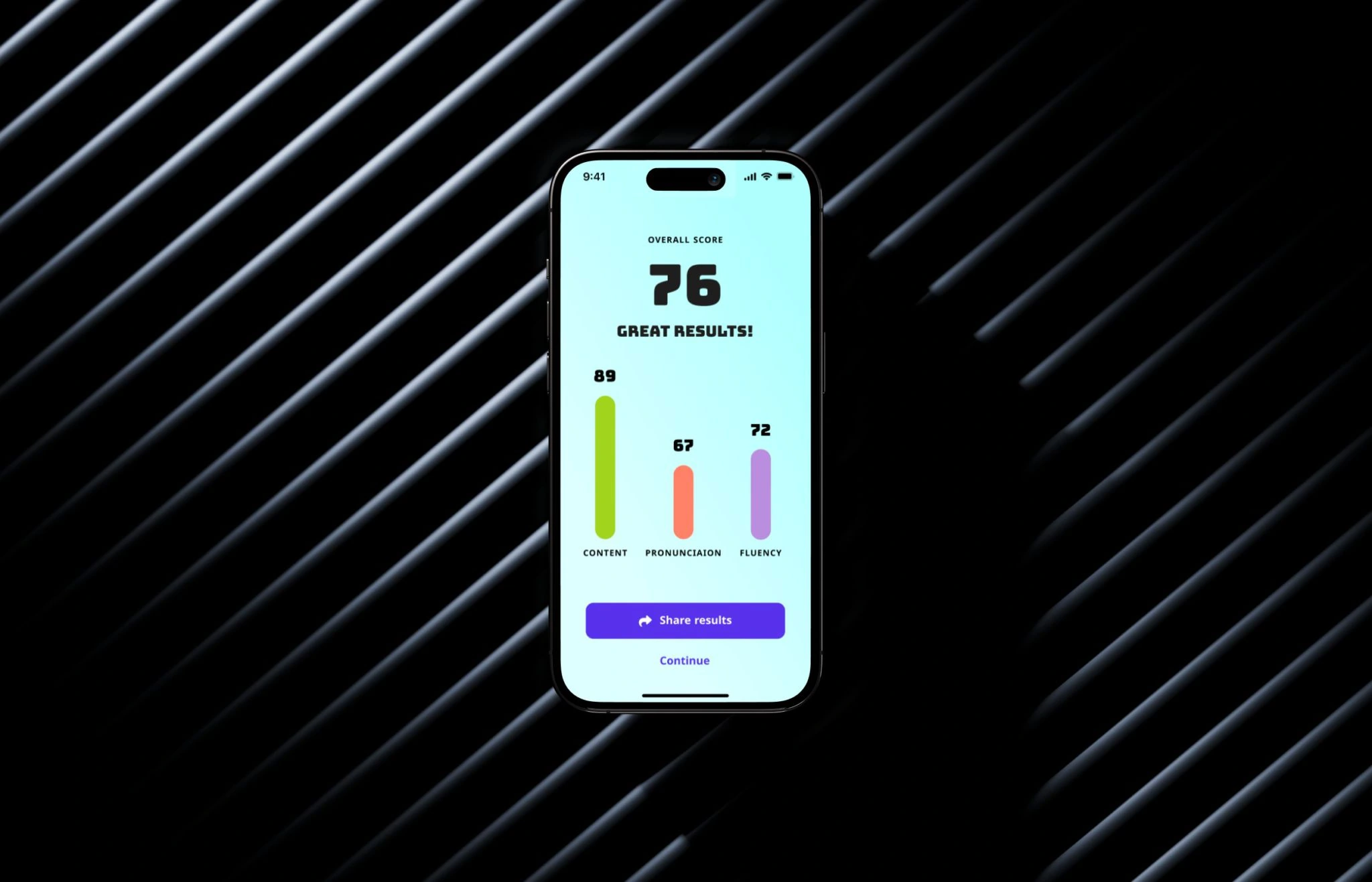
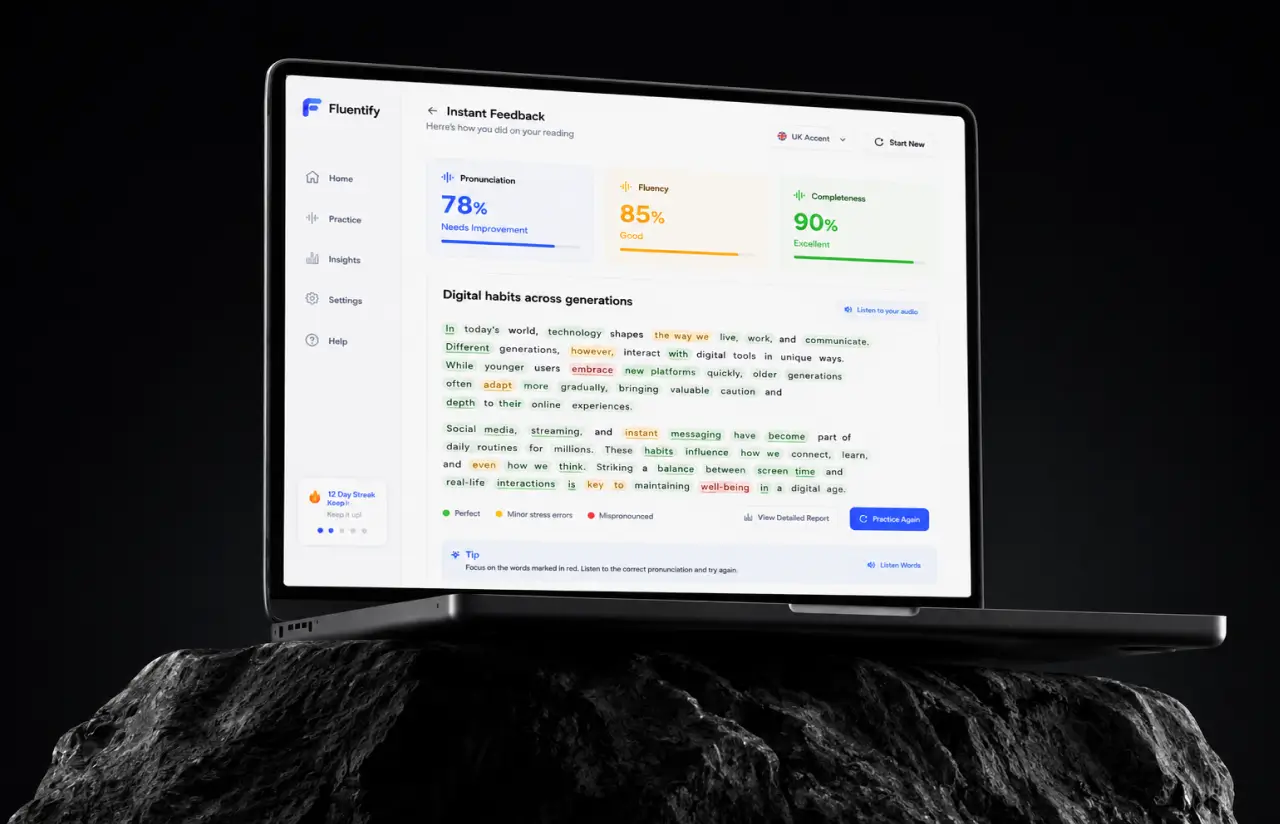
Every word gets a color, and every phoneme gets a confidence value. Learners see which specific sounds pulled the pronunciation score down, so practice targets a /θ/ or a short /ɪ/ rather than the whole English sentence again.
-
Instant Feedback in the Browser
The learner records, the score comes back in under three seconds, and advice on how to improve sits under the transcript. Instant feedback, no queue, and no waiting a day to learn that one word went missing from the sentence.
-
UK and US Reference Models
Learners pick the accent they are working toward, and each take is compared against UK or US English reference pronunciation from native speakers. A student headed for Manchester is never marked down for vowels that are correct in the UK.
-
Fluency and Completeness Analysis
Fluency analysis measures pace, pauses, and repetitions apart from pronunciation. Completeness compares the transcript with the English text on screen and catches the skipped or invented words that a pronunciation score alone would hide.
-
Progress Tracking by Sound
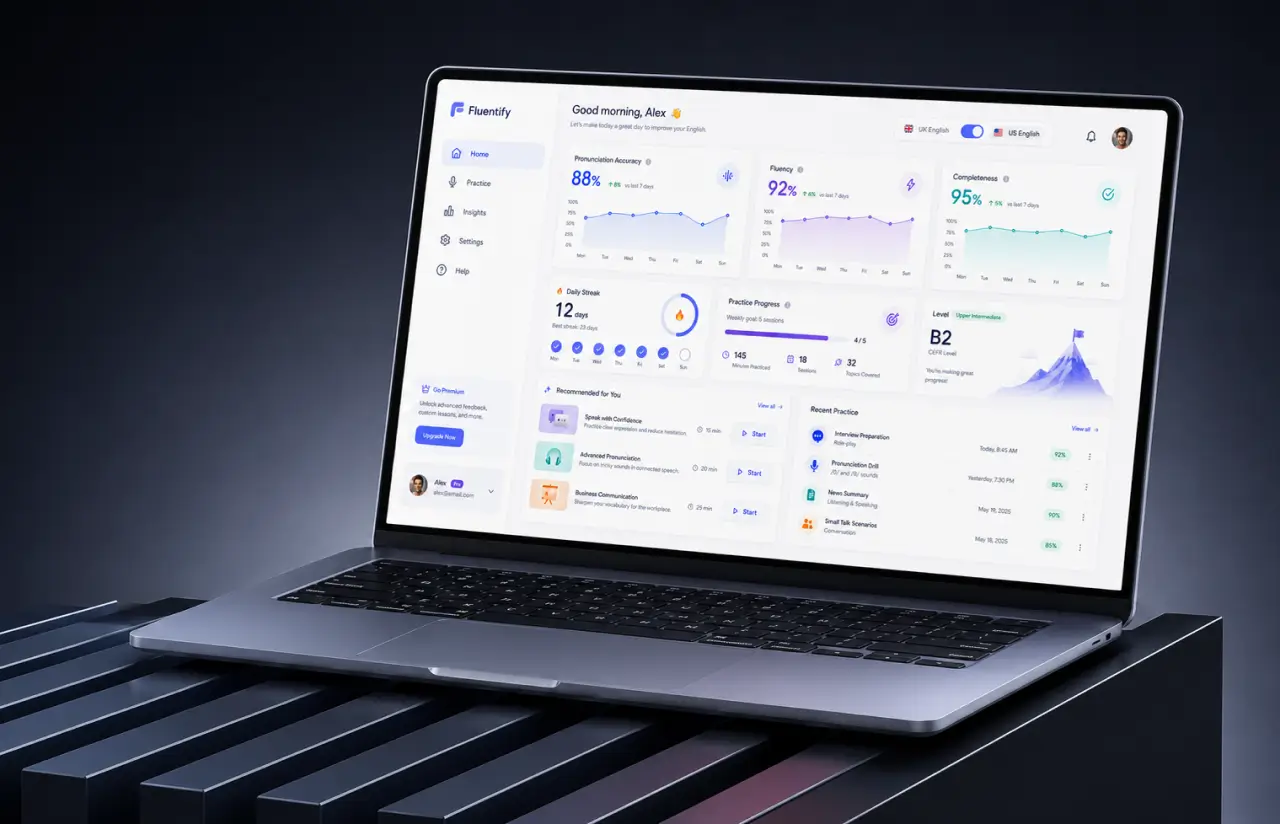
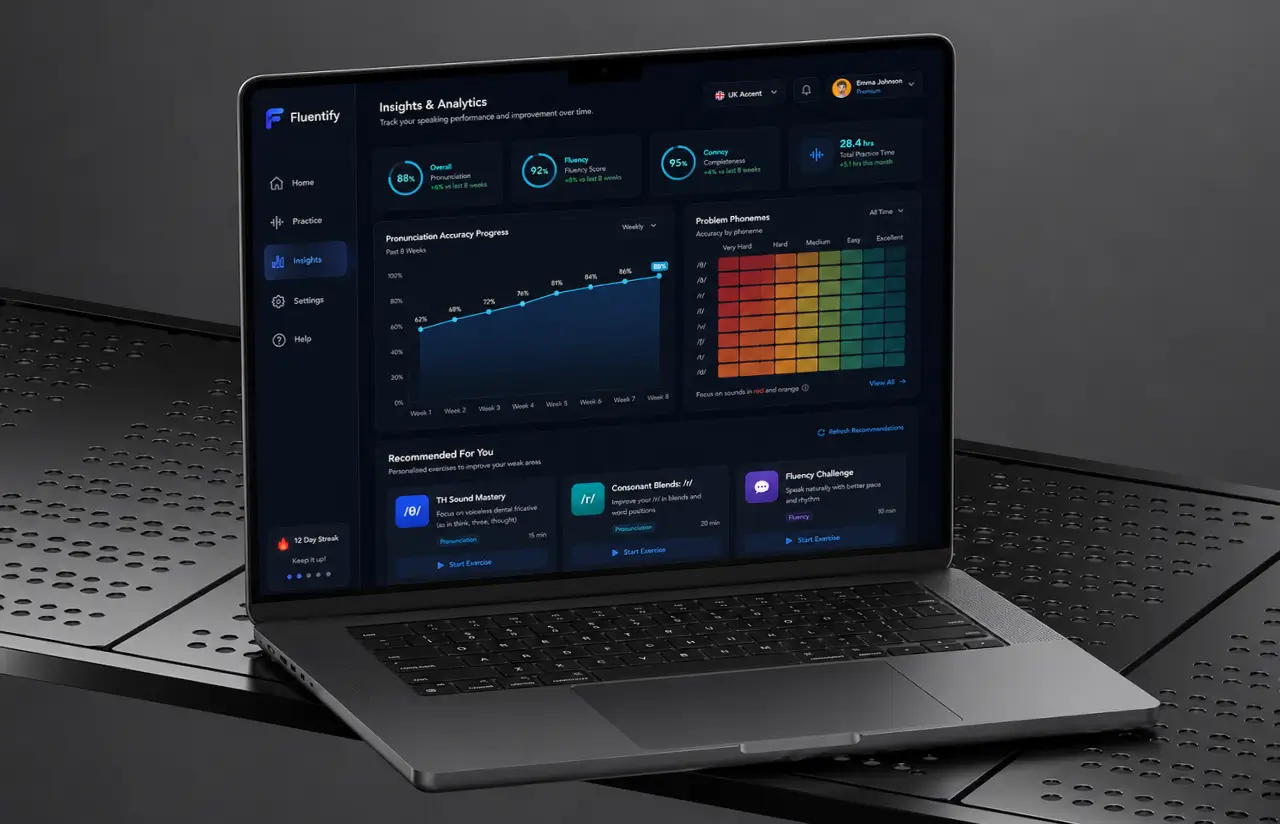
Learners sign in once, and every attempt is stored under their account. The dashboard charts pronunciation accuracy week by week and flags the phonemes that keep coming back as errors, turning vague practice into a short list of sounds.
-
Grading API for Partner Platforms
A Flask service exposes the same scoring engine over REST. Partner schools push English audio and get back the transcript, the grades, and a per-word analysis as JSON, then render all of it inside their own practice tools.
Need speech scoring inside your own learning platform?
Request a Similar SolutionScrum Methodology
Project Journey
Discovery ran for two weeks and ended with the decision that saved the project months: score each rubric dimension separately instead of predicting one blended number. Between those two points sat 22 training runs, three rebuilds of the data pipeline, and one week lost to a bug that turned out to be a sample-rate mismatch. Fourteen sprints later, the same pipeline handled 40-plus accents, six-minute recordings and a live demo in front of the client’s academic board.
- Weeks sprint cycles
- 2
- Sprints completed
- 14
- of sprints delivered on schedule
- 93%
- Team members
- 6
How the Pronunciation Checker Platform Works
-
Learner opens a practice page
A short English text appears on the page. The learner can read it cold, or listen to a native speaker read it first and shadow the audio.
-
Microphone captures the take
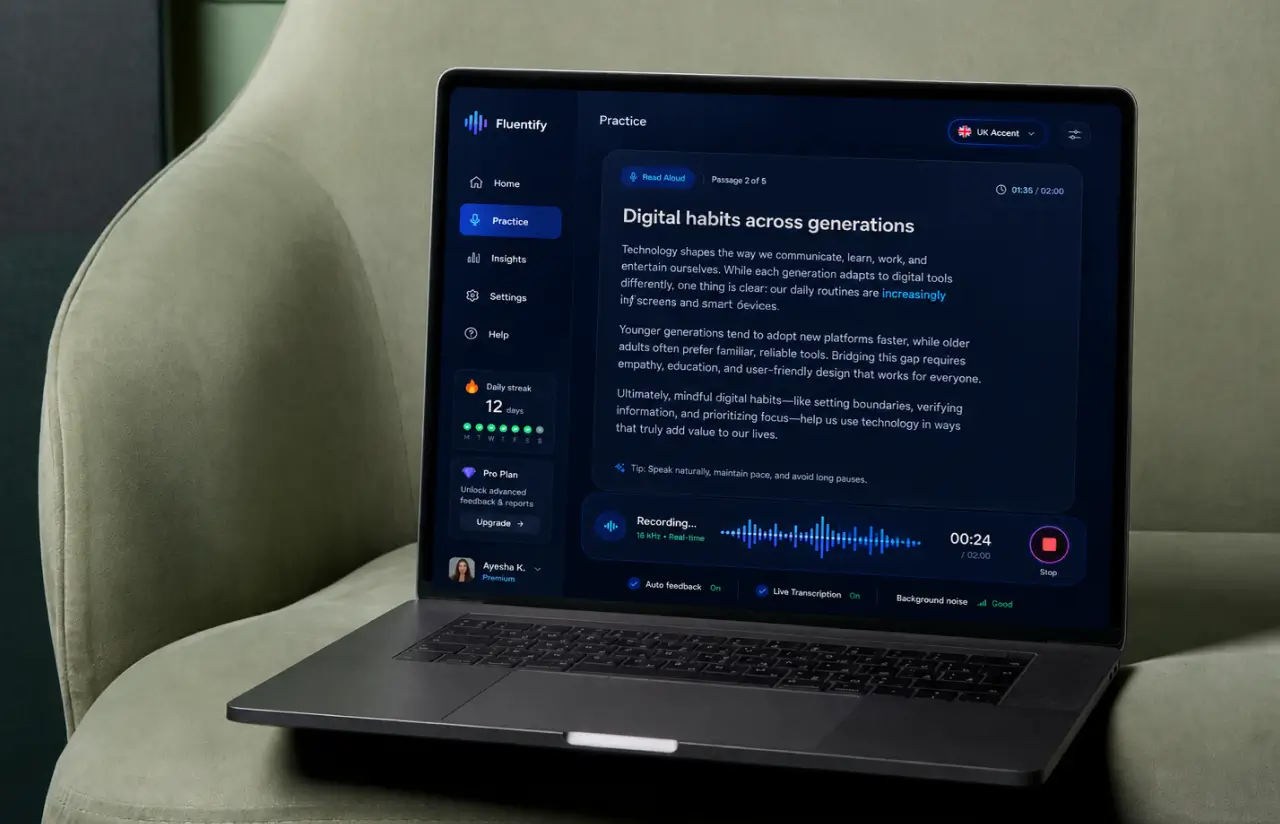
The learner reads the text aloud or repeats the recording. The browser captures voice at 16 kHz, with a live waveform confirming the microphone is picking up sound.
-
MFCC features get extracted
The signal is cut into 25 ms frames and reduced to 40 MFCC coefficients, a numeric shape of how the words were pronounced.
-
Whisper encoder builds embeddings
Whisper's encoder turns those features into an embedding. Its base model produces the transcription of the same audio in parallel.
-
Scoring heads return grades
Convolutional and dense layers decode the embedding into three grades, pronunciation, fluency, and completeness, plus a confidence value for every phoneme in the sentence.
-
Learner reads the feedback
Transcript, colored words, score, and advice on how to improve land in under three seconds. Weak sounds are listed by name. The next attempt is one click away.
Development Process Flow
AI development work goes wrong quietly, and a grading model is worse than most, because a plausible score hides a broken assumption for weeks. Every second Friday, the client’s academic lead scored the same ten recordings the model had just scored, and we compared the two sets side by side. That review loop caught the advanced-speaker bias in sprint 4, long before it could reach a single learner.
Inside Each Sprint
-
Daily Scrum
15-min sync every morning
-
Retrospective
Inspect & adapt process
-
Sprint Review
Demo to stakeholders
-
Increment
Shippable product update
How We Delivered the AI Pronunciation Checker
-
Scope & Timeline
We define the project goal together, agree on priority features, and set a realistic delivery date and budget.
-
Feature Priorities
We build a ranked list of everything the product needs, starting with what matters most to the business.
-
Sprint Kickoff
Work is broken into 2-week cycles. At the start of each, we select the next set of features to deliver.
-
Development Cycle
The team builds, tests, and integrates features throughout the sprint.
-
Review & Feedback
At the end of every sprint, you see working software and give feedback that shapes the next cycle.
-
Delivery
Each sprint produces a shippable piece of the product. We review what worked, adjust, and move forward.
Timeline
Five phases, clearly defined
-
Discovery & Workshop
2 weeks
- Mapping the client's rubric onto model outputs
- Auditing 200 sample recordings for accent and noise range
- Agreeing on what a passing grade has to mean
-
Data Collection & Labeling
3 weeks
- Assembling roughly 1,100 hours of English speech
- Double-scoring a 5,000-recording evaluation set
- Balancing the set across twelve first-language groups
-
Agile Development
~4 months
- Training rubric-specific heads on Whisper embeddings
- Building the chunking pipeline for six-minute audio
- Wrapping both models in a Flask grading API
-
QA & Testing
3 weeks
- Testing microphone capture on 30-plus browser and device combinations
- Replaying noisy recordings down to 12 dB SNR
- Checking score stability across repeated takes of the same sentence
-
Launch & Support
Ongoing
- Deploying GPU inference nodes behind an autoscaling group
- Monitoring rater-versus-model drift every week
- Retraining on fresh learner audio each quarter
UI/UX Design: Intuitive Interface for Speech Learning
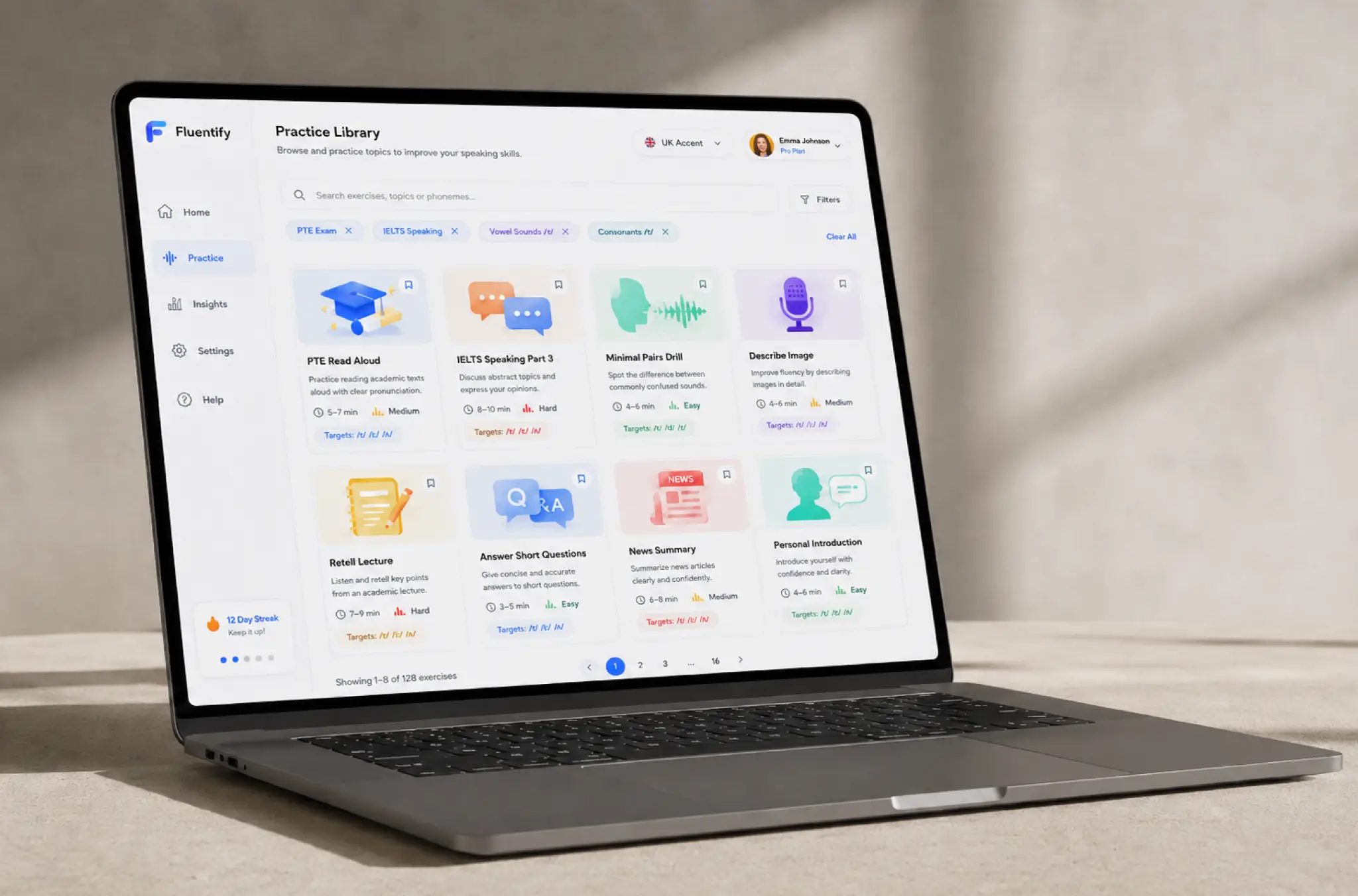
The interface had one job: get a learner from opening the app to speaking in under ten seconds. Practice sits in the left rail next to Home, Insights, Settings, and Help; a search box finds items by topic or by sound; and a session opens as a single card over the page instead of a new screen.
The passage itself is the interface. Words highlight as the learner reads, and after scoring, those same words carry the result: green for clean, amber for shaky, red for the sounds that need work. Tap any of the words or phrases and a native speaker pronounces it, then record that word alone to hear the correct pronunciation next to your own. Long readings scroll inside the card so the script never jumps under the reader.
Insights is the second half of the interface. It charts pronunciation accuracy week by week, lists the phonemes that keep returning as errors, and ranks practice exercises by how much each one is likely to improve the next pronunciation score. Learners who ignore the dashboard still improve. Learners who follow it improve faster, which is the argument the client uses in onboarding.
Results
Before
- Human raters graded practice recordings in 24 to 48 hours.
- Roughly $0.35 per graded recording, rising with every new cohort.
- Feedback arrived as one number, with no per-word or per-sound detail behind it.
- Two raters landed on different scores for about 1 in 5 recordings.
- No single place to track pronunciation progress across weeks of practice.
After
- Under 3 seconds from the end of a recording to a score on screen.
- About $0.02 per graded recording at pilot volume.
- 44 phonemes scored separately, with colored words, sound-level errors and written advice.
- 92% agreement with human raters, within one band.
- One account, one dashboard, every practice attempt tracked week by week.
Impact of the Pronunciation Checker After Launch
The platform scaled from 3,000 learners practicing four recordings a week to eleven without adding human raters. One GPU node handled around 1,200 recordings per hour, while human validation kept model agreement between 90% and 93% after launch.
The biggest surprise was learner behavior: users replayed individual words 6.4 times per session, showing that targeted sound correction mattered more than overall scores. The team rebuilt exercises around common pronunciation mistakes, while support tickets about score explanations dropped by 70% and raters shifted focus to mock exams and detailed feedback.
Thinking about automated speech grading?
Talk to Our AI TeamWhat’s Next
The current release grades read-aloud and repeat-after-me tasks, where the target text is known in advance. The next phase widens what the model is able to listen to:
- Free-Response Speaking: Scoring open answers where no reference script exists, using topic relevance and vocabulary range alongside pronunciation.
- Conversation Practice: A back-and-forth mode where the learner replies to spoken prompts, with feedback on intonation, turn-taking and the pauses that make an answer sound rehearsed.
- Wider Accent Coverage: Reference models for Australian and Indian English, plus better handling of the first languages that are still thin in the training data. Roughly 60 hours of audio per accent is the working target.
- Rater-in-the-Loop Retraining: Human scores collected in production feed the quarterly retraining cycle, so the grader keeps pace with how learners actually speak.
Verified Reviews
Our Reputation on Top Platforms
LITSLINK holds a 4.8 rating on top platforms, with AI, machine learning, and software development work delivered for clients in 82 countries. EdTech clients tend to mention the same two things in reviews: engineers who explain a model’s limits in plain English, and a project manager sitting in a US time zone.
Have an AI EdTech Project in Mind?
Building an English pronunciation checker, a speech grading API, or any AI tool that has to judge how people speak? Tell us what you have already, whether that is audio, rubrics, or just the idea, and our specialist will come back within 48 hours.
Next steps:
- LITSLINK specialist reviews your request and contacts you to discuss the details;
- If needed, we can sign an NDA before moving forward;
- We send a project proposal – estimates, timeline, and team CVs included;
- After launch, we stay on for any updates your product needs.
- 48h Response
- 1540+ Projects
Thank you for your message. It has been sent.