




Building Remote Patient Monitoring App: Tracking Records with Bluetooth Devices
- ~4 min for a full checkup session
- 2 device modes: Bluetooth and wired
- 10 auscultation points, 5 vital signs
- 99.6% crash-free sessions after launch
- ~2,400 patient records in 90 days
Clinicians in the field still lose an hour a day retyping notes. This remote patient monitoring app development project replaced the notebook with an app: Bluetooth medical devices record heart and lung sounds, and every checkup lands in the patient's history as soon as it ends.
Request similar solution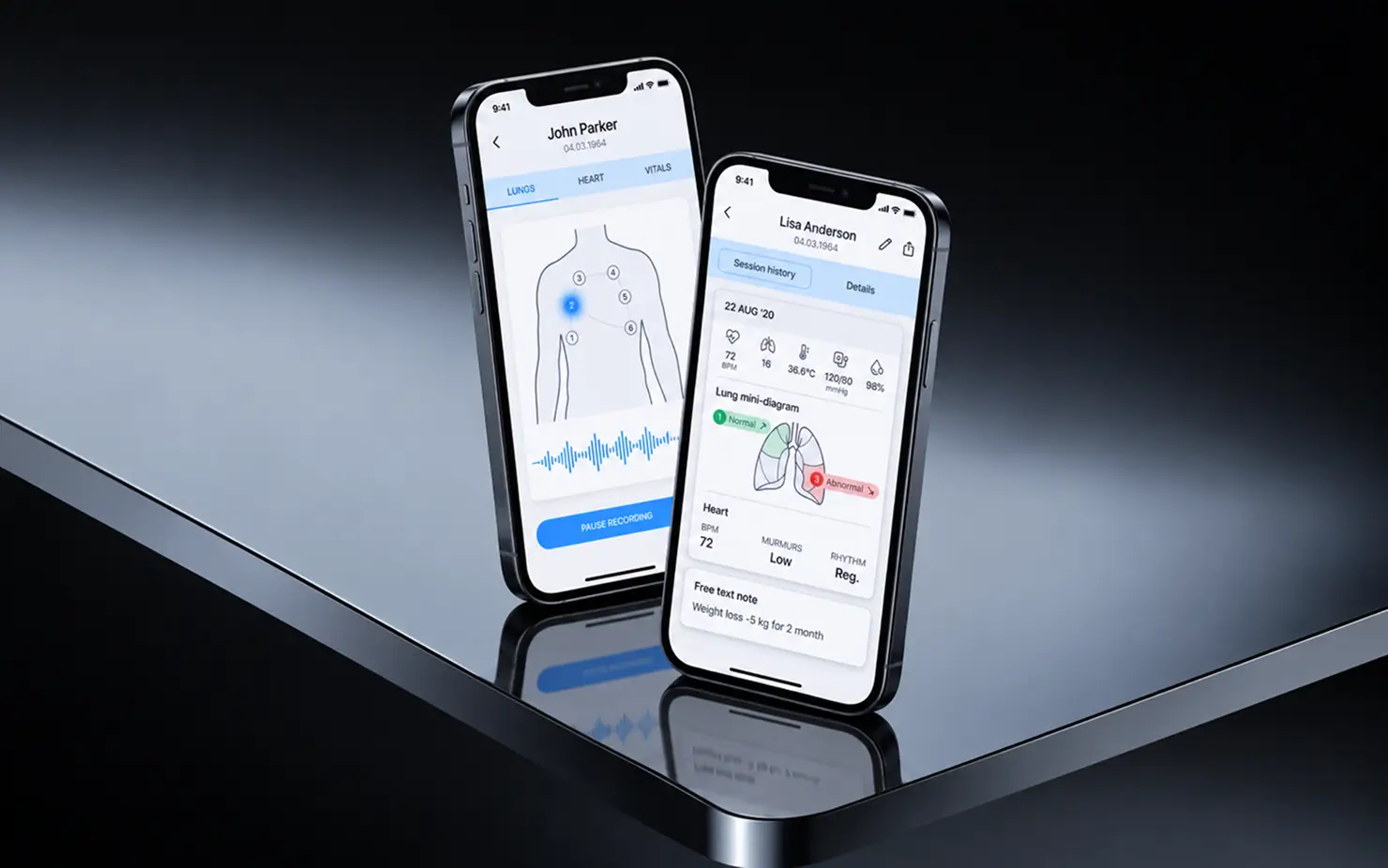
Project Details
A US HealthTech startup came to us with a digital stethoscope prototype and a workflow problem. The client wanted one patient monitoring app that records, analyzes, and saves a session to the record in a single pass, on iOS and Android alike.
 Client
- Dynamic Health
 Industry
- Healthcare
 Solution
- Remote patient monitoring platform with Bluetooth medical device integration and automated sound analysis
 Service
- Product Design + Mobile Development + Full Cycle QA + Medical Device Integration
 Platform
- Mobile (iOS, Android)
 Scope
Scope- Mobile, Backend, Device Integration, Sound Analysis, QA, Design, HIPAA-Ready Data Handling
 Duration
- 12 months
 Location
- US
Business Challenge: Creating a Comprehensive Remote Patient Monitoring System
The client’s clinicians see patients in homes, nursing facilities, and small satellite clinics on behalf of two healthcare organizations, usually with a stethoscope, a cuff, a pulse oximeter, and a notebook. Readings from four separate medical devices ended up in four places. A follow-up visit meant asking the patient how they felt last time, because the previous session’s numbers were in someone else’s notebook.
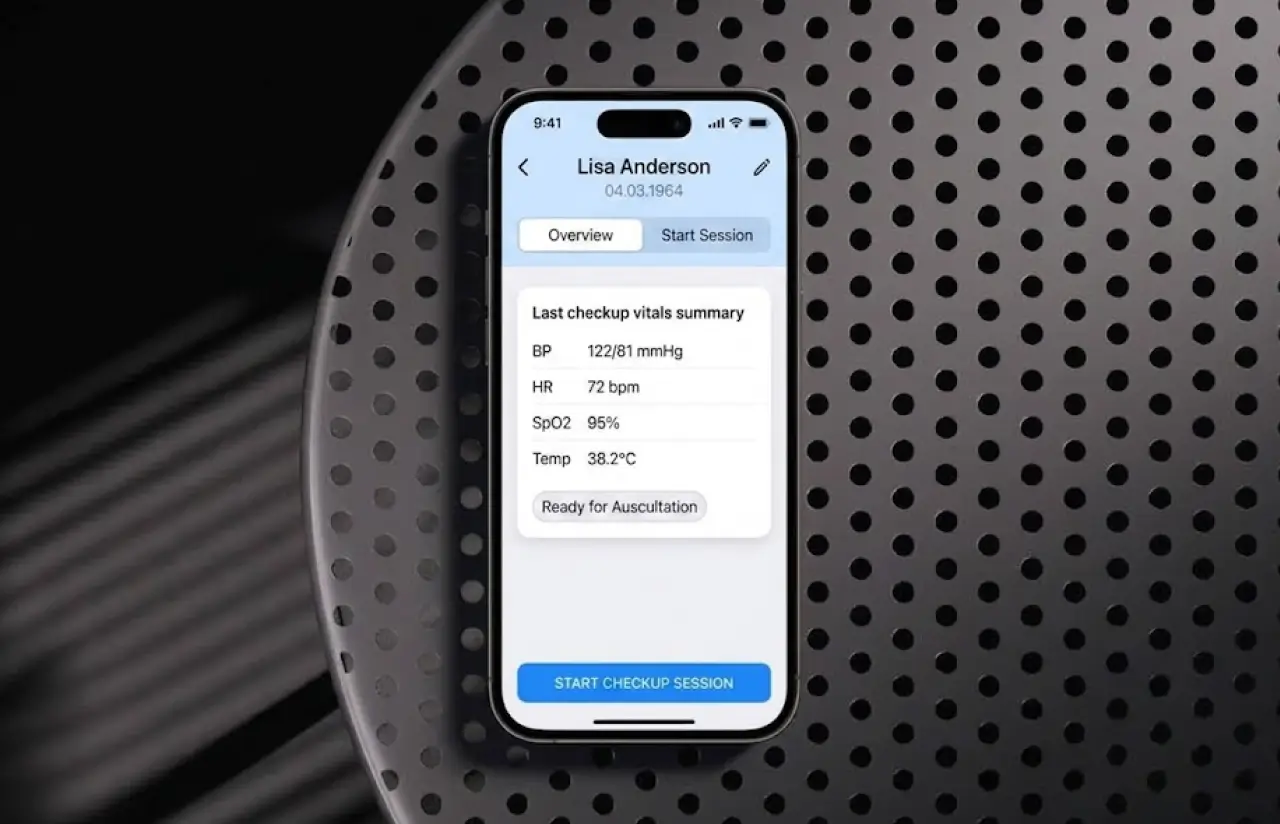
The startup had a working Bluetooth stethoscope and a rough Android prototype that saved audio to the phone’s storage. Nothing linked a recording to a patient, a date, or a chest position. Roughly one recording in four was retaken because of handling noise, and clinicians spent 12 to 15 minutes per visit on paperwork alone. Remote healthcare services only work when the record keeps up with the visit. Here it lagged by a day or more, and healthcare providers had no remote monitoring system to check on patients between visits.
-

Real-Time Medical Device Integration
The stethoscope streamed audio over Bluetooth, but pairing dropped whenever the phone locked, and the wired Aux model needed a separate code path. Clinicians wanted one flow for both, with the app telling them where to place the device next.
-

Multi-Role Platform Architecture
Physicians and nursing staff needed different things from the same record. Nurses capture sessions in the field, physicians review, annotate, and share. Two roles, one patient history, and no way for a nurse to overwrite a doctor's notes by accident.
-

HIPAA-Compliant Health Data Management
Audio recordings, vital signs, and dates of birth are protected patient health data. The prototype kept all of it unencrypted on the handset. The client needed encrypted storage, audit logs, and a sync process that never lost a session when the connection dropped.
Technologies Behind the Remote Patient Monitoring Platform





Our Remote Patient Monitoring App Development Solution
One question shaped every screen: what does a clinician need in the 30 seconds between picking up the device and pressing record? A patient name, a body map, and the next position. Everything else waits.
Before the project, capture happened in one place, and the record lived somewhere else. Audio sat on the phone, patient vitals sat on paper, and patient details sat in a spreadsheet. Nobody could see a patient’s health state as one timeline, so changes in chronic conditions went unnoticed until the next in-person visit.
We built the mobile app in React Native so one codebase serves iOS and Android, which mattered for a small team on a 12-month budget. Our React Native developers handled the device layer directly in native modules where the Bluetooth stack needed it. Ruby on Rails runs the API, and the patient record, PostgreSQL holds sessions and vitals, and encrypted recordings go to AWS. A small Python service handles sound analysis after upload.
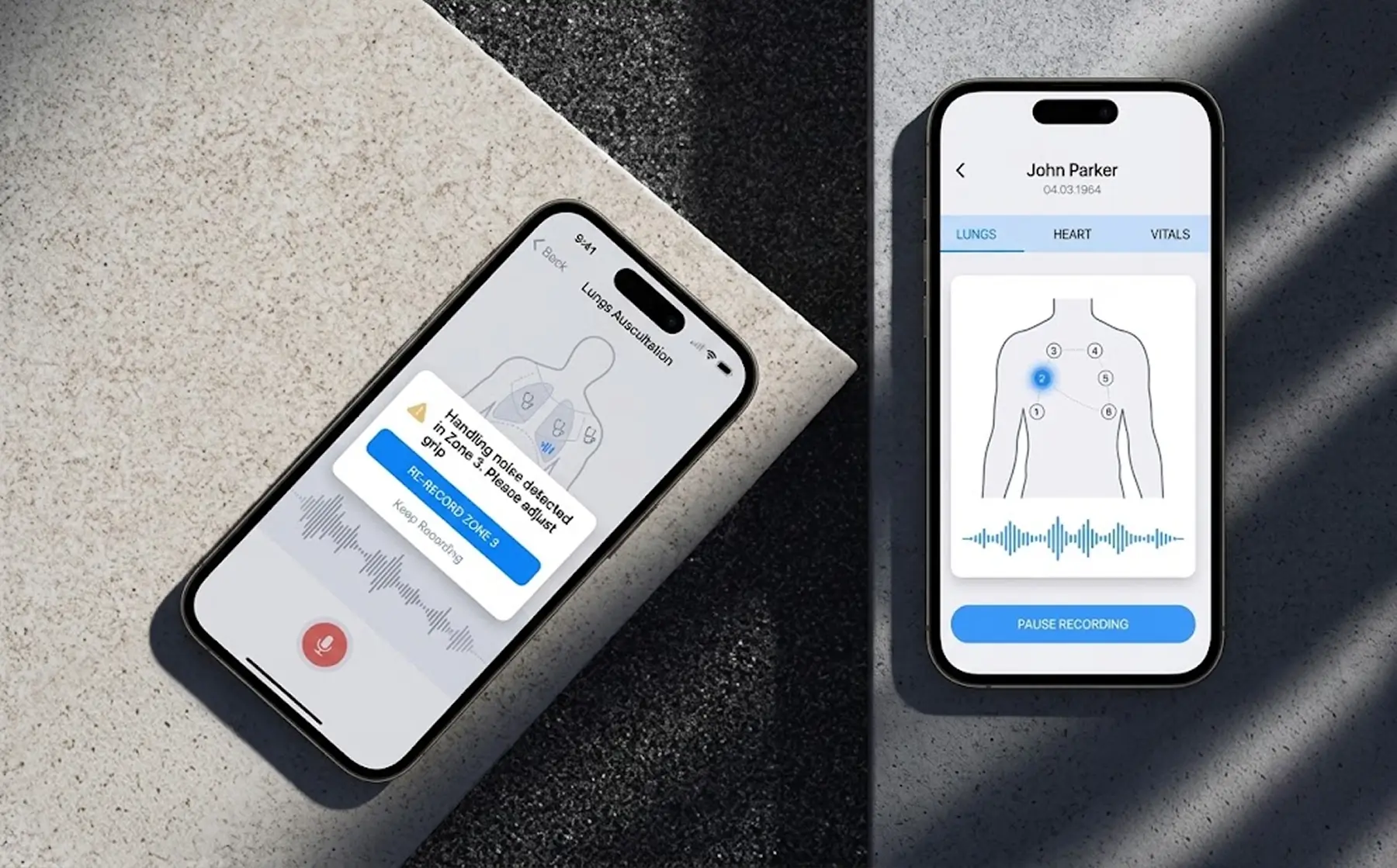
The recording flow follows the body map. Six lung zones, four heart positions, each one numbered on screen. The app opens a Bluetooth session, watches signal quality, and flags a segment for retake if handling noise crosses a threshold. After sync, the Python service marks each zone Normal or Abnormal, estimates BPM, and notes murmurs and rhythm. A clinician can overrule any of it with one tap.
This is not a generic RPM software template with a stethoscope bolted on. The two-role model, the device mode switch, and the zone-by-zone sound review came out of watching real sessions in a pilot clinic, and the client’s own vitals thresholds drive the color coding. The key features below are the ones clinicians touch every day.
-
Medical Device Integration Platform
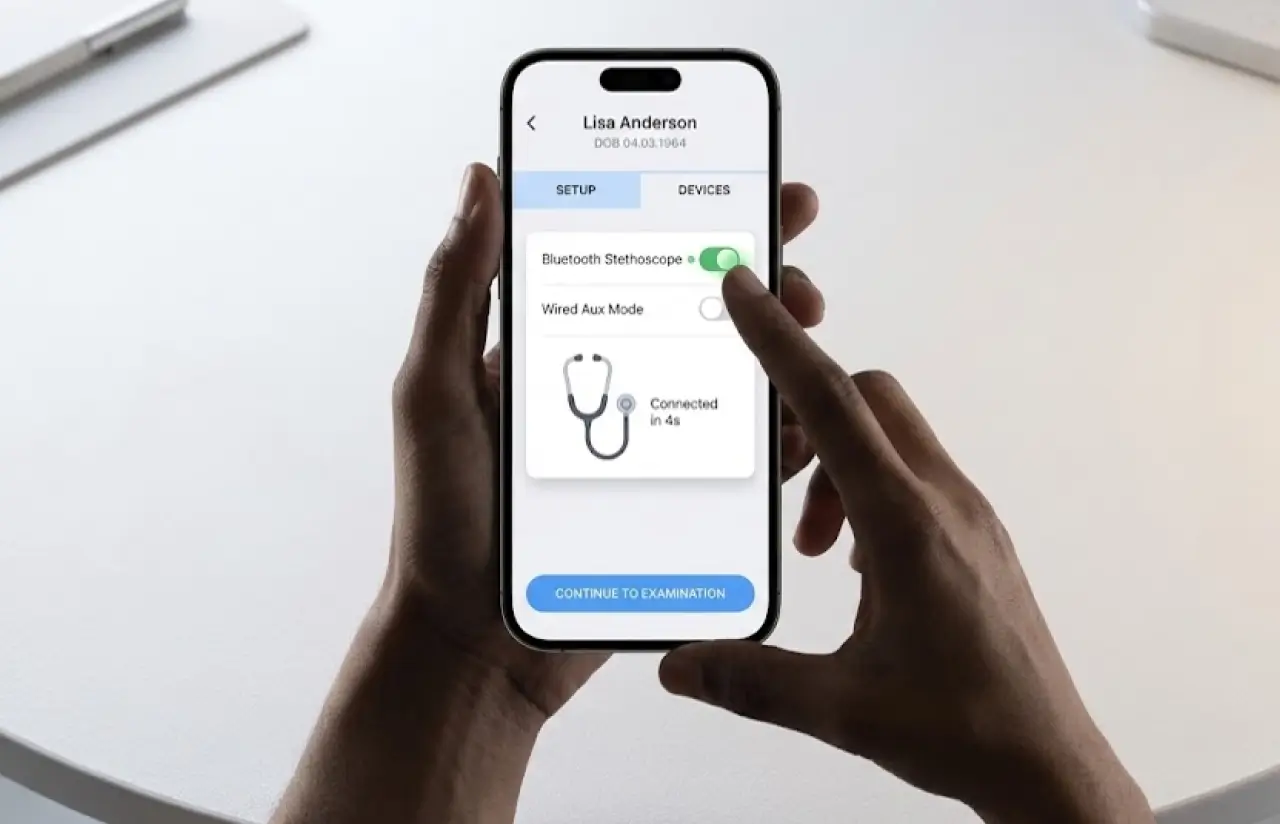
One flow for both device types. The clinician picks Bluetooth or wired (Aux), the app confirms the connection, and the same session screen works for either. Pairing completes in about 4 seconds, and the app reconnects on its own if the phone locks mid-visit.
-
Real-Time Patient Monitoring
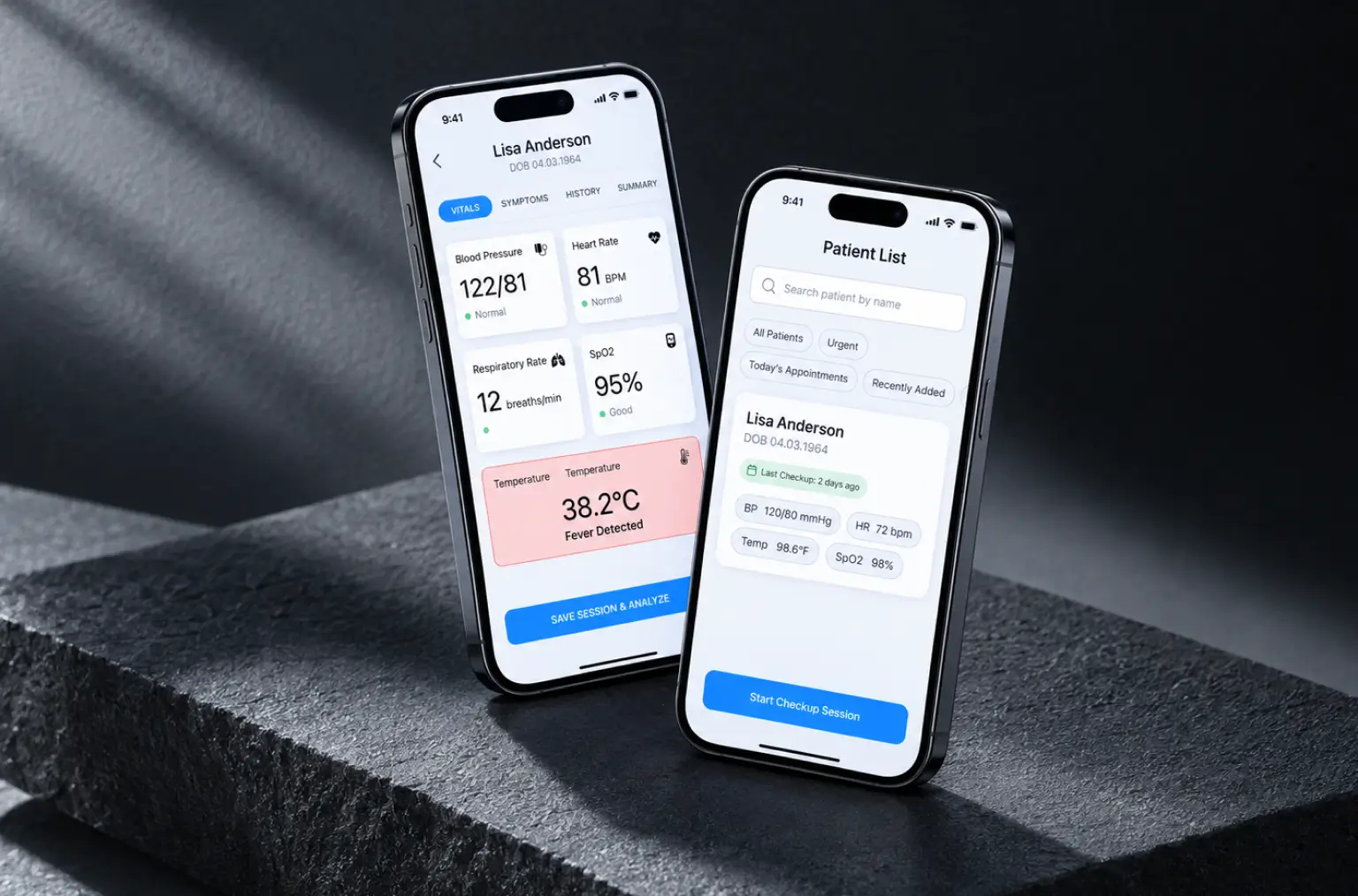
Clinicians collect patient vitals once, on the Vitals tab, and see them next to the recordings: blood pressure, respiratory rate, SpO2, heart rate, and temperature. Out-of-range vital signs turn red the moment they land in the record, so nothing waits for a review the next day.
-
AI-Powered Health Analytics
After upload, each lung zone and heart position is scored Normal or Abnormal, with BPM, murmur level, and rhythm summarized per session. The model reached about 87% agreement with clinician review in the pilot, and every flag stays open to manual override.
-
Clinical Decision Support
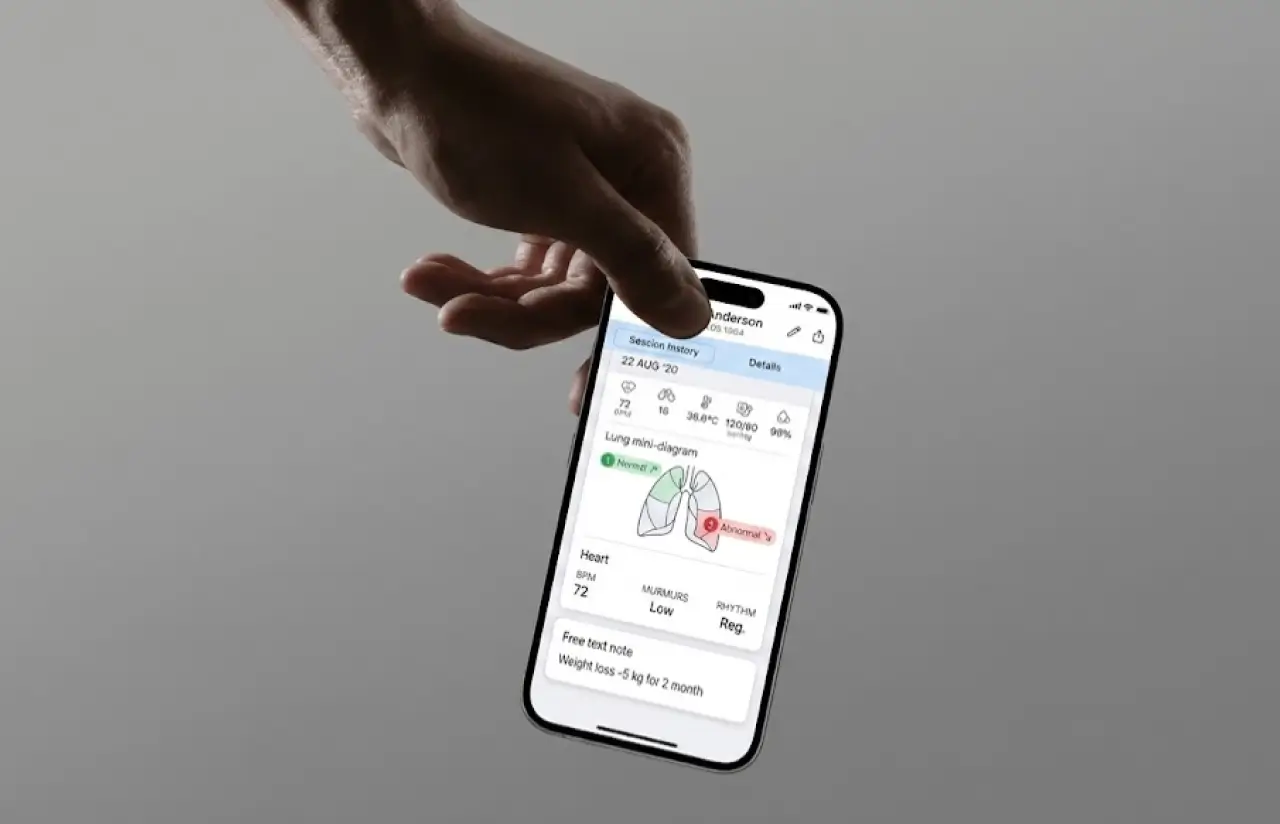
Session history places health metrics from the last checkups side by side with trend arrows per zone. A physician sees a zone moving from Normal to Abnormal across visits without opening each session, and free-text notes on weight or medication sit right under the numbers.
-
Cross-Platform Clinical App
One React Native codebase, two app stores. Patient search, session capture, history, and sharing behave the same on iOS and Android, so a mixed-device team needs one training session instead of two.
-
HIPAA-Compliant Architecture
Recordings and patient data are encrypted on the device and in transit, S3 objects are encrypted at rest, and every view, edit, and share writes an audit entry. Role permissions and data security checks live on the API, not just hidden in the UI, which is the first thing an auditor looks at to ensure compliance.
-
EHR Integration Capabilities
Physicians export a session as PDF or share it with a colleague straight from the patient header. The record model maps to standard fields, so a future connection to electronic health records reads from the same tables without a migration.
Planning a Remote Patient Monitoring Project?
Request similar solutionAgile Development Methodology
Project Journey
The 12-month project ran in two-week sprints, and the first two went to device pairing alone, because nothing else mattered if the Bluetooth link kept dropping. Discovery defined the two roles, the session data model, and the list of monitoring devices to support at launch. Sprint 7 shipped the first end-to-end session, from pairing to a saved record, and the pilot clinic used it that same week.
- Week sprint cycles
- 2
- Sprints completed
- 24
- of sprints delivered on schedule
- 96%
- Team members
- 5
How the Remote Patient Monitoring App Works
-
Select Patient and Device
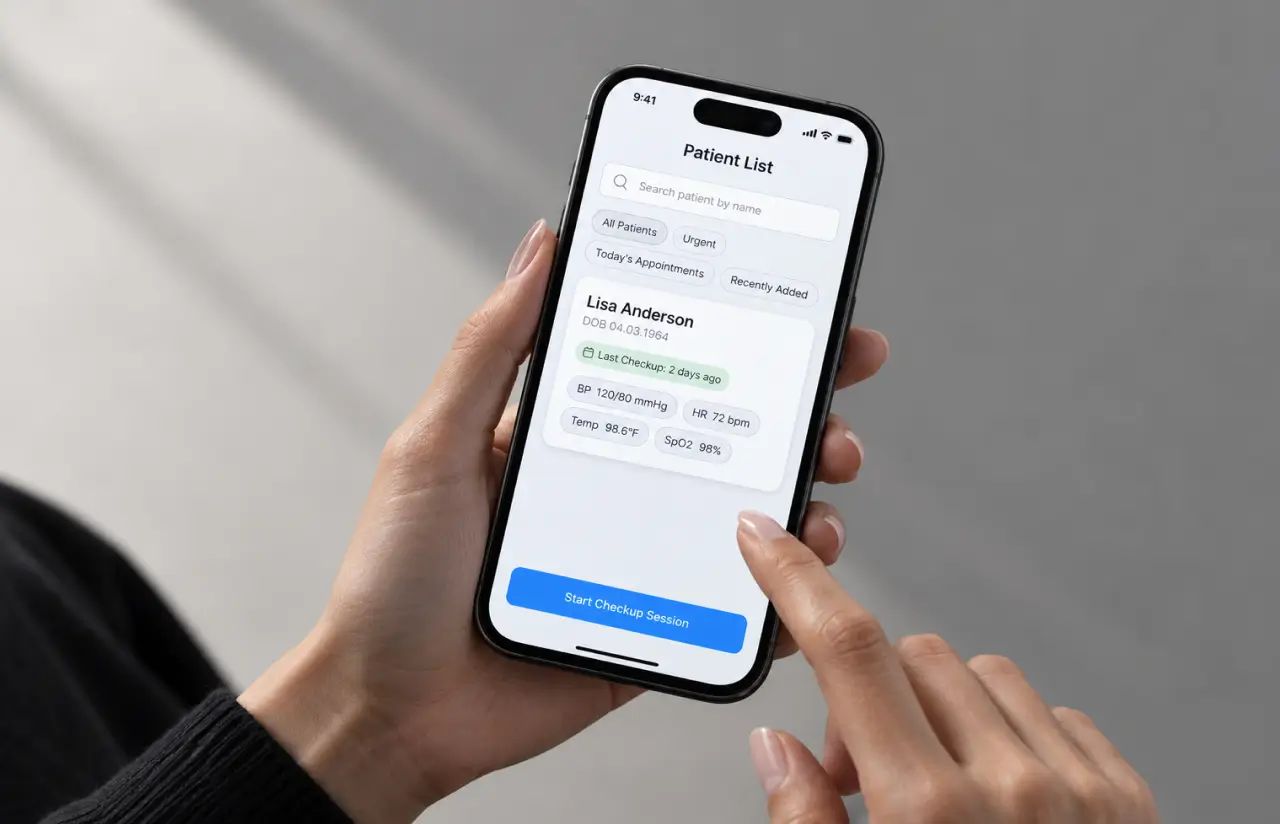
A clinician finds the patient by name or creates a new one, then chooses the Bluetooth or wired device. The app confirms the connection before the session opens.
-
Follow the On-Screen Body Map
Lungs, heart, and vitals sit on three tabs. Numbered positions show where to place the device next, and the app records each zone in order.
-
Record with Noise Filtering
Audio streams from the medical device to the phone. Handling noise above the threshold triggers a retake prompt for that zone only, not the whole session.
-
Capture Vital Signs
Blood pressure, respiratory rate, SpO2, heart rate, and temperature go on the Vitals tab. Values outside the client's ranges are highlighted at once.
-
Sync and Analyze Recordings
Sessions upload in the background with a progress bar. The analysis service marks each zone Normal or Abnormal and adds BPM, murmurs, and rhythm.
-
Review, Annotate, and Share
The physician sees the session next to previous checkups, adds notes, overrides any flag, and shares or exports the record.
Development Process Flow
Mobile app development for healthcare rarely survives a big-bang release. Healthcare professionals find the awkward step in the first five minutes, so we put a working session flow in a pilot clinic by week 14 and shipped changes every two weeks after that. Of 24 sprint reviews, six changed the recording flow, and two of those came directly from a nurse who tested with real patients. User feedback beat any spec we could have written up front.
Inside Each Sprint
-
Daily Scrum
15-min sync every morning
-
Retrospective
Inspect & adapt process
-
Sprint Review
Demo to stakeholders
-
Increment
Shippable product update
How we Delivered Remote Patient Monitoring Project
-
Scope & Timeline
We define the project goal together, agree on priority features, and set a realistic delivery date and budget.
-
Feature Priorities
We build a ranked list of everything the product needs, starting with what matters most to the business.
-
Sprint Kickoff
Work is broken into 2-week cycles. At the start of each, we select the next set of features to deliver.
-
Development Cycle
The team builds, tests, and integrates features throughout the sprint.
-
Review & Feedback
At the end of every sprint, you see working software and give feedback that shapes the next cycle.
-
Delivery
Each sprint produces a shippable piece of the product. We review what worked, adjust, and move forward.
Timeline
Five phases, clearly defined
-
Discovery & Workshop
2 weeks
- Mapping the session flow with the pilot clinic's clinicians
- Defining the two roles and what each can see, edit, and share
- Listing monitoring devices, medical equipment vendors, and firmware versions to support at launch
-
UX Prototyping
3 weeks
- Drawing the body map and numbered positions in Figma
- Testing the one-handed layout with four clinicians
- Settling the Lungs, Heart, and Vitals tab structure
-
Agile Development
~9 months
- Building Bluetooth and wired device sessions in React Native
- Shipping the Rails API, patient records, and background sync
- Adding sound analysis, trend arrows, and record sharing
-
QA & Testing
4 weeks
- Running 260 regression cases on four phones and both device types
- Testing dropped connections, locked screens, and firmware changes
- Reviewing encryption, audit logs, and role permissions for regulatory compliance before release
-
Launch & Support
Ongoing
- Rolling out to the pilot clinic, then three more sites over 10 weeks
- Tracking crash-free rate and sync failures weekly
- Shipping fixes and clinician-requested tweaks on two-week sprints
UI/UX Design: Intuitive Interface for Remote Patient Monitoring
Field clinicians hold a stethoscope in one hand and a phone in the other, often standing. That constraint decided most of the layout. Screens that demand attention get in the way of doctor-patient interactions, so we cut every one down to a single task. Every primary action is a full-width button at the bottom of the screen, reachable with a thumb, and the body map takes the top half so placement is visible from arm’s length.
Our product design team watched eight sessions at the pilot clinic before the first mockup. Clinicians did not read instructions. They looked for the next number. So the map shows numbered positions joined by a path, 1 to 4 on the heart and 1 to 6 on the lungs, and the instruction text repeats that sequence in plain words.
Session history uses the same visual language as capture. Each session card shows five vitals, the zone list with Normal or Abnormal labels and colored trend arrows, and a heart summary with BPM, murmurs, and rhythm. The palette stayed close to the client’s brand: #4DA1FF blue for actions, #CAE3FF for selected states, #F2F3F7 for backgrounds, and Open Sans throughout. At a glance, a physician can see which zone changed since last time.
Results
Before
- 12 to 15 minutes of paperwork per visit, with vital signs and notes on paper
- Roughly 1 recording in 4 retaken because of handling noise
- Recordings kept on the phone with no link to a patient, date, or position
- Previous checkups lived in notebooks and a shared drive, so trends went unseen
- Unencrypted patient health data on the handset and no audit trail
After
- ~4 minutes for a full session with lungs, heart, and vitals saved to the record
- ~1 in 12 recordings retaken, thanks to zone-level noise prompts
- 10 auscultation points and 5 vital signs tied to the patient and timestamp automatically
- Side-by-side session history with trend arrows for every zone
- Encrypted storage, role permissions, and an audit log on a single platform
Impact of Remote Patient Monitoring Platform After Launch
About 4 minutes per session against 12 to 15 minutes of paperwork, a retake rate near 1 in 12, a 99.6% crash-free session rate over the first quarter, and roughly 2,400 patient records created across four sites in 90 days. The bigger change is that patient monitoring is now continuous inside the record. That is what helps improve patient outcomes here. Continuous monitoring of chronic conditions turned into routine patient care instead of a special project.
The result nobody planned for came from the retake prompt. Because the app flags a single noisy zone rather than the whole recording, nurses started re-recording on the spot instead of hoping the audio was usable, and the share of sessions with all ten positions completed rose from about 60% to 94%. That completeness is what makes the trend arrows trustworthy, and it is why the client now talks about proactive care delivery instead of catch-up visits, and patient satisfaction comments at the pilot site mention shorter appointments. Internally, that is the number remote patient monitoring app development gets judged on.
Want patient records that update the moment the visit ends?
Contact usWhat’s Next
The platform covers capture, storage, and review today. The next phase pushes device data further into the care process:
- EHR Integration: clinical data mapping of sessions to standard fields so records flow into existing healthcare systems. Our EHR/EMR development team is scoping the first connector.
- Patient Mobile App: a patient-facing view with personal health records, home readings, and medication adherence tools, so patient engagement continues between clinician visits.
- Predictive Analytics: running RPM data analytics on session history to flag patients whose zone trends drift toward abnormal, a week or two before a physician would spot it by eye.
- More Monitoring Devices: adding Bluetooth cuffs and pulse oximeters so blood pressure and SpO2 stream into the record instead of being typed.
Verified Reviews
Our Reputation on Top Platforms
LITSLINK holds a 4.8 rating on top platforms. Clients writing about our healthcare software development work, including remote patient monitoring applications, most often mention care with protected health data, steady communication across long engagements, and a habit of pushing back when a requirement would slow clinicians down.
Have a Healthcare Project in Mind?
Need remote patient monitoring app development for your clinics, or a patient monitoring app that talks to your own medical devices? Tell us which devices, which roles, and how many sites, and a LITSLINK specialist gets back to you within 48 hours.
Next steps:
- LITSLINK specialist reviews your request and contacts you to discuss the details;
- If needed, we can sign an NDA before moving forward;
- We send a project proposal – estimates, timeline, and team CVs included;
- After launch, we stay on for any updates your product needs.
- 48h Response
- 1540+ Projects
Thank you for your message. It has been sent.